

What if an ambient light rejecting screen improves a washed-out picture but still can’t make a bright room behave like a dark cinema? If daylight or ceiling lights are dulling your projected image, the screen can help, but it isn’t a substitute for managing light. Its performance depends on where that light comes from and how your projector is positioned.
Understanding that distinction makes choosing easier. This guide explains how ALR screens direct projector light toward viewers while reducing the effect of some room light, and why results vary with the room and equipment. You’ll also learn how ALR, CLR and Fresnel designs differ, what each can and can’t improve, and why matching the screen to a standard-throw or ultra-short-throw projector matters.
Before choosing, check your projector’s throw type and placement, the direction of windows and lights, and whether simple light control could help. Wide Way Computers Trading L.L.C supplies ALR and CLR screens alongside Sony, BenQ and LG projectors, with professional projector-screen installation available. The goal is a compatible setup and realistic expectations, not a promise that any screen can overcome every lighting condition.
Key Takeaways
- An ambient light rejecting screen can reduce the effect of some competing light, but strong or direct light may still lower perceived contrast.
- ALR is a broad category; CLR designs target overhead light, while Fresnel screens are commonly associated with ultra-short-throw setups.
- Before choosing, check your projector type and throw distance, room light sources, screen size, and seating position.
- Confirm compatibility in your projector manual and the screen specifications rather than assuming every ALR screen suits every setup.
- Plan screen choice alongside projector placement, seating, and room lighting for a more balanced home cinema setup.
What an Ambient Light Rejecting Screen Does to Projected Light
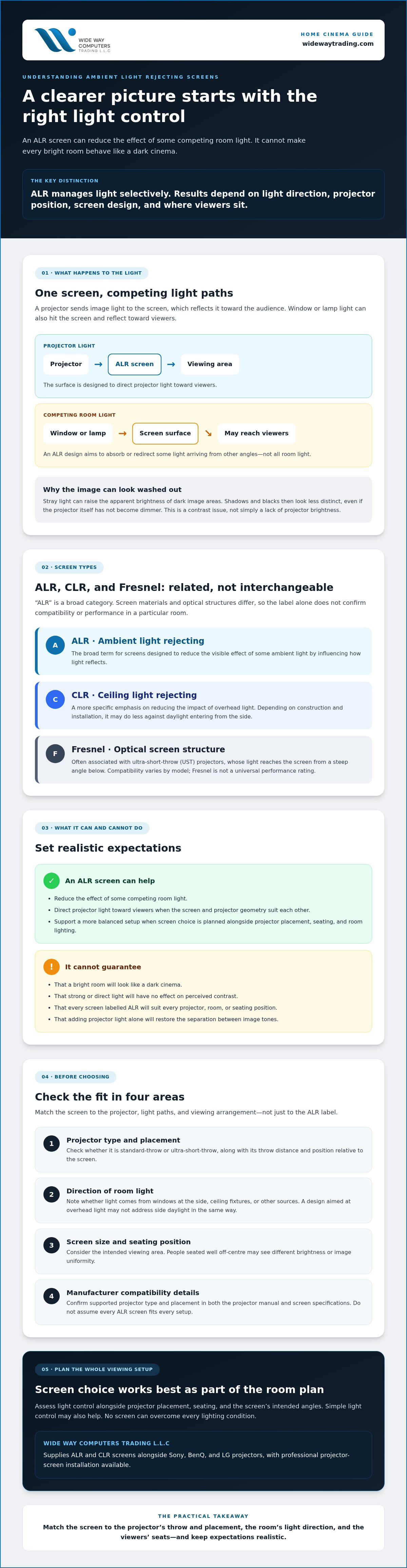
An ambient light rejecting screen is designed to direct projector light toward viewers while reducing the effect of some competing room light. It manages light selectively; it doesn’t remove every reflection or make a bright room equivalent to a dark one. Results depend on the screen’s design, the direction of incoming light, projector placement, and where people sit.
How ambient light changes a projected image
A projector forms an image by sending light to the screen, which reflects it toward the audience. Light from a window or lamp can also strike the screen and reflect toward viewers. That extra light raises the apparent brightness of darker parts of the picture, making shadows and black areas look less distinct. The image may seem washed out, even though the projector itself hasn’t become dimmer.
Consider a living room with daylight coming through a side window. A white shirt in a scene may still look bright, but a dark jacket can appear grey because stray light reduces the difference between light and dark areas. A nearby lamp can have a similar effect. This is a contrast problem, not simply a lack of projector brightness: adding more projector light doesn’t necessarily restore the separation between image tones.
How an ALR screen handles light direction
ALR surfaces use optical layers, textures, or patterns to influence how light is reflected. The design aims to send light from the projector toward the viewing area while absorbing or redirecting some light arriving from other angles. The basic interaction between screen surfaces and projected light is also discussed in Projection screen, including the role of grey screens in managing perceived contrast.
Direction matters. One screen design may suit a standard-throw projector mounted farther from the screen, while another may be engineered for an ultra-short-throw projector positioned close to it. Their surfaces can respond differently to light from windows, ceiling fixtures, and other room sources. A screen may work well when the projector and viewers are within its intended angles, yet deliver a less even or less effective result outside those angles.
That’s why “ALR” shouldn’t be treated as a single performance standard. The label describes a broad approach, not identical materials or results. Before choosing, check the screen specifications against your projector’s throw type and placement, the main direction of room light, and the audience’s seating positions.
How ALR Screen Materials Work With Projector Light
An ALR screen’s surface is designed to influence how projected light and room light reflect. Optical layers, directional textures, or patterned structures can send more projector light toward the viewing area while reducing some light arriving from other directions. The exact approach varies by screen. The surface’s optical design can help only when the projector’s position and light path suit it, so assess screen material and projector geometry together.
ALR and CLR: related terms, different emphasis
ALR is the broader category: it describes screens designed to reduce the visible effect of some ambient light. CLR, or ceiling light rejecting, describes a more specific emphasis on reducing the impact of overhead light. That distinction can help narrow the search, but it doesn’t guarantee a screen will suit every room. A CLR design may address ceiling fixtures while doing less against daylight entering from the side, depending on the screen’s construction and installation.
Fresnel describes a type of optical screen structure, not a universal performance rating. Fresnel screens are often designed for ultra-short-throw projectors, whose light reaches the screen from a steep angle below. Construction and compatibility differ by model, so don’t assume every Fresnel screen will work with every UST projector. Check the manufacturer’s specifications for the supported projector type and placement.
Why screen structure affects the viewing experience
Directional reflection is a useful way to understand the principle: the screen is designed to reflect light more effectively along certain paths than others. That can influence how much of the projector’s image reaches viewers and how much light from other angles is reflected toward them. It also means viewing position matters. People seated well off-centre may see different brightness or image uniformity than those closer to the intended viewing area.
Brightness and contrast aren’t interchangeable. A material may make the projected image appear brighter from a particular seat, while performance across the screen or at wider seating angles depends on its design. Trade-offs can exist, so consider where the main seats are and how the projector will be mounted before selecting a surface.
Use manufacturer specifications to verify material-specific details, including intended projector type, recommended throw geometry, viewing angle, and any stated gain or light-rejection characteristics. These figures describe a particular screen under specified conditions, not every product carrying an ALR label. Wide Way Computers Trading L.L.C supplies ALR and CLR screen options alongside Sony, BenQ, and LG projectors. Reviewing the ALR and CLR screen options can help you narrow down compatible equipment.
What an Ambient Light Rejecting Screen Can and Cannot Fix
An ambient light rejecting screen can reduce the effect of some room light, but it can’t guarantee a dark-room image in every condition. Strong daylight or a lamp aimed directly at the screen may still lift dark tones and weaken perceived contrast. Think of ALR as one part of the solution, not a way to make lighting irrelevant.
When an ALR screen can be useful
ALR may suit a living room where blackout conditions aren’t practical, such as a space used during the day or shared with other activities. Its usefulness depends on the direction of incoming light, the projector’s position, and where viewers sit. A screen designed to manage light from one direction may be less helpful if the strongest source comes from another. Check the screen’s intended projector geometry and viewing area against the actual room before deciding.
For example, if daylight enters from a side window, performance depends on how the screen handles light from that direction and whether viewers sit within its intended viewing area. If sunlight falls directly across the screen, even an ALR surface may struggle to preserve contrast. The room matters as much as the label.
When changing the room still matters
Dimming nearby lamps, closing curtains, or reducing direct light on the screen can improve viewing conditions. These adjustments reduce competing light before it reaches the screen, helping the projected image retain contrast. An ALR screen can complement those steps, but it can’t compensate for a projector that’s unsuitable for the screen, incorrect placement, or a mismatch between the screen design and the room.
Realistic benefits and limits:
- Potential benefit: Can make projected content easier to see when some ambient light is present, if the screen, projector, and room geometry are compatible.
- Potential limit: Direct or intense light can still reduce contrast, and the result varies with the screen’s design and the light’s direction.
- Potential trade-off: Some screen designs may have a narrower preferred viewing area or show brightness differences across seats. Check the specific manufacturer’s viewing-angle and performance specifications rather than assuming this applies to every ALR screen.
Set expectations around the room you actually have. If light can be reduced, do that first, then assess whether an ALR screen addresses the remaining conditions. The best result comes from matching the screen to the projector and installation, not expecting one material to overcome every source of light.
How to Check ALR Screen Fit for Your Room and Projector
Choose an ambient light rejecting screen only after checking the full setup. Screen design, projector angle, room lighting, and audience position work together. Use this checklist to narrow down compatible options before purchasing or arranging installation.
Measure the room and map its light sources
Look at the room during the hours you expect to watch. Note which windows, ceiling fixtures, and lamps cast light onto the screen, and whether curtains or lighting controls can reduce its effect. Measure the usable wall width and mark the main seating positions, including seats off-centre. Checking the room under typical viewing conditions gives you a more useful picture than relying on a general description of its brightness.
Match the screen to projector placement
Identify the projector type before selecting a screen. Standard-throw and ultra-short-throw projectors send light toward the screen from different positions, so compatibility shouldn’t be assumed. Check the projector manual for its throw ratio, permitted placement, and image-size range, then compare those details with the screen’s specifications. If the documentation or room geometry leaves uncertainty, ask an audiovisual installer to verify the fit.
- 1. Light sources: Record where daylight and artificial light fall on the screen during viewing, and note whether you can reduce the strongest sources.
- 2. Projector type: Confirm whether it’s standard throw or ultra-short throw. Don’t choose a screen based on the ALR label alone.
- 3. Throw distance and position: Measure from the proposed projector location to the screen, then check the manual and screen documentation for compatibility.
- 4. Screen size: Measure the available width and verify that the projector can produce the desired image size from its planned position.
- 5. Seating: Map the main viewing positions. The audience’s angle to the screen can affect perceived brightness and consistency, particularly for seats away from the centre.
Use the room, projector, screen, and seating as one checklist. A mismatch in any one of these can undermine the setup, even if the screen is designed to reject ambient light. Verify specifications rather than relying on general descriptions or assuming one material suits every projector.
Once you’ve confirmed the room measurements and projector requirements, arrange professional projector-screen installation to help position the screen as planned.
Plan an ALR Screen as Part of a Complete Home Cinema
A screen choice is only one part of the picture. Plan the projector position, viewing seats, screen size, and room lighting together so that the equipment suits the space you actually have. An ambient light rejecting screen may help manage some room light, but its design still needs to match the projector’s throw type and the direction from which light reaches the screen.
Build a setup plan before choosing a screen
Start by noting the available wall width, intended screen size, likely seating positions, and where daylight and artificial light fall during viewing. Then check the projector manual for its throw ratio, image-size range, and mounting requirements. Compare those details with the screen specifications, including the projector types and angles the screen is designed to accommodate. A room plan makes it easier to spot a mismatch before equipment is selected or installed.
Projector comparisons can help narrow the equipment options. For example, a Sony, BenQ, and LG projector comparison can be useful when weighing models, but confirm each candidate’s specifications against the screen and room rather than choosing by brand alone. For a broader planning sequence, see a step-by-step home cinema setup guide.
Advice on projector or screen installation may be useful if the mounting position is constrained, the throw distance is uncertain, or the screen’s compatibility details aren’t clear. Resolving those questions early can help avoid choosing equipment that doesn’t suit the intended layout.
Know when to ask for installation guidance
Professional input is worth considering when you’re unsure how to mount or align the projector, or whether a particular screen suits its placement. Alignment and geometry matter: even a suitable screen may not perform as expected if the projector’s position falls outside the manufacturer’s guidance. Bring the projector manual, screen specifications, room measurements, and planned seating positions into the discussion.
Wide Way Computers Trading L.L.C supplies projector screens, including ALR and CLR options, alongside Sony, BenQ, and LG projectors. Professional projector-screen installation is also available. These offerings can be a useful starting point for checking equipment choices, though compatibility should be confirmed for the specific room and projector.
For help exploring screen options and installation support, Explore projector screens and installation support.
Choose a Screen That Fits Your Room
An ambient light rejecting screen can help manage competing room light, but it works as part of a complete projection setup, not as a replacement for lighting control. Its surface design, projector type and placement, room light, and seating positions all affect the experience. Check the screen and projector specifications together before choosing, and reduce direct light where practical.
WIDE WAY COMPUTERS TRADING L.L.C supplies ALR and CLR projector screens alongside projectors from Sony, BenQ, and LG. Professional projector-screen installation is also available if you’d like support with the screen setup. Explore the options and consider how they fit your room and equipment through projector screens and installation support.
With the right checks in place, you can set realistic expectations and plan a system around the way you actually watch. A well-matched setup is a practical step toward a more enjoyable home cinema.
Frequently Asked Questions
What is an ambient light rejecting screen?
An ambient light rejecting screen is designed to direct a projector’s light toward viewers while reducing the effect of some competing light from the room. Its surface may use optical layers or patterns to influence how light reflects. It doesn’t eliminate all ambient light, and performance depends on the screen design, projector placement, light direction, and seating position. Check the screen specifications against your projector and room before choosing.
Do ALR screens work in a bright room?
ALR screens can help in rooms where some daylight or artificial light is present, but they can’t guarantee a dark-room picture in every bright environment. Direct sunlight or a strong lamp shining onto the screen may still reduce perceived contrast. Results depend on the direction and intensity of the light, as well as projector and screen compatibility. Closing curtains or dimming lights can improve viewing conditions further.
Is an ALR screen the same as a CLR screen?
No. ALR is the broad category for screens designed to reduce the visible impact of some ambient light. CLR, or ceiling light rejecting, describes a more specific design emphasis on managing overhead light. A CLR screen may suit a room with ceiling fixtures, but its performance against light from windows or lamps depends on its construction. Check the manufacturer’s specifications to confirm which light directions the screen is intended to address.
Can I use an ALR screen with any projector?
No. Screen compatibility depends on the projector’s type and placement. Standard-throw and ultra-short-throw projectors send light toward the screen from different angles, and some screen designs are made for one geometry rather than the other. Check the projector manual for throw ratio and installation requirements, then compare them with the screen specifications. Also consider viewing positions, since the screen’s intended viewing angle can affect the experience.
Does an ALR screen make a projector image brighter?
An ALR screen doesn’t increase the light output of the projector. Its surface can direct more of the projected light toward intended viewing positions, which may make the picture appear brighter from those seats. Perceived brightness and contrast are related but different: reducing reflected room light may help preserve visible detail without changing projector output. The effect varies by screen design, viewing angle, and projector placement, so check product specifications.
Are ALR screens suitable for ultra-short-throw projectors?
Some ALR screens are designed for ultra-short-throw projectors, but not every ALR screen is suitable. UST projectors sit close to the screen and project at a steep angle, so the screen must be compatible with that light path. Fresnel is one screen-design term often associated with UST setups. Confirm the specific screen’s supported projector type and placement in its manufacturer documentation before buying or installing it.
Should I choose an ALR screen or control the room lighting?
Room-light control and screen choice work best as parts of the same plan. Curtains, blinds, or dimmed lamps can reduce competing light before it reaches the screen, while an ALR design may help manage some remaining light. If you can reduce direct light, do so, then match the screen to the projector, room layout, and seating. Neither the screen nor lighting changes can guarantee the same result in every setup.


