

A larger battery doesn’t guarantee a camera will keep recording through extreme weather. Battery powered security cameras extreme climate endurance depends on the whole setup: temperature, recording activity, exposure, weather protection, and whether charging can keep pace. In the UAE, direct sun, dust, humidity, and changing outdoor conditions can all affect how a camera performs at its installation point.
Advertised battery life and weather-resistance labels are useful starting points, but they don’t tell the whole story. Battery performance can vary with temperature and recording activity, while dust and sun exposure can affect the device and solar charging. If the battery runs low, the camera may not capture the footage you need.
This guide explains how climate affects camera endurance and how to compare specifications against real installation conditions. You’ll learn what IP ratings do and don’t indicate, how placement and charging plans matter, and what upkeep to consider. We’ll also cover practical criteria for evaluating Eufy, EZVIZ, and Imou cameras against a property’s exposure and recording needs.
Key Takeaways
- Assess endurance by whether a camera can maintain useful recording, connectivity, and power at its actual installation site, not simply whether it can withstand exposure.
- Compare manufacturer-stated operating-temperature ranges, ingress ratings, power methods, and test conditions before weighing battery-runtime claims.
- Estimate recording demand from motion events, live viewing, night vision, and wireless coverage to plan for realistic power use.
- Use a site checklist to assess sun, shade, dust, rain, mounting stability, charging access, and ongoing maintenance.
- Apply these criteria to battery powered security cameras extreme climate endurance, including options such as the eufyCam S3 Pro 4-Cam Kit Solar, without assuming performance beyond verified specifications.
What extreme-climate endurance means for a battery-powered security camera
For a battery camera, endurance means continuing to provide useful recording, connectivity, and power through the conditions at its installation site. A camera that remains physically intact but misses events, loses its connection, or needs frequent recharging isn’t delivering dependable surveillance. When comparing battery powered security cameras extreme climate endurance, look at ongoing performance, not just whether the device survives exposure.
Runtime also depends on how the camera is used. Temperature can affect battery behaviour, while frequent motion events, live viewing, night vision, and a weak wireless signal can increase energy demand. An advertised runtime is best understood in the context of its test conditions and the manufacturer’s guidance, not as a fixed promise for every property.
Which climate stresses matter most outdoors?
Outdoor exposure comes in several forms. Sustained heat can affect battery behaviour and electronic components. Dust can collect around the housing or obstruct parts of the camera, while moisture may reach vulnerable areas if protection is inadequate. Direct sunlight adds heat and exposure that shade may reduce. Temperature changes add another variable as materials and batteries experience shifting conditions.
Placement matters because exposure can vary across a single property. A camera beneath a sheltered eave and one mounted on an exposed gate may face different amounts of sun, dust, rain, and temperature variation. Assess the exact mounting position rather than treating the entire site as one climate zone.
Why a weather rating does not promise uninterrupted operation
Ingress-protection ratings describe an enclosure’s resistance to specified entry by solids, such as dust, and liquids, such as water. The rating’s digits represent different protection categories, as outlined in this guide to IP ratings for dust and moisture. They don’t describe every outdoor stress a camera may encounter.
An IP rating describes protection against specified dust and water entry; an operating-temperature specification describes the conditions in which the manufacturer rates the camera to operate. Neither one, by itself, guarantees battery endurance, wireless connectivity, or uninterrupted recording. A weather-resistant enclosure could still be outside its stated operating conditions. The camera may also use power faster than expected if activity and feature use increase.
Before comparing models, review each manufacturer’s current documentation for the exact IP rating, operating-temperature limits, and test conditions. Check battery and charging guidance, too. These details help distinguish protection from performance and provide a sound basis for assessing whether a camera fits a particular location.
How heat, dust, and moisture affect camera batteries and recording
Climate affects more than whether a camera’s enclosure stays intact. Heat can influence battery behaviour and electronics, while dust and moisture can affect exposed surfaces. On a camera with solar charging, dust on the panel can reduce the light reaching its surface. Dust on the lens can also soften or obscure the image, making footage less useful even if recording continues.
When assessing battery powered security cameras extreme climate endurance, start with the manufacturer’s model-specific operating and charging limits. Don’t assume guidance for one camera applies to another. The International Electrotechnical Commission (IEC) explains the IP rating system for enclosure protection, but an ingress rating doesn’t tell you how long a battery lasts or how reliably a camera records.
Battery behaviour and real-world recording load
Standby, active recording, and live streaming place different demands on a battery. A camera that mainly waits for activity has a different workload from one that records frequent motion events or is regularly viewed live. Night vision and a weak wireless connection can add to energy use, too. At a busy entrance, repeated detections may mean recharging sooner than a quiet-location estimate suggests.
Quoted battery life depends on the manufacturer’s test settings and the camera’s actual use conditions. Treat runtime figures as qualified estimates, not a universal interval between charges. Compare the conditions behind each claim, then consider the site’s likely activity, viewing habits, and signal quality.
Solar charging is a power strategy, not a weather guarantee
Solar charging can support a camera’s power plan, but recharging depends on panel orientation, shade, dust, and available daylight. A panel shaded for much of the day or coated in dust may receive less useful light than a clean panel with better exposure. Follow the manufacturer’s placement, cleaning, and charging guidance, and plan for periods when solar input may not keep pace with use.
Solar assistance doesn’t remove the need to understand battery capacity or charging limits. Recording demand still matters, and the panel’s position should be considered alongside camera coverage and wireless connection. For kit-specific information, see the eufyCam S3 Pro 4-Cam Kit Solar review.
To compare suitable options, explore security cameras and installation with the property’s exposure, power needs, and recording requirements in mind.
How to compare battery-powered cameras for harsh outdoor conditions
A useful comparison looks beyond a weather label or headline battery-life figure. For battery powered security cameras extreme climate endurance, assess the camera as a system. Its environmental limits, power method, recording workload, wireless connection, and maintenance needs all affect whether it can serve the site reliably.
Which specifications help predict climate suitability?
Start with the model’s manufacturer documentation. Note operating-temperature limits separately from the IP rating, which describes specified protection against dust and water entry. Then check the battery and charging method, along with guidance on outdoor placement. Detection sensitivity, recording settings, and night-vision use can help you estimate power demand at the intended location.
Use a comparison table to keep different claims from blending together:
| Specification | What to record | Why it matters |
|---|---|---|
| Operating-temperature range | Manufacturer-stated limits and any operating conditions | Indicates the temperatures the camera is specified to operate in |
| Ingress rating | Exact IP code and the manufacturer’s explanation or test context | Helps assess protection against dust and water entry, not battery performance |
| Power method | Battery, solar assistance, or another stated configuration | Shows how the camera is powered and what charging plan may be needed |
| Test conditions | Temperature, exposure duration, settings, and power configuration, when stated | Provides context for interpreting performance claims |
Add battery capacity or runtime only when the manufacturer provides comparable, clearly qualified data. If test settings or use conditions differ, the figures may not offer a fair comparison. Don’t fill gaps with assumptions based on another model.
How to assess test claims and product comparisons
Look for details behind broad phrases such as “all-weather” or “24/7.” Check the tested temperature, exposure duration, camera settings, and whether the test used battery power, solar assistance, or another configuration. Without that context, it’s difficult to apply a claim to your installation.
Also consider expected event volume, recording options, connectivity, and upkeep. A busy gate may trigger more recordings than a quiet side wall, while a weak wireless signal can affect dependable operation. Dust on a lens or solar panel may also call for periodic cleaning. These factors help translate specifications into a site-specific comparison.
Separate what a camera is rated to withstand from what its documented tests show, then weigh both against the property’s exposure and recording needs. Where manufacturer details are missing, don’t infer performance from a rating or a claim for a different model.
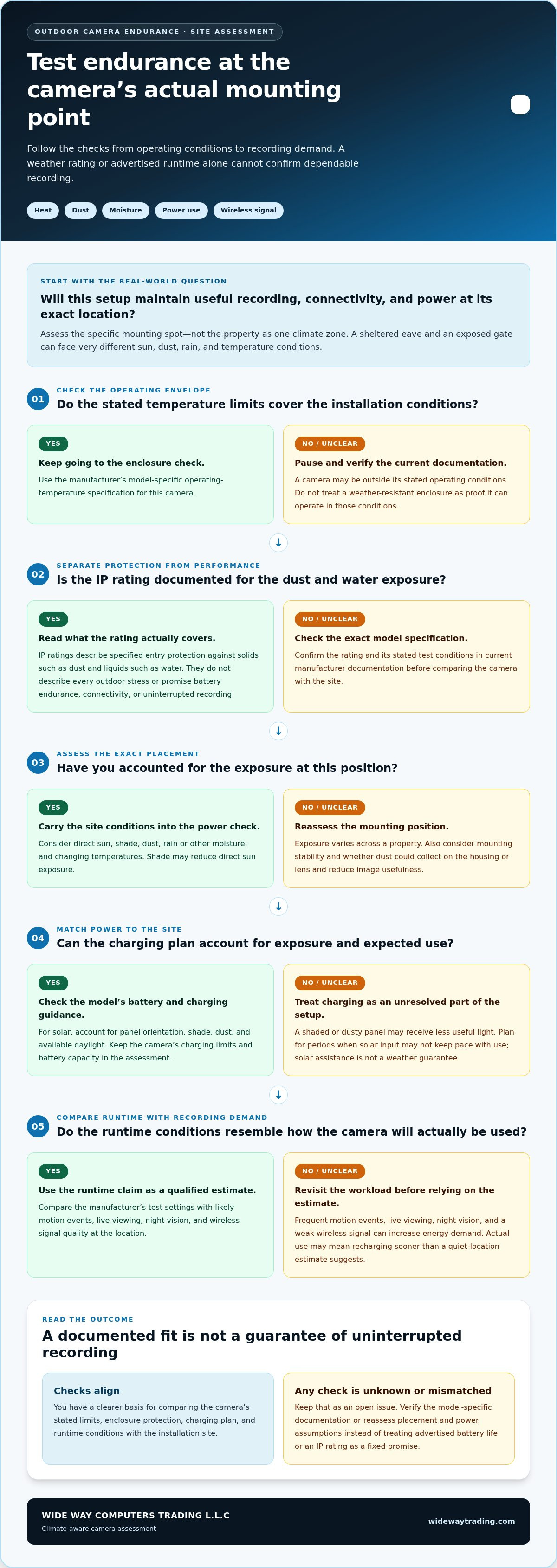
A site checklist for dependable camera placement and power
Endurance is planned at the mounting point, not just selected from a specification sheet. Use this checklist to match the camera, its power plan, and its view to the conditions around your property.
- Map exposure. Note where direct sun, shade, dust buildup, and rain are most likely. Compare sheltered eaves with exposed gates rather than assuming both spots face the same conditions.
- Confirm specifications. Check the exact model’s operating-temperature limits, ingress rating, battery guidance, and charging instructions against the intended location.
- Estimate recording demand. Identify busy entrances, vehicle movement, and other sources of frequent motion events. Consider how often you’ll use live viewing, night vision, and alerts.
- Plan power. Decide how the camera will be charged and where a solar panel, if used, can receive suitable daylight while remaining accessible for inspection.
- Review upkeep. Plan to check the battery, lens, mounting, and charging surface according to actual use and the manufacturer’s maintenance guidance. Don’t invent a fixed cleaning or charging interval.
Plan placement around exposure and reliable footage
Choose a position that captures the area you need without avoidable glare, obstructions, or unnecessary motion triggers. A naturally sheltered spot can reduce direct exposure, but it still needs a stable mount and a clear view. Test the wireless signal at the final mounting point, not only indoors or near the router. A strong app connection elsewhere doesn’t establish usable coverage where the camera will operate.
Fine-tune the camera angle and, where available, event zones to focus detection on relevant areas. For example, excluding a busy walkway outside the property boundary may reduce irrelevant recordings and alerts. Fewer unnecessary events can also help limit avoidable battery use while preserving coverage of the area that matters.
Plan charging, upkeep, and professional installation
Set a practical battery-check routine based on observed use and manufacturer guidance. Keep any solar surface accessible so you can inspect and clean it as directed by the product instructions. Check that the mounting remains stable and the image stays clear after installation and during routine upkeep.
WIDE WAY COMPUTERS TRADING L.L.C provides professional security camera installation, bringing coverage, mounting, wireless signal, and power planning together as one system. For battery powered security cameras extreme climate endurance, site-specific planning helps connect product specifications to real operating conditions.
Plan security camera installation around your property’s exposure, power needs, and recording requirements.
Choosing a climate-ready camera system and next steps
A battery-powered camera can suit a location where wireless placement is useful and event-based recording matches the property’s needs. The decision depends on more than whether the camera is labelled for outdoor use. Consider the installation point’s exposure, expected activity, wireless coverage, and how the battery will be recharged. If you expect frequent recording or intensive live viewing, give verified power specifications and a realistic charging plan greater weight.
Match the camera and power strategy to the property
For occasional event recording, compare the camera’s documented battery and connectivity guidance with activity at the site. If frequent motion is likely, plan for higher power demand rather than relying on an ideal-use runtime claim. A solar-assisted setup may help support charging, but assess sunlight access, panel upkeep, and the manufacturer’s charging limits together. No single power approach is right for every position.
WIDE WAY COMPUTERS TRADING L.L.C supplies security cameras from Eufy, EZVIZ, and Imou, including the eufyCam S3 Pro 4-Cam Kit Solar. Consider it as part of a climate-ready camera comparison, without assuming a particular runtime or performance in every installation. Base your decision on the kit’s current manufacturer specifications and how they fit the property’s exposure, power needs, and recording requirements.
Move from comparison to a practical setup
For kit-specific information, read the eufyCam S3 Pro 4-Cam Kit Solar review. Use its details alongside the manufacturer’s current documentation when assessing whether the system fits your site.
Professional security camera installation brings camera placement and coverage planning together. Positioning affects the view, exposure, wireless connection, and, in solar-assisted setups, the opportunity to charge. A considered plan helps match the selected camera and power strategy to the area you need to monitor.
The practical test for battery powered security cameras extreme climate endurance is whether the full setup can meet your recording needs under the conditions at its intended location. Explore security cameras and installation for a setup shaped around your property.
Choose a Camera Setup That Fits Your Site
Reliable battery performance depends on the whole system, not a single runtime claim. Match the camera’s manufacturer-stated temperature limits and weather protection to its mounting location, then account for recording activity, wireless coverage, charging access, and upkeep. Direct sun, dust, and shade can vary across one property, so placement matters.
These are the practical foundations of battery powered security cameras extreme climate endurance. WIDE WAY COMPUTERS TRADING L.L.C supplies security cameras from Eufy, EZVIZ, and Imou, including the eufyCam S3 Pro 4-Cam Kit Solar. Choose based on verified model information and the property’s real exposure and recording needs, rather than assuming one camera suits every site.
WIDE WAY COMPUTERS TRADING L.L.C provides professional security camera installation, bringing placement and coverage planning together. Explore security cameras and professional installation to plan a setup around your property’s needs.
Frequently Asked Questions
Can battery-powered security cameras work in extreme heat?
Yes, some can, but only within the operating conditions specified by their manufacturer. Check the exact model’s current temperature limits and placement guidance, especially for a position exposed to direct sunlight. An enclosure’s weather-resistance rating doesn’t establish its heat tolerance or guarantee recording, connectivity, and battery performance. A shaded mounting position may reduce direct exposure, but it doesn’t replace checking the camera’s specifications.
How long does a battery-powered security camera last in hot weather?
There’s no single runtime that applies to every camera or hot-weather installation. Battery life depends on the model, temperature, motion activity, live viewing, night vision, wireless conditions, and recording settings. Treat an advertised figure as an estimate tied to the manufacturer’s test conditions, not a guaranteed interval between charges. For battery powered security cameras extreme climate endurance, compare model-specific runtime guidance with expected activity at the actual mounting point.
Are battery security cameras waterproof and dustproof?
Some outdoor cameras have enclosures tested for specified resistance to water and dust, but the level of protection varies by model. Check the exact IP rating and the manufacturer’s explanation of what it covers. An IP rating doesn’t mean a camera is suitable for every exposure, nor does it indicate battery life, temperature limits, or uninterrupted recording. Follow the manufacturer’s installation guidance for the intended outdoor location.
Does solar charging make a battery camera reliable in extreme weather?
Solar charging can help replenish a camera’s battery, but it doesn’t guarantee dependable operation in every weather condition. Charging opportunity depends on panel exposure, shade, dust, available daylight, and the manufacturer’s charging limits. Recording demand still matters: frequent events or live viewing may use power faster than charging replaces it. Check the camera and panel instructions, then plan for inspection, cleaning, and periods of reduced solar input.
What IP rating should I look for in an outdoor security camera?
For outdoor use, IP65 or higher is a useful general starting point, but the right rating depends on the site’s dust and water exposure. The first IP digit concerns protection against solid particles, while the second concerns water ingress. Check the full rating and its manufacturer-defined test conditions. A higher rating doesn’t automatically mean better heat tolerance, longer battery life, or more reliable footage at your installation site.
Can dust affect a battery-powered security camera?
Yes. Dust can build up on the camera lens and reduce image clarity, while accumulation on a solar panel can limit the light reaching its surface. The effect depends on the location and exposure. Check the product’s ingress rating and cleaning instructions, and keep any solar surface accessible for inspection. Use only the care methods recommended by the manufacturer to avoid damaging the camera or charging equipment.
What should I compare when choosing a camera for harsh outdoor conditions?
Compare the manufacturer-stated operating-temperature range, IP rating, power and charging method, and the conditions behind any runtime claims. Then assess expected motion events, recording settings, night vision, wireless coverage, solar exposure, and maintenance needs at the planned location. Make sure the documented specifications fit that site. If the camera will record frequently or has limited charging access, give power planning and actual use conditions particular attention.


