

The lowest lux figure on a camera’s specification sheet isn’t automatically the best choice for your property. The best lux rating for outdoor night security cameras depends on the manufacturer’s test conditions and the scene you need to monitor. A low-light number alone can’t tell you whether footage will show useful detail in your yard, driveway, or entrance.
Lux ratings can help you compare cameras, but treat them as one clue. Scene lighting, subject distance, camera placement, and night-vision mode all affect what the camera captures. A low-light colour camera may suit a lit entrance, while infrared can be a better fit for a darker area where colour matters less.
This guide explains how to read minimum-illumination specifications and compare low-light colour, infrared, and supplemental-light options. You’ll learn how to match them to your outdoor scene and coverage needs, and how to plan camera placement and night-mode settings so the system captures the areas that matter.
Key Takeaways
- The best lux rating for outdoor night security cameras isn’t a universal number. Read minimum-illumination figures alongside the conditions used to measure them.
- Match night vision to the scene: low-light colour uses available light, infrared supports monochrome footage in darkness, and supplemental visible light can help reveal colour.
- Compare ambient-light needs, colour detail, visible impact, and the area each mode can cover before choosing a camera.
- Assess existing lighting, how long the scene stays dark, subject movement, viewing distance, and priority areas to guide your choice.
- Plan camera position, coverage, and night-mode settings together so the installation supports the footage you need.
What does a lux rating mean on an outdoor night security camera?
Lux measures illuminance, or the amount of visible light falling on a surface. A security camera specification may use lux to state the minimum scene illumination at which the camera can produce an image. A lower stated minimum can indicate greater low-light sensitivity, but only under the manufacturer’s test conditions. For a useful explanation of the unit, see What does a lux rating mean.
Lux versus a camera’s minimum-illumination specification
Lux describes the light reaching a surface, not the quality of the image a camera records. A minimum-illumination figure is a manufacturer-stated threshold. Read it alongside any details about the test, such as the lens aperture, exposure settings, or whether infrared illumination was active. Without that context, the number has limited value.
Manufacturers may use different measurement methods and settings. Two cameras with different stated figures may not have been tested on equal terms, so their ratings aren’t necessarily directly comparable. Treat the specification as a clue about sensitivity, not as a consistent score across brands.
Why one lux number cannot identify the best camera
Sensitivity is only one part of night performance. Resolution affects how much detail an image can contain, while image noise can obscure that detail. Exposure settings matter, too. A longer exposure may brighten a relatively still scene, but movement during that exposure can appear blurred. A low minimum-illumination figure therefore doesn’t establish how clearly a moving person or vehicle will appear.
The lens and sensor also shape how a camera handles limited light. A lens that admits more light and a sensor designed for low-light imaging can affect the result, but the stated lux figure alone won’t tell you how those components perform together. Distance, available scene light, and subject movement also influence the footage.
A lux rating is a camera specification, not a guarantee that the camera will capture clear footage or identify a person at night. The best lux rating for outdoor night security cameras depends on the scene and recording goal. A quiet, nearby entrance presents different demands from a dark area with moving subjects at a distance. Compare the test conditions and consider the detail you need, not just the lowest number.
How outdoor camera night vision works in low-light conditions
At night, a camera needs usable light to form an image. If light from the moon, nearby buildings, or outdoor fixtures reaches the sensor, a low-light camera may retain colour. The result depends on the imaging system as a whole, including how its sensor processes the available light. For technical background on light-sensing technology, see Texas Instruments’ High-Resolution Light Sensor Technology.
Low-light colour footage and supplemental white light
Colour footage relies on visible light reaching the camera’s sensor. At a dim but lit entrance, for example, a camera may capture colour using existing light. As the scene gets darker, colour and fine detail can become harder to distinguish.
A camera with a built-in white-light source can add visible illumination when needed. Depending on the model and settings, this may support colour footage in a darker scene. The trade-off is that the light changes the scene: it may be noticeable to people nearby and could affect the appearance of the property. Consider whether added light suits the location and your preference, and check the exact illumination behaviour specified for the camera model.
Infrared night vision and zero-lux claims
Infrared (IR) night vision uses infrared LEDs to illuminate the scene. This light sits outside ordinary visible-light viewing, so the camera can record a monochrome image without casting the same visible light as a white spotlight. Some IR emitters may show a faint red glow, so don’t assume the illumination is invisible without checking model-specific details.
A camera can record in a zero-lux scene by using its own infrared illumination; zero lux describes the visible-light conditions, not the absence of all illumination. IR footage is typically monochrome, which may suit a dark side passage where avoiding visible light matters more than colour.
Compare verified IR range and field-of-view specifications for the camera’s intended position. Range indicates the distance at which the manufacturer says its IR can illuminate a scene, but it doesn’t promise useful detail across that distance. Subject size, distance, placement, and image resolution also matter. For a driveway, assess the actual area and viewing distance rather than relying on range alone.
Choose the mode that fits the scene: low-light colour where ambient light is usable, white-light assistance where visible illumination is acceptable, and IR for darker areas where monochrome footage meets your needs. Professional security camera installation can help align camera placement and night-mode choices with the areas you need covered.
Compare night security cameras by lux, infrared, and colour performance
Night modes solve different problems. Compare the kind of footage each produces and how it affects the scene, rather than ranking cameras by a lux figure alone. The best lux rating for outdoor night security cameras is less useful as a buying guide than a clear match between the camera’s night mode and the area you need to monitor.
| Night mode | Ambient-light dependence | Colour detail | Visible impact | Suitable scene |
|---|---|---|---|---|
| Low-light colour | Needs usable light in the scene | Can retain colour while light is sufficient | No extra visible light from the camera is required | A lit entrance or driveway where colour helps distinguish clothing or vehicle details |
| Infrared monochrome | Can use the camera’s IR illumination when visible light is insufficient | Black-and-white footage | IR illumination is outside ordinary visible-light viewing | A darker side passage or backyard where discreet monitoring matters more than colour |
| Supplemental visible light | Camera adds light to the scene when activated or configured to do so | Can support colour recording with added illumination | White light is visible and changes the scene | An entrance or other area where added light is practical and colour footage is a priority |
When low-light colour is the priority
Choose low-light colour for a scene with some dependable ambient light, such as an entrance illuminated by existing exterior lighting. Colour can help separate details that look similar in monochrome footage. Advertised colour performance still depends on the light reaching the sensor and the camera’s settings. Don’t assume a camera will record useful colour in complete darkness unless that specific model’s documented mode supports it.
When infrared or a light-assisted mode fits better
Infrared suits areas where visible light should be limited and monochrome footage meets the security goal. A light-assisted mode may suit a location where a visible spotlight is acceptable and added illumination helps capture colour. Compare the exact night modes, IR range, field of view, and resolution listed for each camera. These details help you assess performance in the intended position; a low lux figure alone can’t rate the overall result.
Use the table to shortlist a mode, then match camera specifications to the distance and coverage area you need. WIDE WAY COMPUTERS TRADING L.L.C offers smart security cameras and professional installation, bringing camera choice and site coverage together.
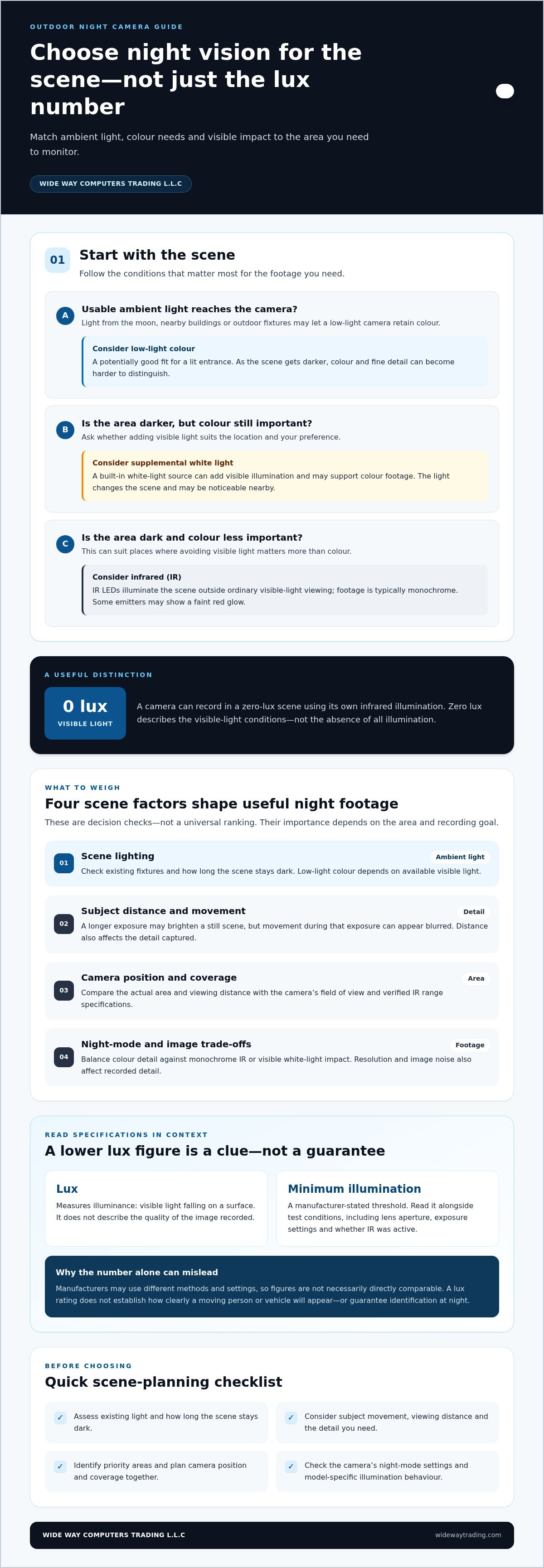
Choose the right outdoor night camera for your actual scene
Start with the place you need to monitor, not the lowest lux figure on a specification sheet. The right choice depends on how the scene changes after dark, what details matter in recorded footage, and where a camera can be positioned to view them.
Assess the scene before comparing camera specifications
Walk the area at night if practical. Note existing lights, shadows, and whether the scene stays dim or becomes fully dark. Then estimate the distance from the camera to key viewing areas, identify where people or vehicles are likely to move, and consider how long the area remains dark. A nearby doorway and the far end of a driveway may need different coverage.
Check the intended mounting position and likely view. Walls, roof edges, plants, and other objects can block part of the scene or interfere with illumination. Glass and other reflective surfaces may create glare or reflections. A camera’s field of view and night performance depend partly on its angle and what sits within its line of sight.
Turn the scene assessment into a camera shortlist
Use these steps to narrow the options:
- Assess ambient light. Note which lights remain on, where shadows fall, and whether the area reaches complete visible darkness.
- Define the footage goal. Decide whether you need colour context, discreet monochrome monitoring, or added visible light to support night recording.
- Compare modes and specifications. Review the camera’s documented night modes, sensor and lens details, and any minimum-illumination figure alongside its test conditions. Don’t treat a lux number as a complete performance score.
- Plan placement. Match the camera’s field of view and stated night-vision coverage to important viewing areas, subject distances, and likely obstructions.
Check environmental and installation requirements in the product documentation, including the camera’s stated suitability for outdoor use and any mounting or power needs. These details matter to a reliable setup as well as image selection. The best lux rating for outdoor night security cameras is ultimately the one that fits the intended scene when considered alongside the camera’s verified specifications and night mode.
For a setup shaped around your site’s lighting and coverage priorities, explore security camera installation options.
Pair the right night camera with a well-planned security installation
A camera’s night mode works as part of a wider system. Its position determines what enters the frame, how far away key details appear, and whether walls, landscaping, or other obstacles block the view. Coverage priorities matter, too: an entrance may call for a closer view, while a wider outdoor area may need coverage from more than one camera.
What a camera installation plan should account for
A practical plan starts by mapping the areas that need monitoring and choosing positions that give each camera a useful view. It should also account for available power and connectivity, mounting options, and the verified requirements of the selected equipment. These factors influence where a camera can be installed and how it can be configured.
Night settings should suit the scene. A camera pointed at a lit entrance may have different needs from one covering a darker yard. Rather than relying on a lux figure alone, consider the camera’s documented night modes and how its placement, field of view, and intended coverage work together. Installation planning connects those decisions to the layout of the site.
Move from specification comparison to a working system
Before choosing, bring your shortlist back to three essentials: the night scene, the footage you want, and the camera’s verified specifications. Compare its sensor and lens information, night-mode details, and installation requirements with the area it will monitor. Check that the planned position supports the intended coverage and system setup.
WIDE WAY COMPUTERS TRADING L.L.C supplies smart security cameras, including Eufy, EZVIZ, and Imou offerings, and provides professional security camera installation. This brings camera selection and placement planning into the same conversation, so the choice reflects the site and footage priorities rather than a single specification. For a closer look at one Eufy kit, read the eufyCam S3 Pro 4-Cam Kit Solar review. It’s a product-specific next step, not a substitute for matching equipment to your own scene.
The best lux rating for outdoor night security cameras is only one part of a sound decision. Discuss your camera selection and professional security installation with WIDE WAY COMPUTERS TRADING L.L.C to plan around your coverage priorities and night-scene conditions.
Choose night security that fits your property
The best lux rating for outdoor night security cameras isn’t a universal number. Treat minimum-illumination figures as clues, then compare them with the stated test conditions, night modes, and the footage you need. Low-light colour, infrared, and supplemental visible light suit different scenes, so consider existing lighting, subject distance, and coverage priorities before deciding.
Good placement matters, too. A well-planned system connects camera position and configuration to the areas you want to monitor. WIDE WAY COMPUTERS TRADING L.L.C supplies Eufy, EZVIZ, and Imou security cameras, along with professional security camera and CCTV installation.
Explore security cameras and professional installation to find an option that fits your scene and setup. With the right match between camera, night mode, and placement, you can make a more informed choice for outdoor monitoring.
Frequently Asked Questions
What is a good lux rating for an outdoor security camera at night?
There’s no universal target because manufacturers don’t use one consistent testing standard for minimum illumination. The best lux rating for outdoor night security cameras depends on the scene, the camera’s test conditions, and whether you need colour or monochrome footage. Treat a lower stated minimum as a possible sign of greater low-light sensitivity, then compare the stated night modes and other specifications instead of relying on one number.
Is a lower lux rating better for a night security camera?
A lower stated minimum-illumination figure can indicate that a camera can capture an image with less visible light under the conditions used for that specification. It doesn’t automatically mean the camera will deliver more useful footage. Lens, sensor, exposure, image noise, resolution, movement, and test methods all affect performance. Compare the conditions behind each figure and consider what you need to see in the recorded scene.
Can a security camera record in complete darkness?
Yes, if it has a night-vision method that supplies or uses illumination in the dark. Infrared cameras use IR LEDs to capture monochrome footage when visible light is insufficient. Some cameras can add visible white light to illuminate a scene, which may support colour recording. Check the specific model’s documented night modes and illumination features. A camera without a suitable night mode may not capture useful detail in a dark area.
What does 0 lux mean on a security camera?
Zero lux describes a scene with no measurable visible-light illumination at the point being considered. It doesn’t necessarily mean the camera records without any light. A camera advertised for zero-lux operation may use infrared LEDs to illuminate the scene, allowing it to record monochrome footage. Check whether the specification refers to IR-assisted operation and review the stated IR range and test conditions for that model.
Is infrared or colour night vision better for outdoor security cameras?
Neither is best for every scene. Infrared suits dark areas where discreet monochrome recording is acceptable. Low-light colour can provide colour context when ambient visible light is available, while a camera’s white-light feature may add illumination where that is practical. Choose based on the footage you need, how dark the scene gets, and whether visible light suits the location. Verify the selected camera’s specific night modes.
Does a camera’s lux rating guarantee clear night footage?
No. A lux figure describes a minimum-illumination specification under particular test conditions; it doesn’t guarantee clear footage or reliable identification. Image detail also depends on resolution, lens, sensor, exposure settings, subject movement, distance, and camera position. For example, a moving subject may appear blurred if the camera uses a longer exposure to brighten a dim scene. Consider the scene and recording goal alongside the specification.
How should I compare lux ratings from different camera brands?
Compare the stated test conditions first, including whether infrared or other supplemental lighting was active and which lens or exposure settings were used. If those details differ or aren’t provided, the figures may not offer a fair comparison. Next, review each camera’s sensor and lens information, night modes, resolution, and relevant range specifications. Match these details to your lighting, viewing distance, and desired footage instead of ranking cameras by lux alone.


