

The highest-spec projector isn’t automatically the best choice for your home. The best projector for home use UAE buyers choose depends on the room, viewing habits and screen as much as the headline resolution. A bright living room, a compact space and a dedicated cinema room call for different trade-offs.
It’s easy to get stuck comparing lumen figures and resolution labels without knowing how they’ll affect the picture in your room. Even a capable projector can disappoint if daylight washes out the image or the throw distance doesn’t suit your layout.
This guide compares five home-projector use cases, from everyday living-room viewing to gaming and dedicated home cinema. It explains how brightness, resolution, throw distance and screen choice work together, and what to measure before you buy or arrange installation. WIDE WAY COMPUTERS TRADING L.L.C offers Sony, BenQ and LG projectors, plus ALR, CLR and motorized screen options. Use your room measurements and viewing priorities to compare the setup, not just the specifications.
Key Takeaways
- The best projector for home use UAE buyers choose depends on room lighting, viewing habits and installation limits, not just headline specifications.
- Compare brightness figures using the same measurement standard, and check native resolution separately from supported input resolution.
- Measure the projector-to-screen distance before choosing a projector type, especially when placement space is limited.
- Use the five use cases to build a shortlist around your room and viewing needs, rather than treating the options as ranked model recommendations.
- Before purchase or installation, confirm current model specifications, availability and compatibility with your chosen screen.
Best projector for home use in the UAE: start with your room and viewing habits
Consider the room, available light, viewing habits and installation limits together. The best projector for home use UAE households can select isn’t necessarily the one with the highest resolution or brightest rating. It’s the one that can produce a satisfying image in the space where it will be used.
This guide compares five projector use cases rather than ranking specific models. A home projector is part of a display system, and the result depends on more than the unit itself. Screen choice, placement, room surfaces and viewing conditions all affect the experience. For a concise introduction to how projectors create images, see Video projector technology, including its overview of resolution and lamp, LED and laser illumination.
Which home viewing setup are you choosing for?
A dedicated cinema room can usually be arranged around controlled lighting and fixed seating. A shared living room has different demands: windows, lamps and furniture may limit where the projector and screen can go. A multipurpose room may need a setup that works around its other uses, such as dining or study.
Think about what you watch most. Films and streaming may favour an immersive image, while sports and gaming can make motion and responsiveness more important. Consider how long you usually watch and how far viewers sit from the screen. A large image may suit a longer viewing distance, while a screen that dominates a compact room can feel tiring. Treat screen size as a room-and-seating decision, not a target to maximise.
Why room conditions matter as much as the projector
Ambient light can reduce perceived contrast, making dark scenes look less distinct. Window light, room lighting and the time you usually watch all influence how the projected image appears. Evening films in a room with controlled light present different conditions from daytime sport in a bright shared space.
Room surfaces matter too. Light-coloured walls can reflect stray light toward the screen, while darker surroundings may help limit distractions. Before choosing a projector, note where daylight enters and which lights will be on during viewing. No single specification guarantees a strong image in every room. Brightness, resolution, placement and screen characteristics need to work together, with specifications and compatibility checked for your particular setup.
How to compare home projectors: brightness, resolution, and throw distance
Compare specifications in context rather than as isolated numbers. Manufacturer ratings can help narrow a shortlist, but check how each figure is measured. Avoid comparing brightness ratings based on different standards. The projector reviews and buying advice from PCMag can offer another perspective on the features reviewers consider. For a final decision, check the exact manufacturer specifications for each model you’re considering.
How much brightness does a home projector need?
Perceived brightness depends on more than a projector’s rating. Ambient light, projected image size and screen characteristics all affect how bright the picture looks. A larger image spreads the projected light across more area, while daylight or room lighting can make the image seem less vivid. Compare manufacturer-rated brightness figures on a like-for-like basis, and check which measurement standard each specification uses.
If the room is bright during viewing, consider whether you can reduce window light or adjust room lighting. A screen suited to the room may also be part of the solution, but confirm its compatibility with the projector and installation. No single brightness figure guarantees a clear, engaging image in every space.
Which resolution and throw type suit your room?
Full HD and 4K describe resolution categories, but check whether a specification refers to a projector’s native resolution or the input signals it supports. Supported input resolution doesn’t necessarily mean the projector displays that resolution natively. Confirm the distinction in the manufacturer’s documentation before comparing models or choosing a screen size.
Throw distance is the space between the projector lens and the screen. It determines the image size a projector can produce from a given position. Standard-throw models generally need more distance than short-throw options to create a similar-sized image, though the exact calculation varies by model. Measure the available lens-to-screen distance and compare it with the manufacturer’s throw ratio, calculator or installation guidance. Don’t assume that two projectors in the same general throw category will fit identically.
Check connections before you buy. Confirm that the projector has suitable HDMI inputs for your source devices, such as a streaming device, game console or media player. Check that the device and projector support the video format you plan to use. If you rely on built-in streaming, verify the available functions for the exact model instead of assuming they’re included.
Once you’ve identified your room constraints and must-have specifications, you can compare available projector options from brands such as Sony, BenQ and LG. WIDE WAY COMPUTERS TRADING L.L.C also offers projector screens and screen installation, so check projector-screen compatibility and installation requirements as part of your shortlist.
Five of the best projector types for home use in the UAE
There isn’t one winner for every home. The categories below match common viewing needs with room conditions rather than ranking specific models or promising a particular result. WIDE WAY COMPUTERS TRADING L.L.C sells Sony, BenQ and LG projectors, giving buyers brands to compare against their space and priorities. Check current model specifications and availability before deciding. Suitability depends on the projector, screen, placement and room lighting working together.
| Use case | Room conditions | Potential strengths | Checks before purchase |
|---|---|---|---|
| Dedicated film room | Lighting can be controlled | Lets you plan seating, screen size and placement around films | Confirm resolution, throw distance and screen compatibility |
| Shared living room | Daylight or household lighting may be present | Supports varied viewing without requiring a dedicated cinema space | Assess light control, brightness specifications and screen options |
| Compact or short-throw setup | Limited distance between projector and screen | May suit layouts where a conventional placement is difficult | Verify the exact throw calculation and image size for the model |
| Premium 4K-oriented viewing | Space and screen size support detailed viewing | Centres the shortlist on 4K resolution options | Distinguish native resolution from supported input resolution |
| Gaming and mixed viewing | Shared use for games, sports and streaming | Helps balance responsiveness with general viewing needs | Check input lag, refresh specifications and source connections |
Projector categories for cinema, shared rooms, and compact spaces
For film-focused viewing, a dark-room setup lets you plan around a fixed screen and seating position. In a shared room, daylight and changing activities matter more, so consider how you’ll manage light and whether a suitable screen fits the space. A compact-room or short-throw setup may help where placement distance is restricted, but confirm the model’s throw specifications before planning installation. For detail-focused viewing, compare 4K options while checking native resolution and intended screen size.
Projector categories for gaming and everyday mixed viewing
Gaming calls for careful checks of input lag and supported refresh rates. Don’t assume a projector has gaming features based on brand alone. Sports and streaming bring other priorities, including motion handling, brightness in your usual viewing conditions and convenient connections for your sources. Buyers considering the best projector for home use UAE should compare specific Sony, BenQ and LG models against these criteria, then confirm screen compatibility and placement. No category is a guaranteed match without checking the exact specifications and room setup.
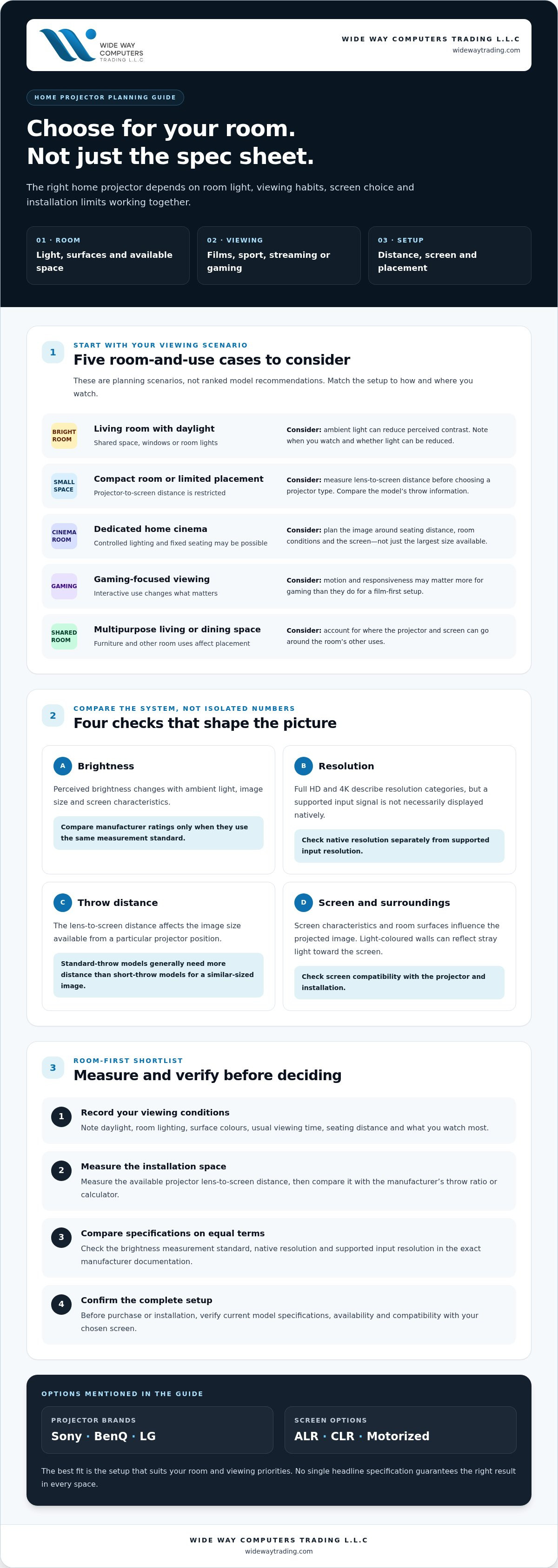
Match your projector to UAE room light, screen, and installation needs
A reliable setup starts with the room, not the product page. Window exposure, room layout and viewing times vary from home to home, so assess the conditions in your own space rather than assuming one projector or screen will suit every home. Use this sequence to narrow your options:
- Measure: Record the distance from the planned projector position to the screen, available screen width, ceiling height and seating position.
- Assess the light: Note when daylight enters and which lights will be on during viewing.
- Choose a category: Match the room and viewing habits to a projector type, such as a standard-throw or short-throw setup.
- Confirm compatibility: Check the exact projector specifications against the screen, placement and installation plan.
This sequence turns “best projector for home use UAE” into a room-specific shortlist. Small layout details can affect the result, so check them before buying.
Measure the room before selecting a projector
Measure the full lens-to-screen distance, not just the room’s overall depth. Also note the usable screen width, ceiling height and where viewers will sit. Then check the exact projector’s throw specifications, zoom range and lens shift, if provided. These features affect whether the image can be positioned and sized correctly without moving the screen or changing the planned layout.
Plan the practical details too. Identify a safe cable route, nearby power access and a stable mounting position. Allow for the projector’s required ventilation clearance according to its documentation. A position that looks convenient on a floor plan may not work if cables cross a walkway or airflow is restricted.
Choose a compatible screen and installation approach
Screen material and room light can influence perceived contrast. If curtains or lighting controls can reduce unwanted light, consider using them first. In rooms where some ambient light remains, an ALR or CLR screen may be worth assessing, but neither is a guaranteed fix. Confirm that the screen type is suitable for the specific projector and installation position.
Screen format also affects how the room functions. A fixed screen stays in one position; a motorized screen can be raised or lowered; a floor-rising screen lifts into place from a base. Choose based on available wall space, furniture and whether the screen needs to disappear between viewing sessions. WIDE WAY COMPUTERS TRADING L.L.C offers projector-screen installation alongside ALR, CLR and motorized screen options. Confirm the installation scope and projector-screen compatibility before proceeding.
For help matching a screen and setup to your room, explore projector screens and installation.
Shortlist a home projector and plan your next steps with confidence
A useful shortlist connects your viewing priorities to the room and the complete setup. Before choosing the best projector for home use UAE, write down what the projector must do, then check each candidate against its manufacturer specifications and the screen you plan to use.
A practical checklist before choosing
- Room and viewing: Record your main use, such as films, gaming, sports or mixed viewing. Note typical room brightness, your preferred image size and the distance from the screen to the seating area.
- Projector specifications: Check native resolution, supported input resolution and the manufacturer’s brightness rating. Compare brightness figures only when they use the same measurement standard.
- Placement: Confirm the model’s throw range for your planned image size. Review zoom, lens shift, connectivity and mounting requirements, if applicable, against the available position.
- Screen match: Compare the projector’s requirements with the screen type, size and intended location. Check compatibility rather than assuming any screen will suit every projector.
Keep the exact model details beside your measurements. A candidate that appears suitable on paper may not fit once you account for lens-to-screen distance, power access, cables and ventilation clearance.
Where to get help comparing projector options
WIDE WAY COMPUTERS TRADING L.L.C offers Sony, BenQ and LG projector options, along with projector screens and professional projector-screen installation. Comparing these options against your room measurements can help clarify which specifications and screen characteristics to verify. Before purchase, confirm the model’s current availability, complete specifications and compatibility with your chosen screen.
Screen installation may be worth considering when the intended screen position, projector alignment or mounting plan is difficult to determine. Confirm the installation scope and requirements for your particular setup in advance. This can help resolve placement questions before equipment is fixed in position, without assuming every projector or room needs the same approach.
Narrow your choices to models that meet your viewing needs, fit the measured throw range and work with the intended screen. Then explore WIDE WAY COMPUTERS TRADING L.L.C’s projector and home-cinema screen options, and verify the details that matter for your setup before committing.
Choose a setup that fits your room
The best projector for home use UAE buyers choose is the one that suits their viewing habits and room, not simply the model with the biggest specifications. Start with how you’ll use it, then compare brightness ratings, resolution and throw distance against the room’s lighting, screen size and placement options.
Screen choice matters too. Check that the screen is compatible with the projector and the light conditions where you’ll watch. Before purchasing, verify the exact model’s full specifications and current availability, and consider whether professional screen installation could help address placement or setup requirements.
WIDE WAY COMPUTERS TRADING L.L.C offers projector options from Sony, BenQ and LG, along with projector screens and professional screen installation. Explore WIDE WAY COMPUTERS TRADING L.L.C's projector and home-cinema options as you compare possibilities for your space.
With your room measurements and viewing priorities in hand, you can make a more confident shortlist and plan a setup that fits your home. Explore the available projector and screen options, then confirm the specifications and installation requirements for your room.
Frequently Asked Questions
What is the best projector for home use in the UAE?
The best projector for home use UAE households can choose depends on room lighting, viewing habits, screen size and placement options. A film-focused room with controlled light has different needs from a shared living room used for sports and streaming. Compare exact models from Sony, BenQ or LG using their verified specifications, then check screen compatibility and availability. This guide compares use cases, not ranked or guaranteed model recommendations.
How many lumens do I need for a home projector in a bright room?
For a living room with ambient light, a manufacturer rating around 2,800 to 3,500 lumens or higher can be a useful starting point, but it doesn’t guarantee image quality. The result also depends on projected image size and screen choice. Compare ratings only when they use the same measurement standard. If daylight washes out the picture, consider reducing light with curtains or assessing a compatible screen strategy.
Is a 4K projector worth it for home use?
A 4K projector may be worth considering if detailed images and a large projected picture are priorities. The difference you perceive depends on image size, viewing distance and source content, so weigh those factors against your budget and room plan. Check whether a model’s 4K specification refers to its native resolution or supported input. Compare the exact specifications rather than assuming every projector labelled 4K displays images in the same way.
Can I use a projector in a living room with daylight?
Yes, but daylight can reduce perceived contrast and make the image look washed out, especially in bright parts of the room. Close curtains or blinds and switch off nearby lights where practical. You can also consider an ambient-light-rejecting screen, such as an ALR or CLR type, but verify compatibility with the projector and setup. The amount and direction of incoming light still matter, so assess conditions at your usual viewing time.
What happens if my projector does not match my screen size or throw distance?
The projector may not produce the image size you want from its planned position. The image could be too small or too large for the screen, or you may need to move the projector or screen. Check the exact model’s throw range and image-size guidance before fixing either in place. Zoom and lens shift, if available, may help with adjustment, but don’t assume they can solve every placement mismatch.
Which is better for home use, a short-throw or standard-throw projector?
Neither is automatically better. The available distance between projector and screen is the key factor. A short-throw projector can suit a room where placement space is limited, while a standard-throw model may fit a layout with more distance available. Compare each model’s throw specifications for your intended image size and mounting position. Measure from the lens to the screen, then confirm the calculation using the manufacturer’s guidance.
Do I need a special screen for a home projector?
No, a dedicated screen isn’t essential, but its surface and placement can affect the projected image. A suitable screen provides a planned viewing area, while ALR or CLR options may be worth considering when some ambient light remains. These screen types aren’t guaranteed to suit every projector. Confirm compatibility and screen dimensions for your setup. A plain wall can work as a basic alternative, though its colour and texture may affect the result.


