

A short-throw projector can save space, but the wrong screen can still produce a poor image. Choosing a short throw projector screen UAE buyers can use confidently starts with matching the screen to the projector’s throw ratio and position. Then consider the room’s lighting and the space available for installation.
It’s easy to focus first on how close the projector can sit to the wall. But throw distance alone doesn’t determine compatibility. Screen size and surface matter too, especially in rooms where daylight or ceiling lights affect visibility.
This guide explains how projector geometry, screen materials and room lighting work together. It gives you practical criteria for comparing standard, ALR and CLR options, plus the room measurements, screen format and mounting details to confirm before buying. A compatibility check can help you avoid a screen that doesn’t suit your projector or fit the planned position. If installation is part of your plan, confirm the screen’s current size and format options, along with installation availability, before deciding.
Key Takeaways
- Distinguish short-throw from ultra-short-throw projection before choosing a screen. Check the projector’s image geometry rather than relying on its label.
- Use your projector model, throw ratio, target image size and planned position to check whether the screen width will work at the available distance.
- Compare standard, ALR and CLR surfaces based on room conditions and projector compatibility. No single type suits every setup.
- For a short throw projector screen UAE setup, assess daylight and lighting in the actual viewing area, then measure the screen space and viewing distance.
- Before confirming a screen or installation, share the projector details, room measurements and intended placement, and verify current screen options.
What makes a projector screen suitable for short-throw projection?
A short-throw projector can create a large image from a relatively short distance. It sits between a standard-throw projector, which generally needs more space, and an ultra-short-throw (UST) projector, designed to project from very close to the screen. The exact boundaries vary by model, so check the projector’s specifications rather than relying on the label in a product listing.
A short-throw projector screen is a screen whose size, position and surface suit the image produced by a short-throw projector. The term describes compatibility, not a particular material. A standard white screen may work if the projector’s image reaches it correctly and the room conditions are suitable. ALR or CLR describes a screen material and its light-control design, not the projector’s throw category.
That distinction matters when choosing a short throw projector screen UAE buyers can position confidently in their room. Compatibility affects more than whether the picture fits. A suitable setup supports consistent image shape, comfortable viewing and a practical layout that leaves space for furniture, walkways and equipment.
Short-throw and ultra-short-throw projectors are not interchangeable terms
The throw ratio describes the relationship between the distance from the projector lens to the screen and the image width. For example, a hypothetical ratio of 1.2:1 means a two-metre-wide image needs about 2.4 metres of lens-to-screen distance. Short-throw and UST models use different optical ranges, but no single distance applies to every projector.
Check the manufacturer’s throw-ratio range and placement guidance for your exact model. Before choosing a screen position, confirm the lens-to-screen distance, desired image width and any stated mounting limits.
Why a standard screen may not suit every short-throw setup
A standard screen can work with a short-throw projector, but only if the projected image aligns with it. Because the image reaches the screen at a steep angle, small positioning errors can be more noticeable. If the screen surface isn’t flat, the image may look uneven or distorted. Material choice can affect the picture under room lighting, but it can’t correct an incompatible position, image size or angle.
Start with the geometry. Confirm that the projector can create the required image from the planned location and that the screen can be mounted flat and square to the picture. Then consider whether a standard surface suits the room or whether an ALR or CLR option merits checking. These are separate decisions. A light-rejecting design doesn’t replace projector compatibility checks, and its suitability should be confirmed for the specific projector and installation.
How throw ratio, screen size and placement shape the image
Start with four details: the exact projector model, its throw-ratio range, your target image size and the planned lens position. Throw ratio is the lens-to-screen distance divided by the projected image width, so it helps establish which image sizes are possible from a given position. Use the manufacturer’s specification sheet or calculator for the final check, since zoom and lens options differ between models.
For a simple illustration, a hypothetical 1.2:1 ratio needs about 2.4 metres of lens-to-screen distance for a 2-metre-wide image. Treat this as a calculation example, not a recommendation for your projector. The manufacturer’s stated range determines whether the image will fit.
Check screen size against the projector’s throw-ratio range
Enter the projector model and intended placement in the manufacturer’s calculator, or compare the specifications directly. A diagonal measurement alone isn’t enough: you also need the aspect ratio to determine the screen’s width. Check that ratio against the projector’s image settings and the content you plan to watch.
Think in terms of active image dimensions. A screen’s stated diagonal may describe the full viewing area, while the projector must produce an image that fits its width and height. The screen surface is a separate choice. Britannica’s overview of common types of screen provides context on surface categories, but the projector specifications establish the workable image size.
Plan placement for a flat, correctly aligned image
Whether the projector sits on a shelf, inside a cabinet or on a mount, measure from the lens to the screen plane, not from the back of the projector. Check the model’s guidance for lens shift, zoom and mounting position. Don’t assume digital image correction can compensate for every placement mismatch.
Short-throw projection can make alignment errors and surface irregularities more apparent because the image reaches the screen at a steeper angle. Confirm that the installation surface is secure and that the screen can sit flat and square to the projected image. Check the cable route, nearby furniture and clearance for the chosen screen format before fixing its position.
- Confirm the projector model and the manufacturer’s throw-ratio range.
- Record the target image width, height and aspect ratio.
- Measure the lens-to-screen distance and check the intended mounting position.
- Verify alignment, screen support and cable access before installation.
These measurements give a supplier the information needed to assess compatibility. Projector-screen installation details are available at projector-screen installation.
Standard, ALR and CLR screens: which suits a short-throw projector?
Choose screen material based on both the projector and the room. A standard white screen may suit a room where light is controlled. Ambient Light Rejecting (ALR) and Ceiling Light Rejecting (CLR) screens are designed to manage certain incoming light, but they are distinct categories, not interchangeable labels or automatic upgrades. For a short throw projector screen UAE setup, check the screen’s intended projector type and placement before comparing materials.
When a standard screen may be the practical choice
In a room where curtains, blinds or lighting controls keep unwanted light low, a standard white surface may be a straightforward option. Suitability still depends on the projector’s output, the intended image size and the screen’s gain, which describes how much light it reflects toward viewers. A larger image spreads the projector’s light over more area, so don’t assume a standard surface will look equally clear in every room or at every size.
When to investigate ALR or CLR screen compatibility
ALR and CLR options are worth investigating if daylight or room lighting is difficult to control. Their surface designs are intended to favour light arriving from certain directions and reduce the effect of light from others. That direction matters: a surface designed for one projector arrangement may not suit another. Confirm the specific screen’s compatibility with your projector type and placement rather than relying on the ALR or CLR description alone. A dedicated ALR and CLR guide can explain these technologies in greater depth.
| Screen category | Room light | Projector and placement | Key checks |
|---|---|---|---|
| Standard white | Often considered for controlled-light rooms | Check the projector’s image size and position | Screen gain, aspect ratio and viewing conditions |
| ALR | Worth investigating where ambient light is a concern | Surface design must suit the projector’s light path | Compatibility, light direction and manufacturer guidance |
| CLR | Can be considered when ceiling light is a concern | Confirm it’s designed for the specific projector setup | Projector type, placement and surface orientation |
Comparison takeaway: Match the surface design to the projector’s image and the room’s light rather than treating standard, ALR or CLR as a universal ranking. Confirm compatibility first, then compare how each option fits your viewing conditions and installation plan.
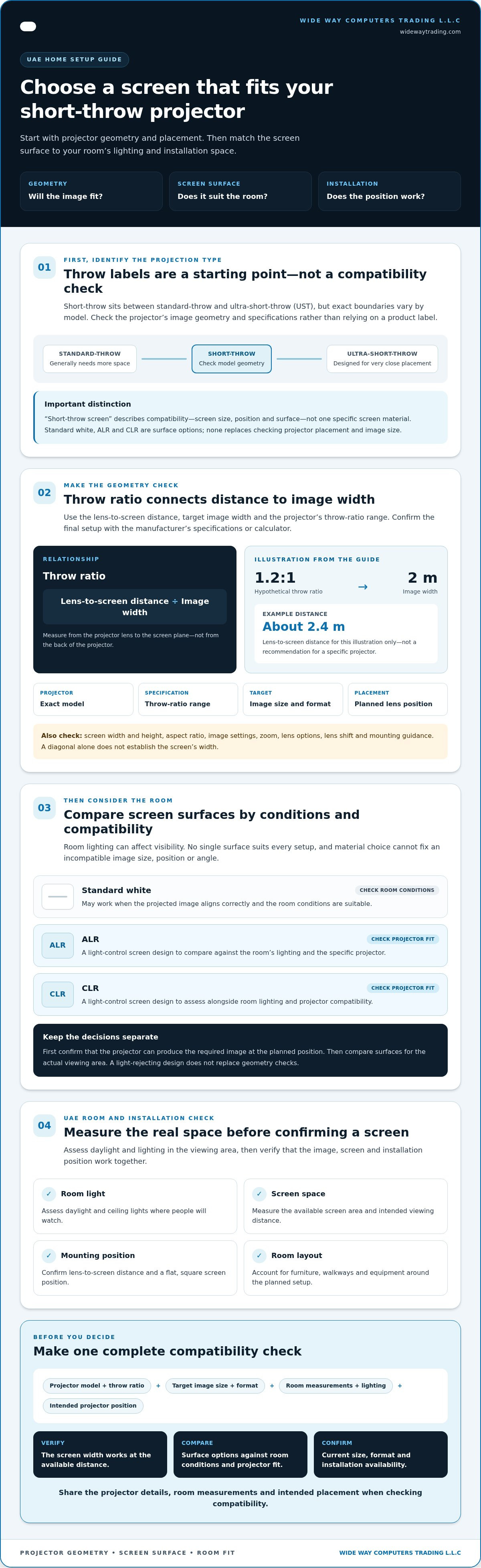
A short-throw projector screen checklist for UAE homes
Room conditions can change how a projected image looks from morning to evening. In the UAE, strong daylight may enter through large windows or balcony doors, but exposure varies by home and room orientation. Assess the actual viewing area at the times you expect to watch. A screen can help manage light, but it can’t remove every effect of bright windows or room lighting.
Room and lighting checks before choosing
Notice when sunlight reaches the screen wall, whether curtains or blinds can control it, and which ceiling or task lights can be dimmed. Then consider where viewers will sit. The image should suit the viewing distance and remain visible from the intended seats, not just fit the wall.
Measure the usable wall width and height, allowing for nearby doors, shelves and furniture. Compare the projector’s image size and aspect ratio with the screen format. Check the manufacturer’s placement guidance and the screen surface’s compatibility with the projector. These checks help narrow the options without assuming one material will perform the same in every lighting condition.
Installation questions to settle before ordering
Measure the intended mounting area and confirm that the support surface can accommodate the selected screen and mounting method. Identify nearby power access and plan the cable route, including any obstacles between the projector and screen. A fixed screen, motorized screen or floor-rising format may suit different room uses, so check operating clearance and storage space as well as viewing dimensions.
If the mounting position, support or alignment is uncertain, ask about professional installation before ordering. Confirm the current screen format, mounting requirements and installation availability for the option you’re considering.
Pre-purchase checklist:
- Observe daylight and room lighting in the viewing area at different times.
- Measure available screen space, viewing distance and projector position.
- Verify image size, aspect ratio and surface compatibility against the projector manufacturer’s guidance.
- Confirm mounting method, wall support, power access, cable path and operating clearance.
- Check current screen specifications and installation availability before purchase.
With those details in hand, you can compare a short throw projector screen UAE option against the room rather than choosing by size or material label alone. Information about installation is available through projector screen installation.
Choosing and installing a short-throw projector screen with confidence
A reliable choice follows a clear sequence: verify the projector, measure the room, compare screen surfaces, then confirm the installation requirements. This helps ensure the screen suits the actual projector and viewing area, not just a product description. For a short throw projector screen UAE setup, share the relevant measurements and projector details before settling on a specific option.
What to prepare for a compatibility check
Gather the projector’s exact model, the manufacturer’s throw-ratio guidance, the intended image size and the aspect ratio. Add the available screen width and height, the planned lens position and typical room-light conditions. If possible, note whether daylight reaches the screen directly and which lights can be controlled.
Ask the supplier to verify that the proposed screen size and surface suit the projector’s image geometry and placement. Confirm current material and format options, along with the screen’s mounting needs. A model name or “short-throw” label alone isn’t enough to establish compatibility.
When professional screen installation can help
Installation support can help resolve practical questions about mounting position, alignment and the support surface, particularly when placement is tight or the screen is motorized. The right approach depends on the screen selected and the conditions at the installation site. Confirm the mounting method, required clearances, power access and cable route before arranging the work.
WIDE WAY COMPUTERS TRADING L.L.C supplies projector screens, including ALR and CLR options, and offers projector-screen installation. Current screen specifications and installation availability should be confirmed for the option you’re considering.
Details about projector-screen options and installation are available at projector-screen options and installation. You don’t need to choose a surface first. A compatibility check can help compare suitable choices based on your projector, room lighting, measurements and mounting requirements.
Make Your Screen Choice with Confidence
A suitable short-throw setup starts with compatibility, not a screen label. Confirm the projector’s throw-ratio guidance, target image size and placement before choosing a screen format. Then consider the room: controlled lighting may suit a standard surface, while ALR or CLR options are worth checking when ambient light is a concern. The right choice depends on both the projector and the viewing conditions.
For a short throw projector screen UAE setup, measure the available space and check mounting, power and cable requirements before ordering. These details help you compare options with confidence and plan installation around the room.
WIDE WAY COMPUTERS TRADING L.L.C supplies projector screens, including ALR and CLR categories, and offers projector-screen installation. Confirm current screen specifications and installation availability for the option you’re considering.
Use your projector model, room measurements and intended placement to explore projector screens and installation support.
Frequently Asked Questions
What is the difference between a short-throw and an ultra-short-throw projector screen?
There isn’t a universal screen distinction based only on whether a projector is short-throw or ultra-short-throw (UST). Those terms describe the projector’s optics and how close it can sit to create an image. Screen suitability depends on the model’s throw range, image size, placement and surface design. Check the projector and screen specifications together, especially for a UST setup, which may require a specifically compatible surface.
Can I use a regular projector screen with a short-throw projector?
Yes, a standard projector screen can work if the projector can create the intended image size from its planned position and the screen suits the room. Confirm the manufacturer’s throw-ratio guidance, image alignment, aspect ratio and screen flatness. A standard surface may be practical in controlled lighting, but it won’t necessarily provide the same visibility in every room. Specialised ALR or CLR material is a separate compatibility decision.
How do I choose the right screen size for a short-throw projector?
Use the projector’s model-specific throw-ratio range or manufacturer calculator to match lens-to-screen distance with the desired image width. Then check the screen’s aspect ratio, since diagonal size alone doesn’t tell you whether its width and height match the projected image. Measure the available wall or mounting area and consider seating distance. For a short throw projector screen UAE setup, compare these measurements with the projector’s guidance before selecting a format.
Does a short-throw projector need an ALR or CLR screen?
No. A short-throw projector doesn’t automatically require ALR or CLR material. A standard white surface may suit a room where light is controlled, while ALR or CLR options may be worth investigating if ambient light is a concern. These are different screen categories, and their performance depends on surface design and the projector’s direction and placement. Verify compatibility for the specific projector and screen rather than choosing by label alone.
Will a short-throw projector screen work in a bright room?
It can work, but bright daylight or room lighting may reduce image visibility. Assess when sunlight reaches the viewing area, whether curtains or blinds can manage it, and which lights can be dimmed. ALR or CLR screens may help manage certain incoming light when correctly matched to the projector, but no screen should be assumed to eliminate ambient-light effects. Consider projector specifications, screen size and actual room conditions together.
Can I use a short-throw projector with a curved screen?
Possibly, but don’t assume a curved screen will suit every short-throw projector. The curve can affect image geometry and focus across the screen, and the result depends on the projector’s optics, placement and the screen’s design. Check the manufacturers’ compatibility and installation guidance before purchasing. If the specifications don’t clearly confirm suitability, ask the supplier to review the projector model, intended image size and proposed screen position.
What should I check before installing a short-throw projector screen?
Confirm the projector model, throw-ratio range, intended image size and aspect ratio, then measure the screen area and projector position. Check that the mounting surface can support the screen, and plan power access, cable routing and clearance for its operation. Review the screen’s material and placement requirements too. If alignment or mounting is uncertain, ask about professional installation and confirm the requirements for the specific screen and site.


