

What if “laser” describes how a projector produces light, not how it forms the picture? That distinction matters when comparing a laser projector UAE shoppers may consider with other options. The light source and the imaging technology are separate parts of the system, and both affect the viewing experience.
It’s understandable to associate laser illumination with a brighter, sharper and more effortless cinema experience. Laser can bring practical benefits, including consistent light output and less routine lamp replacement, but it doesn’t guarantee a better picture in every room. Screen choice, ambient light, throw distance and imaging technology all play a part.
This guide explains the main laser projector technologies in plain language, what’s driving their use in home cinema, and where the trade-offs lie. It also covers what to check before exploring options for a UAE home, including room conditions and projector-screen compatibility. You’ll have a practical way to assess marketing claims against your setup, and to understand why “laser” alone isn’t enough to judge a projector.
Key Takeaways
- Learn how laser-phosphor and direct RGB designs use different approaches to create colour and form an image.
- Compare laser and lamp projectors by maintenance, start-up behaviour and relevant specifications, rather than relying on broad performance claims.
- Use room purpose, viewing distance, ambient light and screen choice to assess a laser projector UAE setup for your home.
- Separate emerging RGB laser trends from features you can confirm in products currently available.
- Check projector and screen compatibility, including ALR and CLR options, before narrowing your choices.
Laser Projectors: Why Technology Is Growing in the UAE
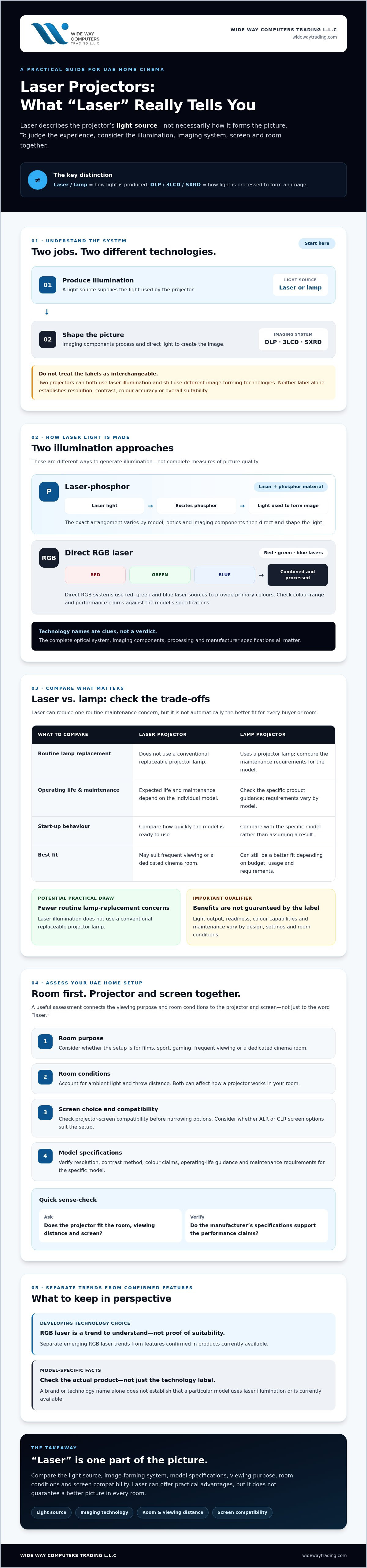
Definition: A laser projector uses laser light as its illumination source to project an image onto a screen. “Laser” describes how the projector produces light, not necessarily how it forms the image.
Laser light source versus projector imaging technology
Think of a projector as having two jobs: producing light and shaping that light into a picture. Laser or lamp describes the light source. DLP, 3LCD and SXRD describe different image-forming systems that process and direct light to create the image. These terms aren’t interchangeable, and they can appear in different combinations.
That distinction makes comparisons clearer. Two projectors may both use laser illumination yet produce images through different imaging technologies. For a concise overview of laser projection technology, its basic design and development, see the encyclopedic background. When assessing a specific model, check its manufacturer specifications rather than inferring picture quality from the word “laser” alone.
Why laser projection is gaining attention
One practical draw is fewer routine lamp-replacement concerns. A laser light source doesn’t use a conventional replaceable projector lamp, but its expected operating life and maintenance requirements depend on the individual model. Check the manufacturer’s guidance rather than assuming all laser projectors offer the same service life or maintenance profile.
Consistency is another consideration. Buyers may want to know how a projector maintains its light output over time, how quickly it becomes ready to use, and whether its colour capabilities suit films, sport or gaming. These are useful questions, not guaranteed advantages. Performance varies by design, settings and room conditions, so verify the specifications and reviews for the model you’re considering.
The growing range of home-cinema options in the UAE gives buyers more reason to compare illumination types alongside resolution, screen pairing and room setup. A laser projector UAE homeowners consider may suit frequent viewing or a dedicated cinema room, but that doesn’t make every lamp model obsolete. A lamp projector can still be a better fit depending on budget, usage and requirements.
The shift is best understood as a developing choice, not a universal upgrade. Laser illumination can reduce one maintenance task and offer features worth investigating, but the full picture depends on how the light source, imaging system and room work together. That’s the foundation for understanding the technology combinations in the next section.
How Laser Projectors Create Images: Phosphor and RGB Explained
A laser projector creates an image through two separate systems: a light source supplies illumination, and image-forming components shape that light into the picture. Laser illumination describes the light source, not the projector’s imaging chip. That distinction helps explain why two laser models can use different technologies and produce different results.
Laser-phosphor and direct RGB laser systems
In a laser-phosphor design, laser light excites a phosphor material, which helps produce the light used to create the projected image. The projector’s optics and imaging components then direct and shape that light. The exact arrangement varies by model.
Direct RGB systems use red, green and blue laser sources to provide the primary colours. Their light is combined and processed to form the image. Both approaches are ways to generate illumination, not complete measures of picture quality. Check claims about colour range or performance against the manufacturer’s specifications for the specific projector.
How DLP, 3LCD and SXRD fit into the picture
DLP, 3LCD and SXRD refer to image-forming approaches, not competing types of light source. They describe how a projector modulates or processes light to produce the picture. Sony is associated with SXRD in its projector technology, while Sony, BenQ and LG are among the projector brands supplied by WIDE WAY COMPUTERS TRADING L.L.C. That doesn’t establish that a particular model uses laser illumination or is currently available.
These imaging systems can be paired with different illumination designs. A label such as “RGB laser” tells you about the light source, while “DLP” or “3LCD” points to image formation. Neither label alone tells you the projector’s resolution, contrast, colour accuracy or overall suitability. Those depend on the complete optical system, imaging components, processing and manufacturer specifications.
For a practical comparison, look beyond the technology name. Check the stated resolution and contrast method, review colour-performance claims in context, and consider how the projector will pair with the screen and room. A laser projector UAE buyer can use these distinctions to ask more precise questions and avoid treating a single feature as a guarantee of image quality.
WIDE WAY COMPUTERS TRADING L.L.C supplies Sony, BenQ and LG projectors, alongside ALR and CLR projector screens. Exploring projector and screen options together can help clarify compatibility. Confirm current laser availability and model specifications before choosing.
Laser Projectors Versus Lamp Models: Benefits, Trade-Offs, and Common Claims
The main difference is the illumination source: a laser projector uses laser-based illumination, while a lamp model uses a replaceable lamp. That can change routine maintenance, but it doesn’t determine picture quality on its own. Compare the full specifications and consider how you’ll use the projector.
| What to compare | Laser projector | Lamp projector | What to check |
|---|---|---|---|
| Light source | Laser-based illumination | Replaceable projector lamp | Confirm the exact light-source design in the model documentation. |
| Maintenance | Doesn’t rely on traditional lamp replacement, though other maintenance may apply. | Lamp replacement may be part of ownership. | Review manufacturer guidance, including any stated replacement intervals and maintenance needs. |
| Startup | Readiness time varies by model. | Warm-up behaviour varies by model. | Check the manufacturer’s instructions if quick startup matters to your routine. |
| Performance | Brightness, colour, resolution and contrast vary between models. | Performance also varies between models. | Compare specifications using consistent measurement methods where possible. |
Where laser illumination can make a practical difference
For frequent viewing, not having to plan around traditional lamp replacement may be a welcome convenience. For occasional use, the maintenance difference may matter less. Either way, check the manufacturer’s documentation for operating guidance and maintenance requirements rather than assuming all laser models are alike.
Brightness and colour performance also depend on the complete projector, its settings and the viewing environment. A bright room can affect how vivid the image appears, while the screen surface influences how projected light is reflected. Specifications alone can’t predict the result in every home.
What laser technology does not automatically guarantee
Laser illumination doesn’t guarantee higher resolution, stronger contrast, quieter operation or better image processing. Those are model-specific characteristics, and marketing language shouldn’t substitute for checking the specifications. A projector designed for a dark cinema room may not suit a living room with significant ambient light.
For a laser projector UAE comparison, start with the room and viewing habits, then weigh maintenance convenience against resolution, contrast, noise and setup requirements. Consider the screen too. ALR and CLR screens are among the options available from WIDE WAY COMPUTERS TRADING L.L.C, but compatibility depends on the projector and installation. Laser can be a useful choice, not an automatic upgrade for every viewer.
How to Assess a Laser Projector UAE Setup for a Home
Start with the room, not the feature list. A projector that works well in a dark, dedicated cinema room may need a different setup from one used in a bright living space. Use this checklist to narrow the options before comparing models.
- Define room use, viewing distance and ambient light. Note whether the projector is mainly for films, sport, gaming or mixed use. Measure the distance from the likely projector position to the screen, and consider whether you’ll watch in a light-controlled room or with daylight present.
- Plan for the room’s brightness. Homes in the UAE can receive strong daylight, depending on window size, orientation and shading. Ambient light can wash out a projected image, so room conditions should inform brightness selection. No single brightness figure suits every room.
- Check screen and placement compatibility. Screen material affects how light is reflected, while projector placement determines whether the image can fill the screen at the intended size. Confirm throw distance and placement options against the room dimensions. ALR and CLR screens may suit some setups, but selection depends on the projector and viewing conditions. Consult a dedicated screen guide for a deeper comparison.
- Compare resolution and brightness claims carefully. Confirm the stated resolution and how brightness is measured. Headline figures can be difficult to compare if manufacturers use different methods, so consult product documentation and look for like-for-like information.
- Review connections and intended sources. Check that the projector has the inputs needed for your media devices, game console or sound system. Confirm the connection types in the specifications rather than assuming they’re included.
- Consider operating noise and installation needs. Fan noise may matter more in a quiet room or during soft dialogue. Check the manufacturer’s operating information, mounting requirements, and any clearance or ventilation guidance.
- Verify the light-source details. Confirm whether the model uses laser illumination and review the manufacturer’s stated operating and maintenance information. Don’t infer lifespan or upkeep from the word “laser” alone.
This process helps laser projector UAE buyers shortlist models that match the actual room, rather than an idealised demonstration environment. Compare complete manufacturer documentation, then assess the projector and screen together. WIDE WAY COMPUTERS TRADING L.L.C supplies Sony, BenQ and LG projectors, plus ALR and CLR projector screens. Explore projector and screen options with your room measurements and viewing needs in mind.
Where Laser Projector Technology Is Headed: How to Explore Options
Laser projection is still developing as a home-cinema option. Laser-phosphor and direct RGB designs offer different ways of producing illumination, while manufacturers explore colour performance, projector size and new uses in the home. These are trends to watch, not promises that every future feature will appear in products available today.
Trends to watch without treating predictions as guarantees
RGB laser systems draw attention for their approach to colour, but performance depends on the complete projector and should be judged using model-specific specifications. Laser-phosphor designs also remain part of the technology mix. Neither approach should be treated as the inevitable winner. Compact formats and a broader choice for home cinema depend on confirmed manufacturer releases, not forecasts or announcements alone.
For buyers, the useful question is what a model can demonstrate and document now. Check whether a product has actually been released and is available, then review its stated resolution, colour performance, brightness and operating details. Treat broad claims about “the next generation” as a reason to investigate, not as evidence of a feature in a projector you can currently buy.
Explore projector and screen options with WIDE WAY
Before comparing models, keep the practical criteria together:
- Room: Consider its purpose, viewing distance and daylight conditions.
- Image needs: Decide which features matter most for your viewing, such as resolution, colour or gaming features.
- Screen: Check that the screen type and size suit the projector and room.
- Installation: Confirm placement, throw distance, connections and any mounting requirements.
- Verified specifications: Use manufacturer documentation, and distinguish confirmed product features from announcements or general technology claims.
This gives anyone considering a laser projector UAE setup a grounded way to compare the technology with their home’s needs. The screen matters too. WIDE WAY COMPUTERS TRADING L.L.C supplies Sony, BenQ and LG projectors, as well as ALR and CLR projector screens. Confirm specific laser-model availability and assess projector-screen compatibility for the intended room.
To explore those categories together, browse WIDE WAY’s projector and screen options as part of its audiovisual solutions across the UAE. Start with your room measurements and viewing priorities, then verify the specifications of any model you’re considering.
Choose a Home-Cinema Setup That Fits Your Room
Laser illumination can offer practical advantages, but it doesn’t determine image quality by itself. The light source, imaging system and model specifications all matter. So do viewing distance, ambient light and screen compatibility.
For a laser projector UAE setup, compare verified manufacturer details rather than relying on a technology label or broad performance claims. Consider how often you watch, what you watch, and the conditions in your room before choosing between laser and lamp projection.
WIDE WAY COMPUTERS TRADING L.L.C supplies Sony, BenQ and LG projectors, along with ALR and CLR projector screens to support home-cinema planning. Confirm current model availability and check projector-screen compatibility before making a decision.
Explore WIDE WAY’s audiovisual solutions and take the next step with a clearer understanding of what your home setup needs. A well-matched system starts with informed choices.
Frequently Asked Questions
What is a laser projector?
A laser projector uses laser light as its illumination source to project an image. “Laser” describes how the projector produces light, not how it forms the picture. Image formation may use technologies such as DLP, 3LCD or SXRD, depending on the model. A laser projector UAE buyer should compare the light source and imaging technology separately, then check the projector’s complete specifications and suitability for the room.
Are laser projectors better than lamp projectors?
Not automatically. The better choice depends on the model and how you’ll use it. Laser illumination can reduce reliance on traditional lamp replacement, while lamp models may still suit particular budgets or viewing needs. Picture quality depends on more than the light source, including resolution, contrast, image processing, room lighting and screen choice. Compare manufacturer specifications and maintenance guidance rather than treating “laser” as a guarantee of superior performance.
How long does a laser projector last?
A laser projector’s operating life varies by model, so check the manufacturer’s stated light-source life and usage guidance. That figure refers to the light source, not necessarily the expected life of every projector component. Usage conditions and maintenance requirements also matter. Don’t assume all laser projectors have the same lifespan, or that a lamp-based projector’s replacement schedule can be compared directly without reviewing each manufacturer’s documentation.
Can a laser projector work in a bright room in the UAE?
Yes, a laser projector can be used in a bright room, but daylight and other ambient light can reduce perceived contrast and image impact. Results depend on the projector’s specifications, screen, placement and how much light reaches the viewing area. Consider curtains or other light control, and assess the actual room before selecting brightness. There isn’t one brightness figure that suits every UAE home or room setup.
Do laser projectors need a special screen?
No, laser illumination alone doesn’t require a special screen, but the screen should suit the projector and room. Screen material, image size and placement all influence the viewing result. ALR or CLR screens may suit some setups, depending on projector type and ambient light. Check compatibility before choosing. WIDE WAY COMPUTERS TRADING L.L.C supplies projector screens, including ALR and CLR categories, for home-cinema planning.
Are all laser projectors 4K?
No, laser projectors are not all 4K. Laser describes the illumination source, while resolution is a separate specification that varies by model. Check the manufacturer’s stated native resolution and supported input formats, and distinguish between them when comparing products. Don’t infer resolution from a product’s laser label or general marketing description. The right resolution depends on your viewing distance, screen size, content and preferences.
What should I check before choosing a laser projector?
Check your room, viewing distance, ambient light, screen compatibility and projector placement first. Then compare resolution, brightness and its measurement method, throw distance, connections, operating noise and manufacturer-stated light-source information. Review installation requirements and maintenance guidance too. Use the manufacturer’s documentation rather than relying on headline claims. Confirm current model availability before making a shortlist, since a brand’s projector range doesn’t establish that a specific laser model is available. Explore WIDE WAY’s projector and screen options to start planning a setup around your room and viewing needs.


