

The screen that looks right on paper may not suit your room. When comparing carvy motorized cinema screens, first confirm the available configuration, then check it against your projector, viewing space, and installation plan. A motorized screen can make a home cinema more convenient, but its size, aspect ratio, surface, and controls need to work with the rest of your setup.
Before making a decision, get clear product specifications and consider how the screen will fit your room and equipment. This guide explains what to verify about available Carvy options, how to assess projector and room compatibility, and which installation details to discuss in advance. You’ll also find a checklist of useful information to prepare for a product enquiry. WIDE WAY COMPUTERS TRADING L.L.C sells Carvy Motorized Cinema Screens and offers cinema screen installation in the UAE. These checks can help you move from initial research toward a suitable product and installation plan.
Key Takeaways
- Before choosing carvy motorized cinema screens, confirm the available models, sizes, aspect ratios, screen surfaces, and motor controls.
- Compare your projector’s throw setup and intended image size with your viewing distance and available screen space.
- Check how ambient light, mounting conditions, and the planned screen position may affect the setup.
- Prepare room measurements and projector details, then ask Wide Way to confirm product specifications and installation scope before ordering.
What to Know About Carvy Motorized Cinema Screens Before You Buy
A motorized screen moves between a viewing position and a stored position, but that general description doesn’t tell you how a particular Carvy screen operates. Before choosing carvy motorized cinema screens, check the exact product details and installation requirements against your projector and room. The guidance here focuses on practical buyer checks, not unverified Carvy specifications or a full product review.
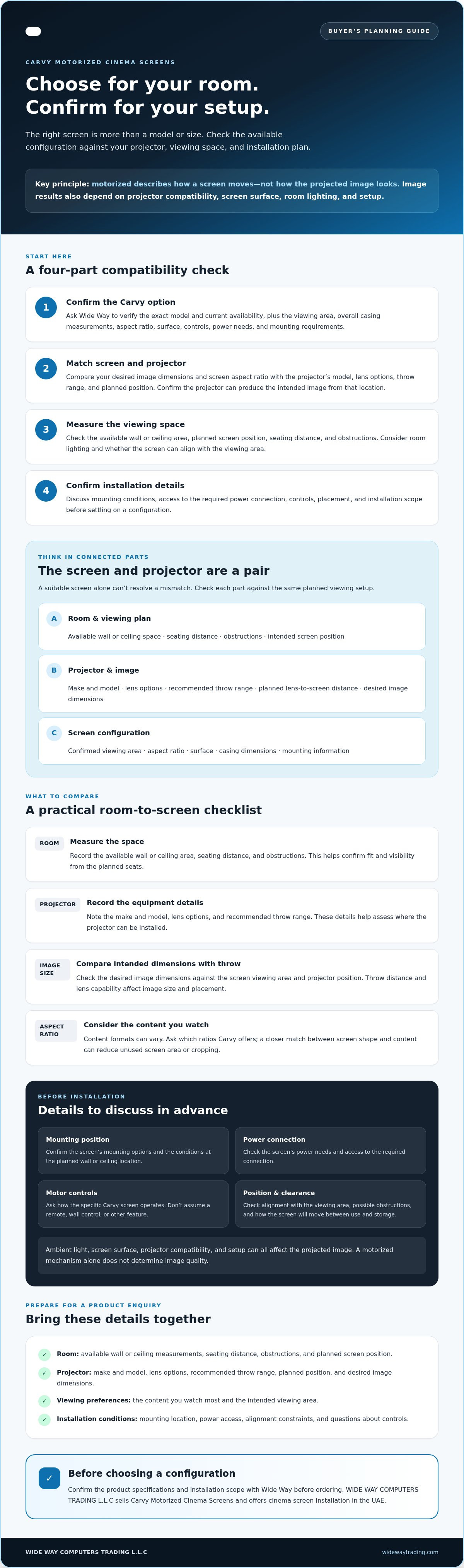
Motorized describes how a screen moves, not how the projected image looks. Image quality also depends on factors such as projector compatibility, screen surface, room lighting, and setup. For an overview of screen types and basic principles, see Projection screen.
What does motorized mean for a cinema screen?
In general, a motorized cinema screen uses powered movement to lower or raise its viewing surface, or to move it between use and storage positions. The mechanism and controls can vary, so don’t assume a specific remote, wall control, or other feature for Carvy. In a multipurpose room, storing a screen when it isn’t in use may help keep the viewing area clear.
Ask Wide Way to confirm the Carvy screen’s power connection, controls, mounting options, and installation requirements. These details affect where the screen can be placed and what needs to be prepared before installation.
Which details should buyers verify about Carvy?
Start by confirming the exact product model and current availability with Wide Way. Request the viewing area and overall casing measurements, along with the aspect ratio, screen surface, and mounting information. These details are specific to the product, so don’t infer them from the term “motorized screen.”
- Carvy-specific: Confirm the model, dimensions, aspect ratio, surface, casing, motor controls, power needs, and mounting requirements.
- Setup advice: Measure the intended wall or ceiling area and check whether the projector can produce the desired image size from its planned position.
Room layout matters because the screen must fit its mounting position and align with the viewing area. Projector compatibility matters because screen size and projector placement work together. A suitable screen alone can’t resolve a mismatch. Check for obstructions, suitable mounting conditions, and access to the required power connection before settling on a configuration.
WIDE WAY COMPUTERS TRADING L.L.C sells Carvy Motorized Cinema Screens and offers cinema screen installation in the UAE. Include your room measurements and projector details in a product enquiry so the discussion can focus on your setup. Confirm the product specifications and installation scope before ordering.
Check Carvy Screen and Projector Compatibility Before Choosing
A screen and projector need to be planned as a pair. The projector’s lens and position affect the image size it can produce, while the screen’s dimensions and aspect ratio define the viewing area. Compare them before choosing carvy motorized cinema screens. The table below offers a practical starting point. Confirm Carvy-specific dimensions and compatibility with Wide Way.
| What to compare | What to check | Why it matters |
|---|---|---|
| Room | Measure the available wall or ceiling area, seating distance, and any obstructions. | Confirms the screen can fit and be viewed from the planned seats. |
| Projector | Record the make and model, lens options, and recommended throw range. | These details help determine where the projector can be installed. |
| Screen size | Compare the desired image dimensions with the viewing area and projector position. | The projector must be able to produce the intended image at the planned distance. |
| Aspect ratio | Consider the content you watch most, then confirm which ratios Carvy offers. | A closer match between screen shape and content can reduce unused screen area or cropping. |
| Throw setup | Measure from the projector lens to the screen position and note alignment constraints. | Throw distance and lens capability affect image size and placement. |
Match screen dimensions and aspect ratio to the viewing plan
Start with the room rather than choosing a screen size in isolation. Measure the intended viewing area and the distance from the screen to the main seats. Consider whether you mostly watch television, play games, or watch films, since content formats can vary. Ask Wide Way to confirm Carvy’s available screen dimensions and aspect ratios before deciding whether an option fits.
Check projector placement, throw, and image alignment
Identify your projector model, lens options, intended throw distance, and desired image dimensions. Moving the projector can change the projected image size, so assess its position and the screen dimensions together. Account for ceiling height, furniture, and other obstacles that could affect the beam or screen position. An installer can assess alignment and clearance against the proposed layout, but don’t assume compatibility until the projector and screen specifications have been checked.
Once you’ve gathered your measurements and projector details, share them when making a Carvy screen compatibility enquiry. Wide Way can confirm available product details and discuss cinema screen installation, helping you clarify the setup before ordering.
Compare Room, Screen Surface, and Installation Requirements
The right screen choice depends on more than the screen itself. Room use, ambient light, mounting conditions, and projector setup all affect the result. Choose a screen for the complete room and projector setup, not as a standalone upgrade. Treat surface performance as a specification to confirm, not an assumed feature of Carvy.
Assess room use, ambient light, and viewing position
Think about how you use the room. A dedicated cinema room may have controlled lighting and a consistent viewing position. A living room may serve other purposes, so moving a screen out of view could be useful. Confirm the actual Carvy mechanism and configuration before relying on that flexibility.
Note windows, ceiling lights, lamps, seating positions, and anything that could block the projected image or screen movement. Light reaching the screen can affect perceived contrast, while the screen surface influences how projected light is reflected. Ask Wide Way to confirm the surface specified for the Carvy model you’re considering. Don’t assume it is matte white, grey, or ambient-light rejecting, or expect a particular image result without verified surface details and an assessment of the room.
Plan power, mounting position, and clearances
Identify the intended wall or ceiling mounting area and check its condition before installation. Confirm the screen’s full casing dimensions, not just the visible viewing area. Allow enough space for the screen to move without hitting lights, furniture, or other fittings.
Power and control arrangements also affect placement. Ask Wide Way to verify the Carvy model’s power connection, control requirements, mounting options, and installation scope. Settle these details before making electrical or mounting preparations.
- Dedicated room: Check how the planned screen position relates to seating, lighting, and fixed equipment.
- Multipurpose room: Consider whether a stored screen suits the space, then verify its actual movement and mounting requirements.
- Uncertain mounting conditions: Share room measurements and photos with Wide Way, and ask whether a site check is appropriate before finalising the installation plan.
These checks help distinguish general buying advice from confirmed Carvy specifications. Wide Way sells carvy motorized cinema screens and offers cinema screen installation in the UAE. Confirm the room conditions, screen surface, power needs, and mounting details with the company before deciding whether a particular setup is practical.
Use This Pre-Purchase Checklist for Carvy Motorized Cinema Screens
Preparing before you enquire helps you ask specific questions and identify installation considerations early. Use this checklist to organise the information you can provide and the Carvy specifications and service scope Wide Way needs to confirm.
Prepare your room and projector information
- Measure the intended screen area. Record the available wall or ceiling width and height. Include space around the planned position because the screen casing may need more room than the visible viewing area.
- Note seating and viewing distance. Measure from the proposed screen position to the main seating area and identify the usual viewing positions.
- List obstacles and room conditions. Note lights, windows, furniture, wall features, and anything that might interfere with the screen, projector beam, or installation position.
- Gather your projector details. Provide the make and model, lens or throw information if known, intended image dimensions, and preferred aspect ratio. These details help assess whether the screen and projector positions can work together.
- Prepare supporting information. Keep room photos or a simple plan available to share if Wide Way requests them. Make sure they show the proposed mounting area clearly.
Confirm product details and installation scope
- Verify the Carvy product. Ask Wide Way to confirm the exact model and current availability, along with the screen dimensions, aspect ratio, surface, casing, motor controls, and power requirements. Don’t rely on specifications that haven’t been confirmed for the product you’re considering.
- Check fit against your setup. Share your measurements and projector information, then confirm whether the proposed screen size and mounting position suit the room and equipment. Treat compatibility as unconfirmed until the relevant specifications have been checked.
- Clarify the installation scope. Before agreeing to the work, ask what the cinema screen installation service includes and whether the mounting conditions or power arrangements require preparation.
- Get the details in writing. Keep written confirmation of the selected product specifications, availability, compatibility information, and agreed installation scope before proceeding.
With these details ready, you can make a focused enquiry instead of choosing based on incomplete assumptions. Discuss cinema screen installation with Wide Way and share your room and projector information to clarify product and setup requirements.
Buy and Install Carvy Motorized Cinema Screens With Confidence
A confident decision brings together verified product specifications, projector fit, room conditions, and a clear understanding of the installation scope. Wide Way sells Carvy Motorized Cinema Screens and offers cinema screen installation in the UAE. Before ordering, confirm the current options and check that the selected setup suits your viewing plan. Don’t rely on assumed features or compatibility.
What to ask Wide Way before placing an order
Request the current Carvy model options and any product documentation available for the specific screen you’re considering. Use the conversation to resolve questions that could affect fit or installation, rather than relying on general descriptions of motorized screens.
- Which Carvy models are currently available, and what are their verified dimensions and aspect ratios?
- What screen surface is specified, and what information is available about the casing?
- Which controls and power connection does the selected model require?
- Which components are included, and are there compatibility details to confirm for your projector?
- What room measurements, projector information, or other details would help assess suitability?
Ask for clear confirmation of the product details that matter to your setup. If a specification or availability detail is uncertain, clarify it before placing an order.
Plan the handover from purchase to installation
Product selection and installation planning should align. Confirm with Wide Way what the cinema screen installation service includes, which site conditions need attention, and how scheduling will be handled. The agreed screen position should account for seating, projector placement, and how you use the room. If the final location changes, revisit the fit before installation proceeds.
Keep the confirmed model details and agreed installation scope together as a shared reference for the purchase and setup. This helps distinguish product specifications from installation arrangements and gives you a clear basis for resolving remaining questions.
Wide Way can help you move from product research to a more informed screen and installation enquiry. Share your projector and room details, then ask for current availability, verified specifications, and installation requirements for your setup.
Enquire about Carvy motorized cinema screens
Take the Next Step Toward a Screen That Fits
A good choice comes down to confirmed details: the screen’s specifications, its fit with your projector, and whether the room and mounting position suit the planned setup. Check current Carvy options and availability directly instead of relying on unverified features. Base your decision on the specific product and installation requirements, not assumptions about motorized screens in general.
Wide Way offers carvy motorized cinema screens and cinema screen installation in the UAE. Share your projector details and room measurements when you enquire, and ask the team to confirm product specifications and installation scope before you proceed.
Enquire about Carvy motorized cinema screens and take a clear next step toward a setup planned around your space.
Frequently Asked Questions
Is a Carvy motorized cinema screen suitable for every projector?
No. Don’t assume carvy motorized cinema screens will suit every projector without checking the specific setup. Compare your projector’s image size, throw distance, aspect ratio, and lens capabilities with the confirmed screen specifications. Share the projector’s make and model, along with room details, when asking Wide Way to assess compatibility. Rely on product-specific claims only when supported by current documentation.
Can a Carvy motorized cinema screen be installed in a room that is not a dedicated cinema?
It may suit a multipurpose room, but suitability depends on the space and the specific screen configuration. Check where the screen would mount, whether there’s clearance for its casing and movement, and how ambient light and seating affect the viewing plan. Confirm the model’s dimensions, power requirements, and installation needs with Wide Way. The projector’s position and alignment must also work with the proposed screen location.
How do I choose the right size for a Carvy motorized cinema screen?
Start by measuring the available wall or ceiling area and the distance from the screen to your seating. Then consider where the projector can be placed and what image size it can produce. Ask Wide Way to confirm the Carvy screen’s actual dimensions and aspect ratio. Don’t choose by diagonal measurement alone. Check that the full screen and casing fit without blocking doors, lights, or other equipment.
What should I check before ordering a Carvy motorized cinema screen?
Confirm the exact model and current availability, then ask for verified screen dimensions, aspect ratio, surface, casing, controls, and power requirements. Compare these details with your projector and room measurements. Also clarify what cinema screen installation includes and whether a site assessment is needed. Product information can vary, so use current details from Wide Way rather than treating general motorized-screen guidance as a specification for a particular Carvy screen.
Does Wide Way install Carvy motorized cinema screens?
Yes. Wide Way sells Carvy Motorized Cinema Screens and offers cinema screen installation. Contact the company to confirm installation availability for the specific screen and clarify the agreed service scope. Ask about mounting conditions, power access, scheduling, and any preparation required before installation. Share relevant room measurements and projector details so the requirements can be discussed for your setup. Confirm the arrangements directly rather than assuming every installation follows the same scope.
Do Carvy motorized cinema screens work well in bright rooms?
It depends on the room, projector, viewing conditions, and verified screen surface. Ambient light can affect how clearly a projected image appears, but the available Carvy information doesn’t confirm surface specifications or performance in bright rooms. Ask Wide Way which surface is available for the model you’re considering. Describe the room’s windows and lighting, and provide your projector details before choosing. Avoid assuming a specific result without checking these factors.


