

The brightest projector isn’t automatically the best choice for a bright living room. A 4K projector UAE buyers choose for a cinematic image also needs the right contrast, room conditions, and screen. Without that balance, even a premium model can look washed out when daylight or ceiling lights reach the screen.
It’s understandable to focus on lumens and resolution, but those specifications tell only part of the story. Sony, BenQ, and LG each bring different strengths. The best fit depends on whether you’re building a dedicated cinema or planning a setup for a shared living space. The screen matters just as much: ALR and CLR options can help manage ambient light, while a motorized screen can suit a clean, flexible installation.
This comparison explains how to assess brightness and contrast, weigh each brand for your room, and check smart features and compatibility before you buy. You’ll also learn which installation details, including placement and throw distance, affect performance. The goal is to help you plan a theater-like setup that suits your home and equipment.
Key Takeaways
- Learn what separates native 4K from 4K enhancement so you can compare resolution claims with confidence.
- See how Sony, BenQ, and LG differ, then narrow your shortlist based on your room and viewing habits.
- Assess brightness alongside contrast when choosing a 4K projector UAE setup for a bright living space or dedicated cinema.
- Match ALR or CLR screen technology to your projector and the direction of ambient light in your room.
- Check placement, throw distance, and ventilation before installation so the projector can perform as intended.
The Evolution of 4K Projection Technology in the UAE
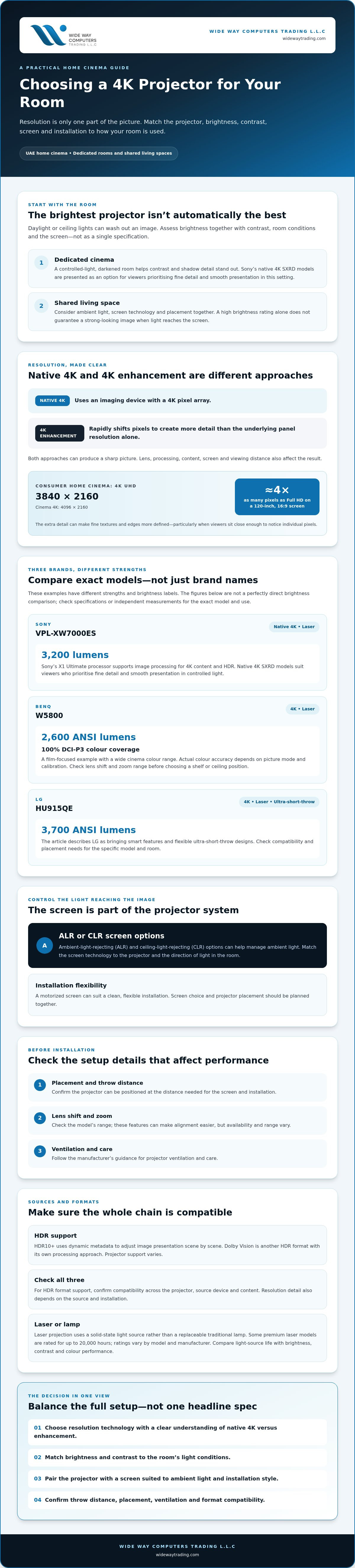
Choosing a 4K projector UAE homeowners can rely on means looking beyond the resolution label. In consumer home cinema, 4K UHD usually means 3840 × 2160 pixels, while cinema 4K is 4096 × 2160, as outlined in this reference to 4K resolution. A native 4K projector uses an imaging device with a 4K pixel array. Some models use 4K enhancement, shifting pixels rapidly to create more detail than the underlying panel resolution alone. Both approaches can produce a sharp picture, but they use different technology.
Image quality also depends on the lens, processing, content, screen, and viewing distance. HDR formats affect how brightness, shadow detail, and colour are presented. To benefit from a format, the projector, source device, and content must all support it.
Why 4K Resolution is Non-Negotiable
Large screens make resolution differences easier to see. On a 120-inch, 16:9 screen, a 4K image packs roughly four times as many pixels as Full HD across the same area. That extra detail can make fine textures and edges look more defined, particularly when viewers sit close enough to notice individual pixels.
For a home cinema, 4K can make a large image feel more immersive without sacrificing detail. It can also be a practical choice for a long-term setup as more viewing content is produced or delivered in 4K. A compatible projector can display that detail without relying on upscaling, although the final result still depends on the source and installation.
Laser vs. Lamp: The Professional Choice
Laser projection uses a solid-state light source rather than a replaceable traditional lamp. Some premium laser models are rated for up to 20,000 hours, but ratings vary by model and manufacturer. Check the specification for the projector you’re considering. A laser source can reduce lamp-replacement needs and often offers quick start-up and shut-down. Follow the manufacturer’s guidance for ventilation and care.
Colour performance depends on the projector’s light engine and processing, not just whether it uses a laser. Laser models can maintain consistent brightness over time, while lamp output gradually changes with use. For a dedicated cinema or shared living room, compare the stated light-source life alongside brightness, contrast, and colour performance instead of treating one figure as a complete measure of quality.
HDR10+ uses dynamic metadata to adjust image presentation scene by scene, while Dolby Vision is another HDR format with its own processing approach. Support varies by projector. Before making format support a deciding factor, check compatibility across the projector, content source, and playback material.
Comparing the Giants: Sony vs. BenQ vs. LG 4K Projectors
There’s no single winner for every home. Sony prioritises native 4K imaging and processing, BenQ offers strong colour performance in dedicated cinema models, and LG brings smart features and flexible ultra-short-throw designs. The right 4K projector UAE buyers choose depends on room lighting, placement, viewing habits, and the screen paired with it.
Compare exact models, not just brand reputations. For example, Sony’s VPL-XW7000ES is a native 4K laser projector rated at 3,200 lumens, while BenQ’s W5800 is a 4K laser model with 2,600 ANSI lumens and 100% DCI-P3 colour coverage. LG’s HU915QE is an ultra-short-throw 4K laser projector rated at 3,700 ANSI lumens. These figures use different brightness labels, so they aren’t a perfectly direct comparison. Contrast and input lag are also model-specific. Check manufacturer specifications or independent measurements for the exact projector and intended use. This explanation of native 4K and pixel-shifting technology can also clarify what a resolution claim means.
Sony 4K Projectors: Native Excellence
Sony’s native 4K SXRD models suit viewers who prioritise fine image detail and smooth presentation in a controlled-light cinema room. In the VPL-XW7000ES, Sony’s X1 Ultimate processor supports image processing for 4K content and HDR. SXRD is Sony’s imaging technology, while DLP uses a different imaging system. Compare real-world sharpness, contrast, and motion performance rather than assuming one technology guarantees a better picture. A darkened room helps contrast and shadow detail stand out.
BenQ 4K Projectors: The Cinephile’s Choice
BenQ’s W5800 is a practical example for film-focused buyers, with stated 100% DCI-P3 coverage for a wide cinema colour range. Actual colour accuracy depends on the selected picture mode and calibration. Before committing to a ceiling mount or shelf position, check the model’s lens shift and zoom range. These features can make alignment easier, but their availability and range vary. BenQ may suit viewers who value colour performance and a film-oriented image, especially in a room where lighting can be controlled.
LG 4K Projectors: Smart and Versatile
LG’s HU915QE combines 4K UHD projection, a three-channel laser light source, and webOS 6.0. Its ultra-short-throw design can produce a 120-inch image from a very short distance, making it worth considering when a conventional ceiling-mounted setup isn’t practical. Smart-platform features and gaming specifications vary by model. Check supported streaming services, connection options, and input-lag figures for the exact projector before choosing it for gaming or everyday viewing.
WIDE WAY COMPUTERS TRADING L.L.C supplies Sony, BenQ, and LG projectors in the UAE. Comparing Sony, BenQ, and LG projector options with your room layout and screen requirements can help narrow the shortlist to a setup that fits how you watch.
Overcoming Ambient Light in UAE Homes
Large windows and bright, open interiors can make a projector feel less cinematic during the day. Ambient light raises the apparent black level on screen, reducing perceived contrast and making colours look less rich. More brightness can help the projected image remain visible, but it can’t fully cancel direct sunlight. In a living room, consider room-darkening options and a screen suited to the direction of the light, as well as the projector itself.
ANSI lumens indicate a projector’s measured light output. For a non-dedicated room, 3,000+ ANSI lumens is a useful benchmark for creating a brighter image, not a guarantee of performance in every space. Screen size, material, window exposure, and how much light you can control all affect the result. A large image generally needs more light to maintain impact than a smaller one.
Brightness vs. Contrast: The Balancing Act
High brightness can help detail remain visible in a lit room, but maximum output isn’t always the best setting. It may make dark scenes look grey, especially when ambient light is already reaching the screen. A projector with strong contrast can preserve more separation between bright highlights and dark areas, but the room still limits perceived black depth.
Some models use a dynamic iris or laser dimming to adjust light output for darker scenes. These systems can improve perceived contrast in suitable viewing conditions, though their effectiveness and behaviour vary by model. Check performance in the image mode you expect to use instead of relying on a headline contrast ratio alone. If daytime viewing is essential, plan to control incoming light. Even a high-output projector can’t reliably compete with direct sun on the screen.
UAE Environmental Factors
Dust and heat are practical considerations for projector placement and care. A sealed optical engine can help limit dust entering the optical path, so check the model’s design and manufacturer guidance rather than assuming every projector has the same level of protection.
Cooling matters, too. Projectors need adequate ventilation, and fan noise can be noticeable in a quiet cinema room. Before installation, check the manufacturer’s ventilation clearances and noise specifications. Choose a position that allows airflow without placing the unit close to viewers. Keep vents clear and follow the recommended maintenance schedule.
For a 4K projector UAE setup in a bright shared room, assess the lighting at the times you’ll watch, not only how the room looks at night. This simple check helps you balance brightness, contrast, and light control before choosing a projector and screen combination.
The Screen Factor: ALR, CLR, and Floor-Rising Tech
A projector sends light to the screen, but a bright room sends light there too. A standard matte-white surface reflects both, so daylight or ceiling fixtures can lift dark areas and reduce perceived contrast. That doesn’t mean a white screen always fails. It means the room and viewing hours matter. For a 4K projector UAE setup used with windows or lights on, choose the screen material together with the projector.
ALR, or ambient light rejecting, screens are designed to reflect more of the projector’s image toward viewers while reducing the effect of ambient light from other directions. They can help preserve perceived contrast and colour in a lit room, but they can’t remove all ambient light or replace sensible light control. Match the screen’s design to the projector’s throw direction, seating position, and room lighting.
ALR and Fresnel Screen Technology
Fresnel surfaces use concentric optical ridges to direct light from a compatible ultra-short-throw projector toward the viewing area while reducing light arriving from other angles, particularly overhead. This makes Fresnel ALR a potential fit for UST setups beneath ceiling lights. Other ALR materials are designed for different projector positions, so confirm compatibility before selecting one. A suitable screen can support stronger perceived blacks and more saturated colour in ambient light. Matching the projector and screen also helps retain visible image detail.
Sony and BenQ projectors can both be paired with ALR surfaces, but the right material depends on the model’s throw geometry and the room. A screen intended for a UST projector may not suit a ceiling-mounted standard-throw unit.
CLR Screens for UST Rooms
Ceiling Light Rejecting screens target overhead illumination, a common challenge in shared living spaces. They’re often considered for ultra-short-throw projection, where the projector sits close to the screen and projects upward at a steep angle. Check the screen’s stated compatibility and installation requirements against the exact projector. For rooms with strong window light from the side, an ALR surface designed for that light path may be more appropriate.
Motorized and Floor-Rising Solutions
A motorized screen can disappear when it isn’t in use, keeping the room flexible. Carvy Motorized Cinema Screens offer a retractable screen option, while the QMJM Cabinet ALR Floor-Rising Screen 120″ rises from a cabinet-style base rather than requiring a permanent wall-mounted screen. Floor-rising designs can suit interiors where a clean look matters. Allow space for the screen and check the projector’s image height and alignment before installation.
Professional screen installation helps position the surface correctly in relation to the projector’s throw and seating layout. Explore ALR, CLR, and motorized screen options to compare screen approaches for your projector and room.
Expert 4K Projector Installation and Support in the UAE
Premium 4K optics need precise placement to deliver the image quality they’re designed for. A small alignment error can soften edges or distort the picture, while an incorrect throw distance can prevent the projector from filling the screen as intended. Professional installation helps account for the projector, screen, room layout, and viewing position as one system.
Ceiling mounting can keep equipment out of the way, but it requires careful measurement, secure mounting, and a plan for power and signal cables. Shelf placement may simplify access, yet it still needs the correct distance, height, and ventilation. Before installation, confirm the model’s throw range, lens shift, zoom, and clearance requirements. Calibration can then refine focus, geometry, and picture settings for the actual screen and room.
Professional AV Installation Services
Neat cable routing supports a clean finish and reduces visible wiring across walls or ceilings. Screen installation matters just as much: a motorized screen must be positioned and aligned so the image sits square, without unwanted distortion. For ceiling-mounted projectors or motorized screens, professional installation can reduce guesswork and help the equipment work together as planned.
Wideway Trading supplies Sony, BenQ, and LG projectors and projector screens, and provides installation across the UAE. Before booking, confirm what the work includes, such as mounting, cable routing, screen alignment, and picture setup. Check that the proposed position also meets the manufacturer’s requirements.
Building Your Complete Home Cinema
Match the projector to a screen suited to the room. ALR and CLR screens can help manage ambient light, while a motorized option keeps the screen out of sight when it isn’t in use. The right pairing depends on projector throw type, screen size, light direction, and where viewers sit.
Smart-home control needs a separate compatibility check. Confirm that the projector, source devices, and any existing lighting or control platform can communicate as intended. Features differ by model and system. Also review warranty terms, who handles support in the UAE, and how service requests are managed. Buying locally can make it easier to clarify those details before purchase, but coverage and support vary, so check the actual terms.
For a 4K projector UAE installation, planning the projector, screen, wiring, and controls together helps avoid placement compromises. Review Wideway Trading’s projector and ALR/CLR screen options as you plan your room.
Build a Home Cinema That Fits Your Room
The best 4K projector UAE setup isn’t chosen by brand or brightness alone. Sony, BenQ, and LG each offer distinct strengths, but the right match depends on your room, viewing habits, and screen. In bright living spaces, an ALR or CLR screen can matter as much as the projector. Careful placement and installation help bring the whole system together.
Wideway Trading supplies Sony, BenQ, and LG projectors, specializes in ALR/CLR screen technology, and provides professional AV installation nationwide. This makes it possible to consider the projector, screen, and installation as parts of one setup, alongside the support terms for the equipment.
Ready to plan your home cinema? Explore the Wideway 4K Projector Collection and compare projector and screen options for your room.
Frequently Asked Questions
Is a 4K projector better than a 98-inch TV for a UAE home?
It depends on your priorities and room. A projector can create a larger, cinema-style image, while a 98-inch TV is generally easier to use in a bright room because it produces its own light. For a 4K projector UAE setup, consider how much daylight you can control, your preferred screen size, viewing distance, and whether you’re comfortable planning for projector and screen installation.
Do I need a special screen for a 4K projector in a bright room?
A screen designed for your projector and lighting conditions can improve the viewing experience, though it can’t eliminate all ambient light. A standard white screen reflects both projected light and room light, which can reduce perceived contrast. An ALR screen is designed to reject some light from selected directions. For overhead lighting and compatible ultra-short-throw projectors, a CLR or Fresnel ALR screen may be appropriate.
What is the difference between Sony and BenQ 4K projectors?
The difference depends on the models being compared. Sony offers native 4K laser home cinema projectors, including models using SXRD imaging and Sony image processing. BenQ’s lineup includes laser models such as the W5800, specified with 100% DCI-P3 colour coverage. Compare the exact projector’s resolution method, brightness, contrast performance, colour specifications, lens adjustment, and supported HDR formats rather than assuming every model from one brand shares the same strengths.
Can I install a 4K projector myself or do I need professional help?
You can handle a simple placement setup yourself if you follow the manufacturer’s instructions and can achieve the correct throw distance, alignment, and ventilation. Ceiling mounts and motorized screens need more planning, including secure mounting, cable routing, and accurate screen alignment. Professional installation can help coordinate these elements and calibrate the picture for your room. Check what the installer includes before arranging the work.
How long do laser 4K projectors last in the UAE climate?
There isn’t one lifespan that applies to every laser projector or home in the UAE. Manufacturers specify light-source life by model and operating conditions. For example, the Sony VPL-XW7000ES laser light source is rated for up to 20,000 hours, while BenQ lists up to 25,000 hours for the W5800. These ratings aren’t guarantees of total projector life. Follow the manual’s ventilation, dust, and maintenance guidance.
What is an ALR screen and why is it recommended for UAE villas?
An Ambient Light Rejecting screen is designed to direct projector light toward viewers while reducing the effect of ambient light from other angles. This can help preserve perceived contrast and colour in rooms with windows or other light sources. The right surface depends on where the light comes from and how the projector is positioned. ALR screens don’t replace light control, and some types are designed for specific projector styles.
Which 4K projector brand is best for gaming in the UAE?
No brand is automatically best for every gaming setup. Compare individual models for input lag, supported refresh rates, resolution, and the connections required by your console or PC. Also consider whether the projector can be positioned at the required distance and whether the image remains clear at your preferred screen size. Manufacturer specifications vary by model, so verify gaming performance for the exact projector before buying.
Does Wideway Trading provide professional installation across the UAE?
Yes. Wideway Trading provides professional nationwide installation services for audiovisual setups, including projector screen installation. The company supplies Sony, BenQ, and LG projectors, along with ALR and CLR screens. Before arranging a project, confirm the installation scope for your chosen equipment, such as mounting, screen alignment, and cable routing. Check the product’s warranty and applicable after-sales support terms directly with the seller.


