

More cameras don’t automatically mean better coverage. For CCTV for villa UAE, start with the property’s layout and the areas you need to monitor, not a camera count chosen at random. Entrances, outdoor spaces and blind spots each call for a considered plan.
Reliability matters too. Outdoor exposure, Wi-Fi reach and what happens when power or connectivity is interrupted can all affect day-to-day performance. Wired, wireless and solar-powered cameras suit different situations, so the right fit depends on your home and priorities.
This guide compares practical CCTV approaches for UAE villas and explains what to consider when planning camera positions, recording and storage. It also looks at when a solar-powered option may suit a location with appropriate sunlight and mounting conditions, and how Eufy, EZVIZ and Imou cameras can fit into a wider security plan. From coverage priorities to installation, the aim is to help you make a clear, informed choice for your villa.
Key Takeaways
- Map entrances, driveway access and garden approaches before deciding how many cameras your villa needs.
- Compare wired, wireless and solar options by power, connectivity, recording and installation needs.
- Match fixed-view or pan-and-tilt cameras to the area and monitoring task, then weigh features against household priorities.
- Use a pre-installation checklist to account for sun exposure, heat, dust and outdoor mounting conditions.
- Plan CCTV for villa UAE around your coverage priorities, then consider Eufy, EZVIZ and Imou cameras alongside professional installation.
CCTV for a UAE villa: Start with the areas you need to protect
Start with the property, not the camera catalogue. For CCTV for villa UAE, identify the routes people could use to approach the home and the places where you need a clear view. This helps prevent duplicated coverage while leaving a gate, side passage or entrance out of sight.
A villa CCTV system connects cameras to a recording or viewing method. Depending on the setup, it may include network connections, a recorder or other storage, and a screen or mobile app for viewing footage. Closed-circuit television (CCTV) describes the broader technology. For a home plan, the practical questions are where each camera should point and how you’ll use its view.
Which villa areas should a CCTV plan cover first?
Walk the property as a resident or visitor would. Mark the main entrance, secondary doors, accessible ground-floor windows, driveway and pedestrian gate. Then consider perimeter access points and approaches to the garden or outdoor living areas. These are priorities to assess, not a checklist that automatically requires a camera at every point.
Choose views that serve a clear purpose, such as seeing who approaches an entrance or following movement along a side path. Outdoor seating may need coverage if it forms part of an access route, but monitoring should remain proportionate to your household’s needs. Keep cameras directed at your own property. Avoid framing a neighbour’s home or shared spaces, and don’t place cameras in areas where household members expect privacy.
How do villa size and layout affect camera coverage?
Floor area alone doesn’t determine camera count. A wall can block a view, a gate can create a narrow approach, and mature landscaping may obscure a path. A camera mounted too high or aimed across a wide space may show general movement without clearly covering the doorway or route that matters. Check sightlines from likely mounting positions, including how they change when gates open or vehicles are parked.
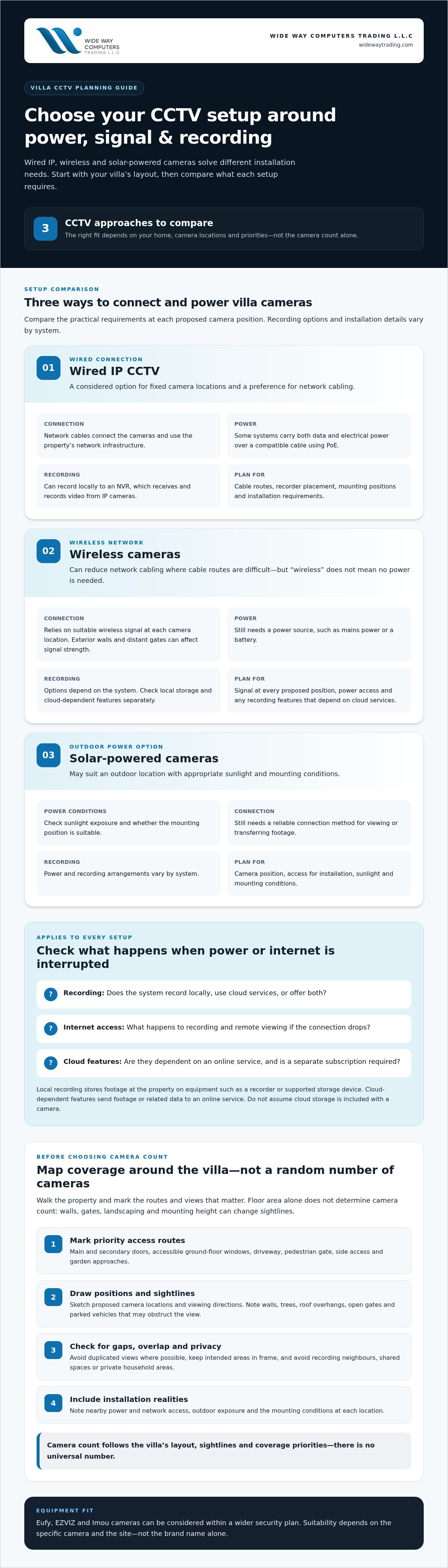
Draw a simple property sketch. Mark doors, windows, driveway and perimeter access, then add proposed camera locations and the direction each one faces. Use arrows to show sightlines and mark likely obstructions such as walls, trees or roof overhangs. Note practical connection points too, including nearby power and network access, so the plan accounts for installation as well as viewing goals.
- Mark priority routes: entrances, side access, driveway and garden approaches.
- Check overlap: identify where two camera views repeat the same area and where gaps remain.
- Review the frame: keep the intended property in view and exclude neighbouring or shared areas where possible.
This map gives you a reasoned starting point for selecting equipment and planning installation. The final camera count depends on the villa’s layout, sightlines and coverage priorities, not a universal number.
Wired, wireless or solar CCTV for a UAE villa: Compare the setups
The connection and power method shape how a CCTV system fits a villa. IP cameras transmit video over an internet protocol network, such as a home network, so compatible equipment can record or display footage. “Wireless” usually describes the camera’s network connection, not necessarily its power supply or recording method.
| Setup | Wiring and power | Connectivity | Recording and installation |
|---|---|---|---|
| Wired IP | Network cables connect cameras; some systems also carry power over the cable. | Uses the property’s network infrastructure. | Can record to a local recorder. Cable routes and mounting positions need planning. |
| Wireless | Fewer network cables, but cameras still need a power source, such as mains power or a battery. | Relies on a suitable wireless signal at each camera location. | Recording options depend on the system. Check local storage capability and any cloud-dependent features separately. |
| Solar-powered | Solar power may suit an outdoor position with suitable sunlight and mounting conditions. | Still needs a reliable connection method for viewing or transferring footage. | Power and recording arrangements vary by system; installation must account for the camera’s position and access. |
Local recording stores footage on equipment at the property, such as a recorder or supported storage device. Cloud-dependent features send footage or related data to an online service and may require a separate subscription. These are different storage approaches. Review how each system records, what happens if internet access drops, and whether remote viewing depends on connectivity. Don’t assume cloud storage is included with a camera.
When does wired IP CCTV make sense for a villa?
Wired IP CCTV can suit a home with planned, fixed camera positions and a preference for network cabling between cameras and recording equipment. An NVR, or network video recorder, receives and records video from IP cameras. PoE, or Power over Ethernet, carries both data and electrical power over a compatible network cable. Cable paths, equipment placement and installation requirements depend on the property.
When are wireless or solar-powered cameras a practical fit?
Wireless cameras can reduce the need for network cabling, which may help where cable routes are difficult. Signal strength still matters, especially across exterior walls or at distant gates. Solar power may fit a position with suitable sunlight and mounting conditions. Eufy, EZVIZ and Imou are brands to consider; suitability depends on the specific camera and site, not the brand name alone.
The eufyCam S3 Pro 4-Cam Kit Solar is one solar-powered option to consider. Its fit depends on the intended mounting locations and available sunlight. WIDE WAY COMPUTERS TRADING L.L.C pairs camera selection with professional security camera installation, aligning equipment choices with the villa’s coverage plan.
There’s no universal winner. For CCTV for villa UAE, compare cable routes, network reach, power access, recording preferences and camera positions. A wired system may suit fixed coverage; wireless or solar options may help at selected locations. A setup can also combine approaches, provided the components work together as a coherent plan.
Compare villa CCTV features by the job each camera must do
A camera feature is useful only if it supports a clear monitoring task. One position may need a steady view of a pedestrian entrance; another may need to cover a wider outdoor area. For CCTV for villa UAE, shortlist cameras by location and purpose, then compare their stated specifications. Avoid prioritising functions that don’t improve the view or recording you need.
Fixed-view or pan-and-tilt: which suits the location?
A fixed-view camera watches one direction, making it a straightforward choice for a defined view such as a doorway or driveway entrance. A pan-and-tilt camera can move its viewing direction, which may help when an area is wider than one fixed frame. Movement doesn’t mean every angle is covered at once. Consider what should remain visible continuously and whether someone will actively use the camera’s controls.
Which CCTV features matter most for outdoor villa coverage?
For exterior positions, check the specific camera’s weather-resistance rating and stated operating conditions rather than relying on a general “outdoor” label. UAE sun, heat and dust make mounting position and exposure important practical considerations. Review the likely view at different times of day too. Direct sunlight, glare, deep shadows and nearby lighting can affect what the camera captures, especially at night.
Night-visibility features should suit the approach being monitored. A path lit by exterior lights presents different conditions from a dark side entrance. Resolution matters, but it doesn’t guarantee useful identification: distance, angle, lighting and the size of a person or object in the frame all affect detail. For a product-specific example, see this Eufy camera kit review.
How should you compare storage, alerts and remote viewing?
Separate three functions: recording footage, receiving motion alerts and viewing a live or recorded feed remotely. Recording may use local storage or depend on an online service, depending on the system. Check the specific product’s supported storage options and whether remote access requires a working internet connection. Don’t assume an app or camera purchase includes a cloud-storage subscription.
Alerts need practical consideration too. A camera aimed at a busy driveway may generate frequent notifications, while a view of a less active entrance may need fewer. Look for settings that let you adjust alert areas or sensitivity where the specific model supports them. This EZVIZ camera features and setup guide offers brand-specific context; check individual capabilities against the camera’s product information.
- Essential: a suitable view, reliable power and connectivity, and a recording method that fits your needs.
- Optional: movement controls, advanced detection or extra app features, when they solve a defined household need.
Choose for the job first. That keeps the system purposeful, easier to assess and less likely to be driven by features you won’t use.
Plan CCTV for a UAE villa with this pre-installation checklist
A reliable plan connects each camera to a clear coverage purpose, a suitable mounting point and a workable route for power and data. Before selecting equipment, walk the property and record the practical conditions. Use this checklist to turn that assessment into decisions for CCTV for villa UAE.
- Map the views. Mark entrances, access paths and other priority areas on a simple floor plan or property sketch. Add proposed camera positions, sightlines and likely obstructions such as walls, landscaping and gates. Give each camera a defined job rather than adding overlapping views without a clear benefit.
- Check mounting and exposure. Note whether each position is sheltered or exposed to direct sun, heat and dust. Check the specific camera’s stated environmental and operating specifications before choosing an outdoor location. A mounting point should provide the intended view while allowing secure installation and access for maintenance.
- Trace power and network access. Identify nearby power sources, network reach and practical cable routes. A distant gate may have different installation needs from a camera near the house. Walls and other obstructions can affect wireless connectivity, while a wired setup needs a feasible cable route. Account for these constraints before finalising camera positions.
- Choose the recording and access approach. Decide how footage should be recorded and who in the household needs app access. Consider how many people need notifications, which events should trigger them and whether everyone understands how to view footage. Keep access limited to appropriate household users.
- Review privacy and approvals. Check current UAE requirements relevant to CCTV privacy, recording and approvals before installation. Plan camera views to focus on your own property and avoid unnecessary capture of neighbouring or shared spaces. Requirements can depend on the location and circumstances, so verify the rules that apply to your property.
- Confirm the installation plan. Match camera type and mounting position to the coverage map, then review the intended connections and recording arrangement. This can reveal practical issues before equipment is fixed in place.
How does professional installation support a reliable setup?
Professional CCTV installation connects equipment choices with the villa’s actual conditions. It can include mounting cameras at planned positions, routing and connecting equipment, configuring recording and access settings, then testing views, connections and basic functions. A final review helps confirm that the intended areas appear in the frame and household users can access the system as planned.
For broader context on how cameras fit into a home security plan, see this UAE home security systems guide. WIDE WAY COMPUTERS TRADING L.L.C provides professional CCTV installation planned around your villa’s coverage and connection requirements.
Choose a villa CCTV solution with Wide Way Trading
A useful shortlist brings together three decisions: which areas need coverage, what camera type suits each position, and how the equipment can be powered and connected. For CCTV for villa UAE, those choices depend on the property’s layout and household priorities. A camera that suits a sheltered entrance may not be the right choice for a distant, exposed boundary.
Match the solution to the property and household
For perimeter coverage, focus on sightlines and camera positions first, then compare devices by their stated capabilities. Flexible placements may suit wireless cameras, but power access and network reach still matter. For a sun-exposed mounting point with suitable conditions, a solar-powered option may be worth considering. WIDE WAY COMPUTERS TRADING L.L.C’s security camera portfolio includes Eufy, EZVIZ and Imou, as well as the eufyCam S3 Pro 4-Cam Kit Solar.
Use the property plan to compare the shortlist against actual installation needs. For each proposed camera, note the area it should cover, whether its view is fixed or adjustable, how it will receive power, and how it will connect to recording or remote viewing. Review the specific product details rather than assuming every camera from a brand offers the same features.
A practical shortlist can group cameras by role:
- Defined entrance or access route: prioritise a suitable, steady view of the approach.
- Wider outdoor area: consider whether a movable view is useful, while accounting for what may not be visible at the same time.
- Position with limited cable access: compare wireless options alongside signal reach and power requirements.
- Suitable sun-exposed position: assess whether a solar-powered camera fits the mounting conditions and intended use.
This approach keeps features tied to the job. It also makes it easier to spot coverage gaps, unnecessary overlap or a camera location that may be difficult to connect.
Move from shortlist to an installed system
Camera selection and installation work best as one plan. WIDE WAY COMPUTERS TRADING L.L.C supplies security cameras and provides professional CCTV installation, connecting equipment choices with mounting positions, power and network access, and intended coverage. A property layout marked with priority areas, possible camera positions and known connection points gives installation planning a useful starting point.
Before planning the installation, gather the sketch, your priority-area list and any preferences for recording and household app access. This helps turn a product shortlist into a coherent system rather than a collection of cameras chosen in isolation. The setup can then be planned around the villa’s specific conditions.
Review CCTV cameras and installation with WIDE WAY COMPUTERS TRADING L.L.C to explore security camera options and professional installation for your villa.
Turn your villa security plan into a practical next step
A useful CCTV plan should fit the way your household uses the property today, while allowing for changes to access routes or outdoor spaces. Before choosing a setup, write down the views that matter most and the compromises you’re comfortable with, such as a fixed camera view versus more flexibility in placement. That brief keeps decisions focused and helps define a system suited to your home.
For CCTV for villa UAE, the goal isn’t to add complexity. It’s to create a considered setup that feels clear to use and appropriate for your property. Wide Way Trading brings security camera selection and professional installation together, with Eufy, EZVIZ and Imou in its security portfolio.
When you’re ready, explore CCTV cameras and professional installation with Wide Way Trading to plan a setup around your villa’s coverage needs.
Frequently Asked Questions
Is CCTV allowed at a private villa in the UAE?
Yes, CCTV can be used at a private villa, but footage should be handled with privacy in mind. A person’s image is personal data under the UAE Personal Data Protection Law, so capturing and processing footage requires a lawful basis. Standalone villas aren’t generally required to have CCTV. Requirements can vary by location and circumstances, so check current rules that apply to your property before installation.
Can villa CCTV record areas outside the property boundary?
Camera views should be aimed at your own property and avoid unnecessarily capturing a neighbour’s home or shared areas. For example, adjust a driveway camera so it focuses on your entrance rather than a neighbouring doorway. If a view includes a shared access route, review applicable privacy and recording requirements before use. Some cameras offer privacy masking, but availability differs, so don’t rely on that feature without checking the specific device.
Does villa CCTV work if the internet connection goes down?
It can, if the system records locally and the camera and recording equipment still have power. Internet loss may interrupt remote viewing, app notifications or features that rely on an online service. A cloud-dependent recording setup may also be affected. Before choosing a system, identify which functions should continue offline, then check the product’s recording method and test what happens during a brief internet outage.
How can CCTV reduce false alerts at a villa?
Use motion zones or sensitivity controls where the camera supports them, and exclude areas with routine movement, such as a busy road or swaying branches. A camera facing headlights or reflective surfaces may also generate distracting alerts. Start with settings that capture the important approach, then review notifications during normal household activity and adjust them. Detection options differ by model, so confirm the available controls for each camera.
Can solar-powered CCTV cameras work in UAE outdoor conditions?
They can suit an outdoor position with adequate sunlight and a suitable mounting point, but performance depends on the specific camera and site. Check the device’s stated operating conditions and environmental specifications, and consider whether nearby walls, roof edges or landscaping will create shade. Dust and heat are also practical factors for outdoor placement. Don’t assume every solar-powered camera is suitable for every exposed location.
Do I need an NVR for CCTV at a villa?
No, an NVR isn’t required for every villa system. It’s a network video recorder that receives and stores video from compatible IP cameras, often providing a central local recording point. Other cameras may support different recording methods. Choose based on system compatibility, how much footage you want to retain and whether you prefer central recording. Check the specific camera and recorder requirements before combining equipment.
How do I choose the right number of CCTV cameras for a villa?
There’s no fixed camera count that suits every home. For CCTV for villa UAE, base the estimate on the views needed, the villa’s layout and what each camera can clearly capture from its mounting position. A wide view may cover a large area but show less detail at a distant entrance. Mark blind spots on a property plan, then refine the count around actual coverage needs.


