

What if the best screen for your home cinema is one that disappears when the film ends? A floor rising projector screen UAE homeowners consider can keep a room flexible, but choosing one takes more than finding a clear patch of floor. Projector position, screen material, viewing distance and space for the housing all affect whether the setup will work.
Weigh that convenience against a fixed screen, especially if you’re unsure whether ALR, CLR or standard material suits your projector and room. The right choice should fit your equipment and how you use the space, not just look suitable on a product page.
This guide explains how motorised floor-rising screens operate and how they compare with fixed and ceiling-mounted options. You’ll learn how room lighting and projector type inform material choice, what to measure before settling on a screen size, and how to plan the screen’s position around furniture and viewing habits. Use the steps to assess your room and plan installation before choosing a model.
Key Takeaways
- A floor-rising screen can keep a room adaptable, but it still needs a clear area to deploy.
- Match standard white, ALR or CLR material to your projector and room lighting. Light-rejecting surfaces don’t eliminate every effect of ambient light.
- For a floor rising projector screen UAE setup, assess projector geometry and room measurements before choosing a screen size.
- Plan in order: measure the room, confirm projector geometry, decide placement, then coordinate installation.
- The QMJM Cabinet ALR Floor-Rising Screen 120″ is one option to compare with your projector and room layout.
How a Floor-Rising Projector Screen Works in a UAE Home Cinema
A floor-rising projector screen is a motorised screen that lifts from a housing positioned at floor level for viewing, then retracts into the housing after use. The wall and room can return to their usual arrangement between sessions. This is a practical alternative when you don’t want a permanent screen on display, but the housing needs a suitable location and the screen needs clear space to rise.
Like any projection screen, it provides a surface for the projector’s image. The difference is how the surface is stored and brought into position. A fixed-frame screen stays on the wall. A ceiling-mounted screen is installed overhead, while a drop-down screen descends from an upper housing. Choose between these formats by considering your room layout, viewing habits and installation plan.
What happens when a motorised floor-rising screen opens and closes?
The floor-level housing holds the screen when it’s not in use. When operated, the motor raises the surface to its viewing position; retracting it returns the screen to the housing. Control methods and operating details vary by model. Plan a stable position for the housing and keep the screen’s full travel path clear of furniture, décor and walkways.
Why consider a floor-rising format in a UAE home?
In a living room or multipurpose space, a permanent screen may compete with everyday furniture, décor or other uses of the wall. Retracting the screen can leave the room visually clearer between viewing sessions. That convenience is only useful if the screen can rise into the right position without blocking the room or compromising the projected image.
For example, a room used for both family viewing and entertaining may benefit from a screen that isn’t always on display. But “retractable” doesn’t mean “out of the way” during use. The housing takes up floor space, and the screen needs an unobstructed area as it rises. Assess the screen as part of the room plan, including where people sit and move, rather than choosing it in isolation.
For a wider view of equipment placement and room planning, see this home cinema setup guide. It can help you plan the screen alongside the rest of the cinema layout.
Compare Floor-Rising Screen Materials and Projector Compatibility
Screen material affects how the projected image appears in your room. Standard white, ambient light rejecting (ALR) and ceiling light rejecting (CLR) surfaces suit different conditions. They aren’t interchangeable, and no surface removes every effect of room light. Start by identifying the light sources in the room, then match the material to the projector’s position and image geometry.
| Surface | Room conditions | Projector type | Key selection question |
|---|---|---|---|
| Standard white | Typically suited to rooms where light can be controlled during viewing. | Assess against the projector’s throw and intended image position. | Can you manage room light when watching? |
| ALR | Designed to reject some ambient light, though other light can still affect the image. | Compatibility depends on the specific surface and projector geometry. | What light sources are present, and where? |
| CLR | Designed to reduce the effect of light coming from above. | Requires suitable projection geometry; check the exact screen design. | Does the projector’s image reach the screen at the intended angle? |
When does an ALR or CLR surface make sense?
ALR may suit a viewing space where some ambient light is difficult to control. It can help manage that light, but it doesn’t guarantee an unaffected image. CLR is designed to reject ceiling light, so its directional design must suit the angle at which the projector sends the image to the screen. For a closer explanation of surface types, read the ALR screen technology guide.
How should the screen match the projector?
Start with the projector type, throw distance, intended image size and screen position. Standard-throw projectors sit farther from the screen than ultra-short-throw (UST) models, which project from close to it. This changes the angle at which the image reaches the surface. A UST projector therefore needs a screen designed for its projection geometry. An ALR or CLR label alone doesn’t establish compatibility.
Compare the projector’s placement requirements with the screen’s intended use and your room layout. Check the projector and screen specifications together rather than assuming a material suits every model. For context on choosing projection equipment, see this UAE 4K projector comparison. Matching these details helps you choose a floor rising projector screen UAE setup that fits both the equipment and the room.
Once you’ve narrowed down the projector type and surface, explore projector-screen options as part of planning your setup.
Is a Floor-Rising Projector Screen Right for Your Room?
A floor-rising screen can suit a room where a permanent display would get in the way, but retracting it doesn’t remove every planning challenge. The housing needs a practical position, the screen needs room to rise, and the projector must produce an image that fits the screen. The final picture also depends on the projector, screen surface, room conditions and setup working together.
What room conditions support a floor-rising screen?
Start by measuring the space the screen will occupy both when stored and when deployed. Check that the housing can sit securely where the projected image needs to appear, and that furniture, walkways and décor won’t block the screen’s path. Then consider the distance from the seating position to the screen, along with the projector’s position and intended image size.
Light conditions matter too. Note where windows and artificial lights are in relation to the screen, and when the room is usually used for viewing. A room used mostly in the evening may present different conditions from one used during the day. The right material depends on the actual light sources, projector position and screen design.
What are the main trade-offs compared with fixed screens?
The choice comes down to a clear room when the screen is retracted versus a display that’s ready whenever you want to watch.
- Floor-rising: The screen can be concealed between viewing sessions, which may suit a living room used for several purposes. The trade-offs are floor space for the housing, a clear deployment area and a motorised mechanism with moving parts that needs sensible placement and use.
- Fixed: The screen stays in position and is ready for viewing without deployment. That can work well in a dedicated cinema room, but the screen remains part of the room’s appearance when it’s not in use.
Occasional cinema use in a multipurpose room may make concealment especially useful. A dedicated cinema room may benefit more from an always-ready screen, depending on its layout and design. Neither format guarantees a better picture by itself. The projector and screen still need suitable placement and room conditions.
For a floor rising projector screen UAE setup, focus on how you use the room. Identify the housing position, mark the clear area needed for deployment, and consider when you watch before deciding whether concealment is worth the space and planning involved.
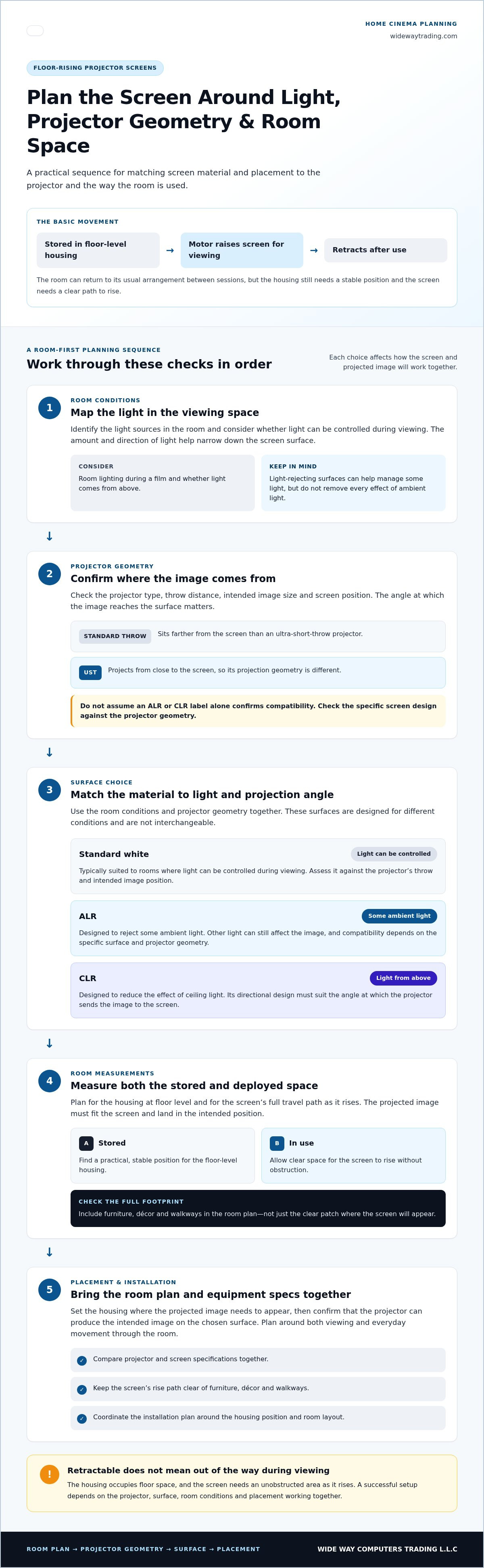
Plan Screen Size, Placement, and Installation Before You Buy
A screen can suit the room on paper and still be awkward once the projector and furniture are in place. Plan the viewing position, screen housing and projector as one setup before choosing a model. Use this sequence to organise the decision:
- Measure the room. Record the available width, viewing distance, intended floor position and clearance around the housing. Include the screen’s deployment area, not just the space it occupies when retracted.
- Confirm projector geometry. Note the projector type, planned position and throw distance, plus the intended image size. Check that these align with the selected screen’s specifications.
- Plan placement. Map where the housing will sit, the screen’s travel path and the viewing position. Make sure furniture and walkways won’t obstruct normal operation.
- Coordinate installation. Review screen placement alongside projector alignment and the wider room setup before arranging installation.
Which measurements should you take first?
Measure the usable width of the intended screen area and the distance from the likely seating position. Mark where the housing could sit, then note nearby furniture, circulation paths and the clearance needed as the screen rises. Record your preferred image size and projector position as well. Use the selected model’s dimensions and specifications to confirm the fit. A diagonal screen size alone won’t tell you whether the housing and deployed screen will fit your room.
What should installation planning cover?
Plan the whole viewing arrangement: where the housing will sit, whether the screen can travel unobstructed, how the projector will align with the image, and whether the equipment remains accessible for normal use. Confirm the selected screen’s dimensions and requirements before finalising its position.
For broader room-planning context, connect these decisions with the home cinema setup guide. A floor rising projector screen UAE installation works best as part of a coordinated projection setup, rather than as a standalone screen placement decision.
WIDE WAY offers projector-screen installation as part of its audiovisual solutions. Once you’ve assessed the room and shortlisted a suitable screen, plan your projector-screen installation around the full setup.
Explore Floor-Rising Projector Screens and Choose Your Next Step
A useful shortlist brings four decisions together: the projector, the screen surface, the room measurements and the installation plan. Compare them as one setup rather than choosing a screen on appearance alone. This makes it easier to catch mismatches between the equipment and room before deciding how the cinema space should come together.
What to compare when shortlisting a floor-rising screen
- Screen format: Decide whether a floor-rising design suits the room better than a fixed or ceiling-mounted option.
- Surface category: Consider standard white, ALR or CLR according to the room’s lighting and the projector geometry.
- Projector fit: Match the screen to the intended projector type, throw distance, image size and position.
- Model dimensions: Compare the selected model’s specifications with your measurements, including the housing location and clear deployment area.
Room use matters as much as equipment. A retractable screen may suit a multipurpose living area, while an always-ready display may be preferable in a dedicated cinema room. Choose a shortlist that reflects how often you watch, how the room is arranged and how much space is available when the screen is in use.
How WIDE WAY can help complete the setup
The QMJM Cabinet ALR Floor-Rising Screen 120″ is an option to consider if you’re looking for a cabinet-style floor-rising screen. Compare its listed size and product specifications with your room measurements and projector. The ALR surface category alone doesn’t establish compatibility.
WIDE WAY supplies projection equipment and provides projector-screen installation as part of its audiovisual solutions. Bring screen selection, projector choice and room planning together, from the intended image position to how the screen will be used. Installation connects the selected screen with its planned position in the room.
For a floor rising projector screen UAE setup, use your measurements and projector details to guide the final comparison. Explore WIDE WAY’s projection solutions to plan your home cinema setup.
Make Your Screen Choice Work for the Whole Room
A floor-rising screen is a room-planning choice as much as an equipment decision. Before selecting one, match the screen surface to your projector and lighting, measure the intended viewing area, and make sure the screen has room to deploy. Retracting the screen can keep a multipurpose room flexible, but careful placement still matters.
For a floor rising projector screen UAE setup, consider the projector, screen and installation plan together. WIDE WAY supplies projection and audiovisual products across the UAE, including the QMJM Cabinet ALR Floor-Rising Screen 120″, and provides projector-screen installation to bring the planned setup into the room.
Use your measurements and projector details to guide the next step. Explore WIDE WAY’s projection solutions and plan a home cinema that fits your viewing habits and the way you use your space.
Frequently Asked Questions
Is a floor-rising projector screen suitable for a living room?
Yes, a floor-rising screen can suit a living room when a permanent screen would interfere with everyday use. It retracts into its housing between viewing sessions, helping keep the viewing area clear. Suitability depends on available floor space, viewing distance, projector geometry and room lighting. Check that the screen can rise without obstruction and that its position aligns with the projector before choosing this format.
Can a floor-rising screen work with an ultra-short-throw projector?
Yes, if the screen design and projector geometry are compatible. An ultra-short-throw (UST) projector sends an image from close to the screen at a steep angle, so the surface and projection geometry need to work together. Compare the specifications for both models before deciding. Don’t assume every floor-rising screen is designed for every UST projector, even if the screen’s material category sounds suitable.
What is the difference between ALR and CLR projector screens?
ALR describes ambient-light-rejecting screen surfaces, while CLR refers to surfaces designed to reject ceiling light. They address different light conditions and aren’t interchangeable guarantees of a bright image. The better fit depends on the projector type, screen position, room lighting and specific surface design. Consider where light enters the room and match the screen’s intended projection geometry to your equipment.
Does a floor-rising projector screen need installation?
A floor-rising screen needs suitable positioning and setup so it can rise without obstruction and align with the projected image. Planning should account for the housing, projector position, viewing area and access for normal use. The work depends on the screen and room. WIDE WAY offers projector-screen installation to coordinate screen placement with the wider home cinema setup.
Is a floor-rising screen better than a fixed projector screen?
Neither format is best for every room. A floor-rising screen can be practical when concealment and flexible room use matter. A fixed screen stays in position and is ready for viewing without being deployed. Compare how the room is used, available space, desired concealment, projector geometry and screen surface. Choose the format that fits your layout and viewing habits rather than assuming one will always perform better.
How do I choose the right size floor-rising projector screen?
Start with the room’s viewing distance, available width, intended image size and projector position. Compare those measurements with the selected screen’s exact dimensions and compatibility details. Include furniture, the housing location and the screen’s rising path in your assessment. A diagonal measurement alone doesn’t show whether a screen will fit the room or work with the projector. Plan the screen, room and equipment together for a floor rising projector screen UAE setup.
Can a floor-rising projector screen improve viewing in a bright room?
An ALR or CLR surface may help manage some ambient light, depending on its design and the room conditions. It won’t remove every effect of light or replace a suitable projector and careful setup. Consider the room’s light sources, viewing times, projector type and screen position before choosing a surface. Match the material’s intended projection geometry to your equipment.


