

The best EZVIZ camera isn’t necessarily the one with the highest resolution. The right choice depends on the area you need to cover, the power and network connection available at that location, and how you want footage recorded. If you’re comparing indoor, outdoor, wire-free, 4G, or PoE cameras, these practical differences matter more than a long list of features.
Before choosing, consider Wi-Fi coverage where the camera will be mounted, your preference for local or cloud recording, and any ongoing cost associated with cloud storage. This guide compares common EZVIZ camera types and features, then explains how to plan setup and recording options for your home or business.
You’ll also find guidance on matching camera placement and connectivity to your space, and on deciding between a standalone camera and a professionally installed system. WIDE WAY COMPUTERS TRADING L.L.C sells EZVIZ smart home cameras and provides security camera and CCTV installation across the UAE.
Key Takeaways
- Choose a camera based on its location, available power, and the connection it needs.
- Compare viewing area and recording preferences before weighing convenience features.
- Understand the trade-offs between Wi-Fi, 4G, PoE, and battery-powered cameras.
- Follow the exact model’s setup instructions, then test its connection, view, and recording settings.
- Decide whether a standalone camera meets your needs or whether professional security camera and CCTV installation is a better fit.
What Is EZVIZ, and What Types of Smart Cameras Does It Make?
EZVIZ is a smart-home security brand with connected cameras for monitoring indoor and outdoor spaces. Models differ in where they’re intended to operate, how they receive power, how they connect to a network, and how they record footage. Start by matching those requirements to the installation location rather than choosing by feature count alone.
EZVIZ is part of Hikvision, a video surveillance company. The Hikvision Wikipedia page offers background on its parent company. EZVIZ also presents cameras within a broader smart-home ecosystem, though this guide focuses on camera choices and security use.
What kinds of EZVIZ cameras are available?
Indoor cameras are intended for rooms inside a home or business, while outdoor cameras are designed for areas such as entrances and exterior spaces. Battery-powered cameras can offer more flexibility where running a power cable is difficult, but runtime depends on the specific model and how it is used. Check the model’s specifications instead of assuming a battery will last for a particular period.
Connectivity is another important distinction:
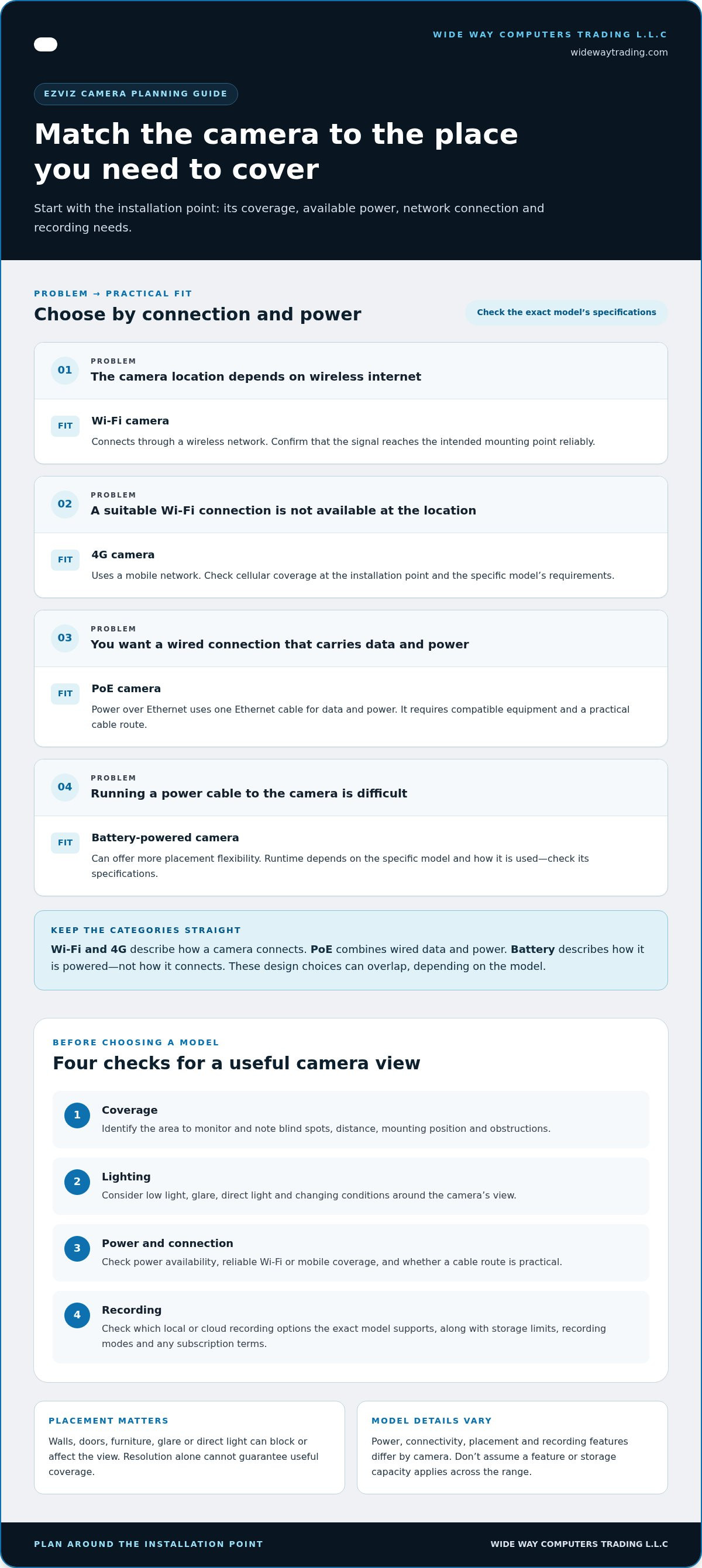
- Wi-Fi: Connects through a wireless network. The signal needs to reach the camera’s installation point reliably.
- 4G: Uses a mobile network, which can suit locations without a suitable Wi-Fi connection. It depends on cellular coverage and the model’s requirements.
- PoE: Uses an Ethernet cable to carry both data and power. This creates a wired connection and requires compatible equipment and a practical cable route.
These categories describe different design choices, and not every camera has every feature. Power, connectivity, placement, and recording options vary by model, so check the specifications for the camera you’re considering. Some models support local memory-card recording, while cloud recording may also be available depending on the model and service terms.
Is EZVIZ only a camera brand?
No. EZVIZ presents cameras alongside a wider smart-home ecosystem. For a security decision, focus first on the camera: identify the space to monitor, the available power and network connection, and how you want footage stored. These requirements also help you decide whether a standalone camera will do or whether you need a coordinated installation.
For a wider view of how cameras fit into a complete setup, read this home security systems guide for UAE homes. It can help you decide whether one camera meets the need or whether several areas call for a more coordinated security installation.
Which EZVIZ Camera Features Matter for Your Home or Business?
Start with the area you need to monitor, not the longest feature list. Resolution matters, but it cannot guarantee useful coverage on its own. Viewing angle, distance from the activity, mounting height, obstructions, and lighting all affect the image. Even a high-resolution camera may miss a doorway if it is pointed in the wrong direction.
How should you match camera type to the space?
Choose a camera intended for the location: indoor models are for interior rooms, while outdoor models are designed for exterior coverage. First identify the area to watch and possible mounting positions. Check whether walls, doors, furniture, glare, or direct light could block or affect the view. The suitable model depends on the space and how you plan to use it.
Next, check the practical requirements. Is power available near the mounting point? Can Wi-Fi reach it reliably? Would a wired or mobile connection suit the location better? Decide whether local or cloud recording fits your preference, too. Treat these as essential checks; features such as additional detection or camera controls are useful when they address a real need and the specific model supports them.
What should you know about connectivity and recording?
Wi-Fi cameras rely on a stable wireless connection at the installation point. 4G cameras use a mobile network, so cellular coverage matters. PoE cameras use an Ethernet cable for data and power, requiring suitable cabling and equipment. Each option has different installation requirements, so check how the exact camera connects before settling on its position.
Recording options vary by model. Some cameras support local storage, while cloud recording may involve a subscription. Before choosing, verify the camera’s storage limits, recording modes, app functions, and any current subscription terms for your region. Don’t assume a feature or storage capacity available on one model applies to the whole range.
Use this checklist to compare EZVIZ camera options:
- Coverage: Which area needs to be visible? Note potential blind spots and obstructions.
- Lighting: Will the camera face low light, glare, or changing conditions?
- Power and connection: Is power available? Is there reliable Wi-Fi or mobile coverage, or a practical cable route?
- Recording: Which local or cloud options does the exact model support, and what limits or terms apply?
Once you’ve narrowed down these requirements, browse EZVIZ camera options or consider how security camera installation can support coverage across multiple areas.
EZVIZ Camera Types Compared: Wi-Fi, 4G, PoE, and Battery
Choose the connection and power arrangement that suits the installation point. Wi-Fi and 4G describe how a camera connects. PoE combines a wired network connection with power over an Ethernet cable. Battery describes how a camera is powered, not how it connects. These categories can overlap, depending on the model.
| Category | Typical fit | Key dependency | Main trade-off |
|---|---|---|---|
| Wi-Fi | Locations with suitable wireless coverage | Reliable Wi-Fi at the camera’s installed position | Connection quality can vary by location and obstacles |
| 4G | Sites where a suitable Wi-Fi connection isn’t available | Cellular coverage and model-specific mobile connectivity | Depends on the mobile network and any model-specific service requirements |
| PoE | Installations where a wired network connection is practical | Ethernet cabling and compatible equipment | Requires cable routing and planning at the installation point |
| Battery-powered | Locations where flexible placement is useful | Charging access, battery requirements, and a supported network connection | Runtime and charging needs vary by model and use |
When is Wi-Fi, 4G, or PoE the more suitable approach?
Wi-Fi can suit a location with reliable wireless coverage where the camera will be mounted. A strong signal elsewhere in the building doesn’t guarantee it will reach that position, so assess coverage at the installation point. 4G may suit a site that relies on cellular connectivity, but only a camera designed for 4G can use it. PoE carries network data and power through an Ethernet cable, so account for the cable route and compatible equipment.
How do battery and wired power affect camera planning?
A battery-powered camera can offer more placement flexibility where running power cabling is difficult, but you’ll need to consider charging and runtime. Wired cameras need a suitable power source or, for PoE, compatible cabling and equipment. Neither approach is universally better or maintenance-free. For any EZVIZ model, verify its charging method, expected runtime, power needs, and supported connectivity before choosing.
Plan power and connectivity together, but treat them as separate decisions. A battery camera may still rely on Wi-Fi or, in some models, 4G. A PoE camera uses a wired network connection and power arrangement. Confirm the model’s specifications so both its connection and power supply suit the intended location.
How Do You Set Up EZVIZ Cameras and Choose a Recording Option?
A smooth setup starts before mounting. Decide what the camera needs to see, how it will connect, where it will receive power, and how you want footage stored. Then follow the instructions for your exact model and app version. Setup steps and controls can differ, so don’t rely on directions written for another device.
What should you prepare before setup?
Check the planned view from the mounting position. Look for obstructions, identify a suitable power source, and test whether the network reaches that spot. For a wired connection, plan the cable route and required equipment. Keep the model’s instructions, app guidance, and storage information handy so you can follow the correct steps.
A practical sequence is:
- Choose the location: Confirm the camera can cover the area without a wall, doorway, or other obstruction blocking the view.
- Check power and connection: Make sure the planned power source and Wi-Fi, mobile, or wired network approach suit the exact model.
- Mount and connect: Follow the model-specific instructions to attach the camera and complete its connection through the app.
- Configure recording: Review available recording modes and storage options. Local storage and cloud recording vary by model, and cloud terms can vary by region. Check current details in the app before choosing a plan.
- Test the result: View the live image, confirm the intended area is visible, and check that recording works as configured.
When is professional camera installation useful?
A standalone camera may suit a focused monitoring need. Several cameras or wider property coverage take more coordination: placement, cabling, power, network access, and recording settings may all need to work together. Professional security camera and CCTV installation can help bring these elements into a coherent setup for a home or business in the UAE.
For a straightforward setup, careful preparation and the correct instructions can make the process easier. For multiple cameras or broader coverage, explore security camera installation solutions to plan the installation around the property’s needs.
Where Can You Buy EZVIZ Cameras and Get Help With Installation in the UAE?
Start with the area you need to cover, then match the camera category to the available power and network connection. A single camera for one room may be a straightforward standalone purchase. Coverage across several rooms or exterior areas can call for more planning, especially when camera positions, cabling, and recording need to work together.
Can you buy EZVIZ cameras with professional installation?
Yes. WIDE WAY COMPUTERS TRADING L.L.C offers EZVIZ cameras and professional security camera and CCTV installation across the UAE. A camera purchase can meet a defined monitoring need. An installed security solution also involves planning camera positions and how the system’s connections and setup fit the property.
Installation can be useful for multi-camera plans or wider coverage, where placement and cabling need to be considered together. The right scope depends on the property and intended use. If you’re comparing brands, the Eufy and EZVIZ camera comparison offers another reference point as you assess your options.
What is the next step when choosing an EZVIZ solution?
List the areas you want to monitor and the practical conditions at each location. This makes it easier to narrow the choice between indoor or outdoor coverage and the available connection and power options. Then decide how you want footage recorded, checking the chosen model’s specifications and current storage terms before setup.
- Coverage: List the rooms, entrances, or other areas you want to see.
- Connectivity: Consider whether Wi-Fi, cellular connectivity, or a wired network approach suits each camera position.
- Power: Note whether power is available or a battery-powered option may fit the location.
- Installation scope: Decide whether one camera meets the need or whether multiple cameras require coordinated planning.
These notes help clarify whether a standalone camera or a professionally installed security system is the more practical route. WIDE WAY COMPUTERS TRADING L.L.C connects EZVIZ camera selection with security installation, helping align the product category and installation scope with your coverage needs. Explore EZVIZ cameras and installation solutions for your home or business in the UAE.
Choose the Camera Setup That Fits Your Space
The right camera choice starts with the area you need to monitor. Match indoor or outdoor placement to the location, then consider power access, network coverage, and recording preferences. Wi-Fi, 4G, PoE, and battery-powered options have different requirements, so check the exact model’s specifications rather than choosing by resolution or feature list alone.
Setup matters, too. Follow the instructions for your camera and app version, configure a suitable recording option, and test the view and connection. A standalone camera may work well for a focused need; multiple cameras or wider property coverage can benefit from coordinated installation planning.
WIDE WAY offers EZVIZ smart home cameras and professional security camera and CCTV installation across the UAE. Use your coverage and connection requirements to guide your EZVIZ choice, then decide whether a standalone device or an installed system is the better fit. Explore EZVIZ cameras and security installation solutions and take the next step with a clear plan.
Frequently Asked Questions
What is EZVIZ, and what does the brand make?
EZVIZ is a smart-home security brand that makes connected cameras for monitoring indoor and outdoor spaces. Its camera categories differ by placement, power, connectivity, and recording approach. EZVIZ also presents cameras as part of a broader smart-home ecosystem. For security planning, focus first on the intended location and the connection and storage options supported by the specific model.
Are EZVIZ cameras suitable for indoor and outdoor use?
Yes, the range includes cameras designed for indoor monitoring and cameras intended for outdoor coverage. The right category depends on where you plan to install the camera, such as inside a room or facing an exterior area. Check the exact model’s specifications for its intended environment and installation requirements. Also consider mounting position, viewing direction, lighting, and anything that could obstruct the view.
Do EZVIZ cameras need Wi-Fi to work?
Not every EZVIZ camera uses Wi-Fi. A Wi-Fi model needs a suitable wireless connection where it will be installed, while a 4G model uses cellular connectivity and a PoE model uses a wired Ethernet connection. Available connection methods vary by camera. Check the exact model’s requirements and assess network coverage or cable access at the planned location before choosing.
Can EZVIZ cameras record without a cloud subscription?
Some EZVIZ models support local recording, such as storage on a microSD card, so a cloud subscription may not be necessary for that recording method. Storage options and capacity limits vary by model. Cloud recording may also be available under separate service terms. Check the camera’s specifications and current terms in the app to understand which options it supports and whether recurring charges apply.
How do you set up an EZVIZ camera?
Choose a position with a useful view, suitable power access, and the required network connection. Follow the setup instructions for your exact camera model and app version to connect and configure it. Select a supported recording option, mount the device as directed, and test the image and recording settings. Setup steps and available features vary, so use instructions for the correct model.
Can EZVIZ cameras be professionally installed?
Yes. WIDE WAY COMPUTERS TRADING L.L.C offers EZVIZ smart home cameras and professional security camera and CCTV installation across the UAE. Professional installation can be useful when a plan involves multiple cameras, wider property coverage, or coordinated cabling and system setup. For a single camera in a straightforward location, a standalone setup may be sufficient. The right approach depends on the property and the coverage you need.
What should you compare before choosing an EZVIZ camera?
Compare the intended location, viewing area, lighting conditions, power access, network connection, and recording preferences. Then check the exact model’s resolution, supported features, storage limits, app functions, and any cloud service terms relevant to your setup. Resolution alone doesn’t determine whether a camera covers the area effectively. A clear view and a suitable connection matter just as much when choosing an EZVIZ camera.


