

What makes a home security system useful isn’t the number of cameras, but whether the devices cover the areas that matter and work as expected. A camera aimed at the wrong entrance, unreliable alerts, or unclear recording settings can leave practical gaps. Start by planning a coordinated setup around your home, daily routines, and privacy priorities.
It’s understandable to feel unsure about how cameras, sensors, alarms, and connected features fit together. This guide explains the main types of home security systems and what each component can do, so you can compare options without getting lost in product features. You’ll learn how to assess entrances and blind spots, choose useful alerts, and consider recording and ongoing system management. We’ll also cover the difference between selecting security hardware and planning its installation, including how professional security camera or CCTV installation can help put a setup into practice. The aim is to help you make informed choices based on your home and security priorities.
Key Takeaways
- A home security system works best as a coordinated setup, with devices and controls chosen to suit your home.
- Compare camera-only, camera-and-sensor, and professionally installed CCTV options by coverage, connectivity, recording preferences, and installation support.
- Plan camera placement and user access around privacy, household routines, and the areas you want to monitor.
- Understand how motion detection, alerts, live viewing, and recording fit together before choosing your system.
- Explore Eufy, EZVIZ, and Imou security products, with professional camera installation available through WIDE WAY.
What a Home Security System Includes and What Each Part Does
A home security system brings together devices and controls to help you detect activity, receive alerts, and review relevant information. Cameras, sensors, recording options, and user controls can work together, but the right combination depends on your home and the features you need.
Think of it as a chain. A camera may capture movement at an entrance; a door sensor may register that the door has opened; an app can notify an authorised user; and a recording option may let them review what happened. Each part has a role, but no system guarantees safety or prevents every incident.
What are the main components of a home security system?
Components vary by system and configuration. Common options include:
- Cameras: Provide live views or capture footage around selected areas, such as an entrance or driveway.
- Door and window sensors: Detect when a protected opening changes state. When connected to a compatible system, they can trigger an alert or alarm.
- Control app or panel: Lets users view device status, manage settings, and receive notifications. Access depends on the system and its configuration.
- Recording options: Store footage locally or, where supported, through an optional cloud-based service. Check how the system handles recording and playback.
An alarm may add an audible warning or another alert when a sensor detects activity. For an overview of common components and arrangements, see this explanation of a security alarm system.
How is a security camera setup different from a complete system?
A standalone camera setup focuses on visual monitoring. It can show a live view and, depending on the camera and recording method, provide footage to review later. This may suit someone whose main priority is seeing activity in a particular area.
A broader setup can combine cameras with door or window sensors and coordinated alerts. For example, a sensor could notify a user that an entry has opened, while a nearby camera provides visual context. Additional devices can improve awareness, but they also add settings and access to manage. Choose components based on the coverage and alerts you need, not simply the number of devices available.
How Home Security Systems Detect Activity, Record Events, and Send Alerts
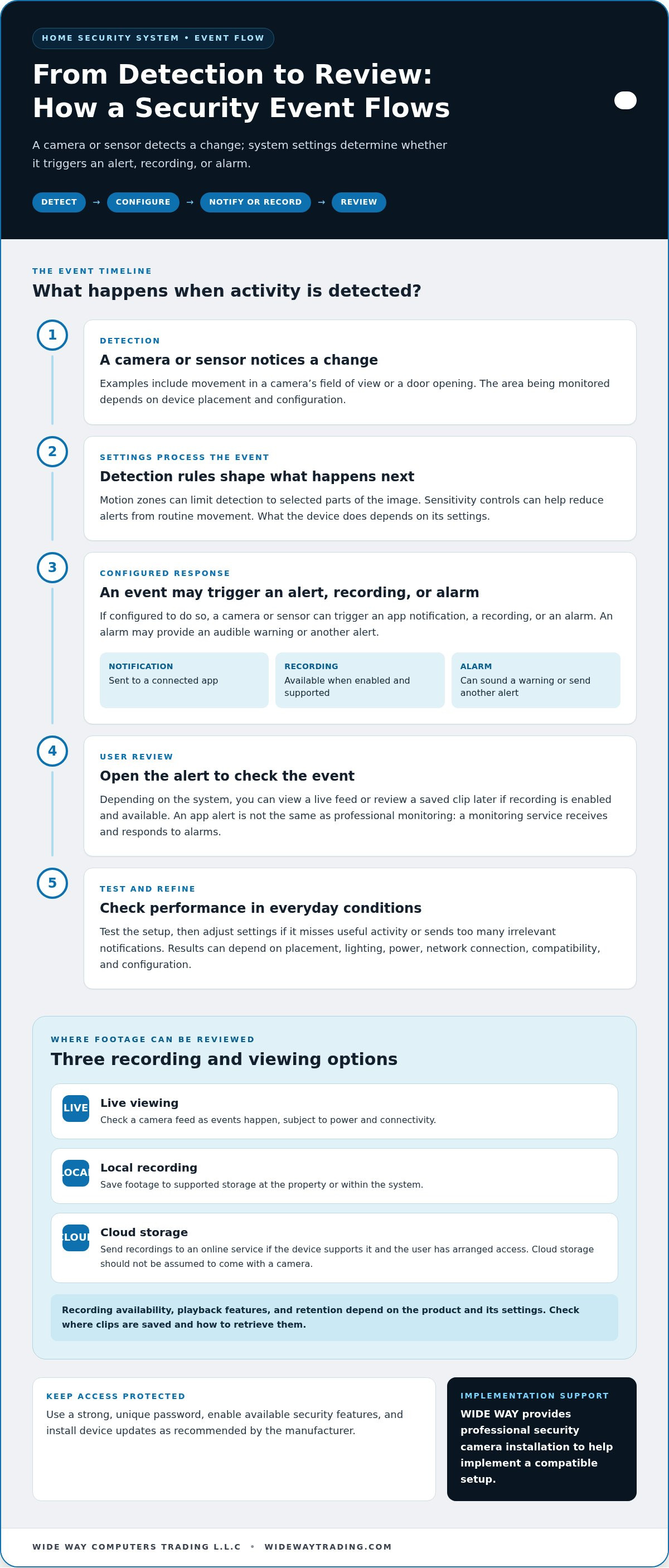
Follow one event from start to finish to understand how a system works. A person moves through a camera’s detection area. The camera processes that activity using its settings, then may send a notification to the connected app. You can open the alert to view a live feed or, if recording is enabled and available, review the saved clip later.
The process depends on more than the camera. Power, network connectivity, device compatibility, placement, and notification settings all affect what happens. An alert feature sends information to your device; it isn’t the same as professional monitoring, where a monitoring service receives and responds to alarms.
What happens when a camera or sensor detects activity?
A camera or sensor detects a change, such as movement in its field of view or a door opening. If configured to do so, the device can trigger a recording, an app notification, or an alarm. You can then review the event and decide what action to take.
Motion zones can limit detection to selected parts of the image, while sensitivity controls can help reduce alerts from routine movement. Results still depend on camera position, lighting, network connection, and configuration. Test the system in everyday conditions, then adjust settings if it misses useful activity or sends too many irrelevant notifications.
Where can security footage be stored and reviewed?
Live viewing lets you check a camera feed as events happen, subject to power and connectivity. Local recording saves footage to supported storage at the property or within the system. Cloud storage sends recordings to an online service, if the device supports it and the user has arranged access. These options work differently, and cloud storage should not be assumed to come with a camera.
Recording availability, playback features, and retention depend on the product and its settings. Before relying on a particular method, find out where clips are saved and how to retrieve them. Protect account access with a strong, unique password, enable available security features, and install device updates as recommended by the manufacturer.
WIDE WAY provides professional security camera installation to help implement a compatible setup as part of your home security system.
Which Home Security System Setup Fits Your Home and Priorities?
Start with the areas you want to see or monitor, then match devices to those needs. A camera aimed at an entrance may suit a household that mainly wants visual coverage. A home with several doors may benefit from sensors as well. For a larger or more complex layout, professionally installed CCTV can help coordinate camera positions and recording across the property.
| Setup | Coverage | Connectivity and recording | Installation support |
|---|---|---|---|
| Camera-only | Visual monitoring of selected areas, such as an entrance or driveway. | Needs power and, for app features, may rely on a network connection. Recording options depend on the camera and configuration. | Often suited to a focused setup with straightforward placement. |
| Camera and sensors | Combines visual coverage with alerts from selected doors or windows. | Devices need compatible connections and coordinated settings. Recording depends on the cameras and chosen options. | Setup involves positioning and configuring multiple device types. |
| Professionally installed CCTV | Can be planned to cover multiple useful areas across a property. | Power, cabling, connectivity, and recording arrangements depend on the system design. | Professional installation supports camera placement and implementation. |
How should home layout influence camera coverage?
Sketch the property and mark entrances, shared access points, and outdoor approaches where monitoring would be useful. For each camera, consider its viewing angle, distance, lighting, and possible obstructions such as walls, plants, or gates. A camera facing a bright outdoor area may show less detail than expected, while a narrow angle can miss movement to the side. Focus the view on your own property and avoid recording neighbours’ private spaces.
Should you choose wireless cameras, CCTV, or a combined setup?
Wireless cameras can offer placement flexibility, but they still need suitable power and a dependable connection for connected features. CCTV may suit a planned, multi-camera layout where installation and recording are considered together. A combined setup can bring cameras and sensors into one arrangement, provided the devices work together. Choose based on your home’s layout and how you prefer to view and manage coverage.
For a structured checklist of selection factors, see this guide on how to choose a home security system. Compare the arrangement’s practical coverage with the devices and features you will actually use.
How to Plan a Home Security System for Privacy and Everyday Use
Start with what you need to know, not with the number of devices you can install. Consider who uses the home, which areas matter, and how alerts and footage will be managed. Account for privacy from the start, then test the system as part of normal household routines.
- Identify priorities. Decide whether you mainly want to view entrances, receive alerts when selected doors open, or review recordings later.
- Map useful coverage. Mark relevant entrances and areas within your property. Note obstacles, lighting, and places where a camera view could capture more than intended.
- Choose components. Select cameras, sensors, and compatible recording options that match those priorities. Avoid adding features that create extra alerts or account management without a clear benefit.
- Set access. Give household members the access they need, and remove permissions that are no longer required. Agree on who receives notifications and who can view recordings.
- Test alerts and views. Trigger a sensor or walk through a camera’s detection area. Confirm the right users receive notifications and that the view and recording settings work as intended.
How can you balance useful coverage with privacy?
Keep camera views focused on relevant entrances and areas of your own property rather than recording indiscriminately. Where supported, privacy zones can mask parts of an image, while recording schedules or other settings may help limit when footage is captured. Review each camera’s live view after installation and adjust its angle if it includes spaces that don’t need monitoring. Before making decisions based on legal requirements, consult current authoritative UAE guidance relevant to your property and camera use.
What should you check before using the system every day?
Check that cameras and sensors have power, connected devices can communicate, and recording settings match your preferences. Confirm that intended users can sign in and receive alerts. Use strong, unique passwords, enable available account security features, and install firmware updates as recommended by the device maker.
Household routines matter. A notification that helps when everyone is away may become disruptive during busy hours, so adjust alert schedules and recipients to suit how the home is used. Review camera views and permissions after a change to the household, network, or device setup. Periodic checks can catch a shifted camera, a disconnected device, or outdated access before it interferes with everyday use.
WIDE WAY provides professional security camera installation to help put your plan into practice. A well-planned home security system should fit both the property and the people who use it.
Choosing and Installing a Home Security System with WIDE WAY
Choosing devices is only part of the decision. A suitable home security system should match the areas you want to cover, how your home connects, and how you prefer to access recordings. Use this checklist to align product selection with installation planning:
- Coverage: Identify useful views and any gaps, taking camera position and property layout into account.
- Connectivity: Consider where network access and power are available for the devices you plan to use.
- Recording: Decide whether your priority is live viewing, local footage storage, or another recording option supported by the selected devices.
- Privacy: Keep camera views focused on relevant areas of your property and manage who can view the system.
- Installation: Decide whether you prefer to set up the equipment yourself or use professional camera installation.
WIDE WAY supplies Eufy, EZVIZ, and Imou security products, alongside professional security camera and CCTV installation across the UAE. The eufyCam S3 Pro 4-Cam Kit Solar is one option in the range, but the right choice depends on your layout, connectivity, and coverage priorities.
What should you expect from professional security camera installation?
Hardware selection and installation planning solve different problems. The equipment needs to suit your needs, and its placement and setup need to work in the space. Installation planning considers camera positions, power access, connectivity, and the views required. A final walkthrough can help you understand the controls, check camera views, and learn how to use the system. WIDE WAY provides professional security camera installation to help implement a planned setup.
How can a product range support different security needs?
Households may prioritise different features and configurations, so comparing options across Eufy, EZVIZ, and Imou can help narrow the selection. Start with what each camera needs to do in your setup, then consider how it will connect and how you intend to review footage. For more product-specific information, read the published eufyCam S3 Pro kit review.
A good final decision joins the product to the plan: coverage, connectivity, recording, privacy, and installation should work together. WIDE WAY’s security products and professional installation support help put that plan into practice.
Build a Setup That Fits Your Home
A practical home security system brings together the devices and settings that suit your property, routines, and priorities. Cameras can provide visual coverage, while sensors and alerts add awareness of selected activity. The right configuration depends on where you need coverage, how devices connect, and how you prefer to record and review events.
Plan camera views with privacy in mind, manage account access carefully, and test alerts so the system works as intended in everyday use. Choosing suitable hardware is one step; thoughtful placement and installation help put that plan into practice.
WIDE WAY offers security products from Eufy, EZVIZ, and Imou, along with professional security camera and CCTV installation across the UAE. The eufyCam S3 Pro 4-Cam Kit Solar is one product option to consider; the right fit depends on your home and coverage needs.
Explore WIDE WAY’s home security products and professional installation support to plan a setup around your home and priorities.
Frequently Asked Questions
What is included in a home security system?
A home security system may include cameras, door or window sensors, an alarm, a control app or panel, and recording options. Cameras provide visual coverage, while sensors detect activity such as an opening door. The app or panel can show device status and deliver alerts. Components vary by system and configuration, so choose devices based on the areas you want to monitor and how you plan to manage alerts and footage.
Are wireless home security cameras reliable?
Wireless cameras can work reliably when they have suitable power and a stable connection for the features you use. Performance may be affected by Wi-Fi coverage, distance from the router, walls, interference, and camera placement. Check the signal at the intended location and test live viewing and alerts there. Some wireless cameras use batteries, so include charging or battery checks in your routine. Wireless does not mean the camera needs no power or setup.
Can a home security system work without internet?
Some systems can record locally or sound an alarm without internet, but capabilities depend on the devices and configuration. Without a connection, remote viewing and app notifications may be unavailable, even if local recording continues. Check which functions need internet, power, or a connection between devices. If offline operation matters, choose compatible equipment and test what still works when the network is unavailable rather than assuming every feature will remain active.
How do home security cameras store video footage?
Depending on the camera, footage may be saved to local storage, a compatible recorder, or an optional cloud service. Live viewing is separate from recording: seeing a feed does not necessarily mean a clip is being saved. Recording availability, playback, and retention depend on the product, configuration, and settings. Before relying on stored footage, learn where clips are kept, how to access them, and how account permissions protect recordings.
Do home security cameras need professional installation?
No. Some camera setups can be installed by the homeowner, while a larger or more involved layout may benefit from professional installation. Planning includes camera positions, power, connectivity, and the views needed to cover useful areas. Professional installation can help implement the setup and familiarise users with its controls. WIDE WAY provides security camera and CCTV installation across the UAE, as well as security products from Eufy, EZVIZ, and Imou.
Can security cameras record areas outside my home in the UAE?
Position cameras to monitor relevant areas of your own property and avoid capturing neighbours’ private spaces. An outdoor view can sometimes extend beyond a property boundary, so review the camera angle and use privacy zones or masking features where available. Camera use in the UAE can raise privacy considerations. For legal requirements that apply to your specific situation, consult current guidance from relevant UAE authorities rather than relying on a general rule.
What is the difference between a home security camera and CCTV?
A home security camera is an individual device or part of a connected setup, often managed through an app. CCTV generally refers to a camera system that sends video to designated monitors or recording equipment, though modern systems may also connect to networks. The terms can overlap. Compare the actual setup by checking how cameras connect, where footage is stored, how it is viewed, and whether installation support is needed.


