

What if one outdoor camera could show the whole approach to your home and still zoom in on a person at the gate? That’s the idea behind the Eufy s340’s dual-lens design: a 3K wide-angle view for the broader scene and a 2K telephoto lens for closer detail, supported by pan-and-tilt movement. But wider coverage alone doesn’t guarantee a good fit. Solar charging depends on where the panel can receive direct sunlight, and a reliable connection depends on your home Wi-Fi setup.
Before choosing a security camera, consider whether it can cover the areas you care about, whether its power approach suits the mounting location, and whether it will connect to your network and any HomeBase equipment you plan to use.
This guide explains how the Eufy S340’s lenses and movement work in practice, what to consider about solar placement and 2.4 GHz Wi-Fi, and how HomeBase compatibility and storage fit into the decision. You’ll also find practical setup and installation considerations for UAE homes to help assess the camera against your property before buying.
Key Takeaways
- The Eufy s340 combines a wide overview with a telephoto view and pan-and-tilt movement, but each lens serves a different viewing purpose.
- Assess direct sunlight and shade at the planned mounting point before relying on the detachable solar panel to support charging.
- Check that Wi-Fi reaches the camera location and supports the 2.4 GHz band. Review HomeBase compatibility and storage needs for your setup.
- Compare its movable coverage with a fixed-view camera based on the areas you need to monitor, not on feature count alone.
- Plan placement in sequence: define the view, assess sun exposure, test Wi-Fi, then finalize mounting with outdoor heat and dust in mind.
What the Eufy S340 Is, and What Its Dual-Camera Design Means
The Eufy s340 is an outdoor security camera that combines two lenses, remote pan-and-tilt movement, and a detachable solar panel in one wireless unit. It’s a single camera, not a complete multi-camera kit: its coverage comes from adjusting its viewing direction, not from placing separate cameras around a property. As an IP camera, it sends video over a network, so both image capture and connectivity matter to how it works.
The main advantage is flexibility. One lens provides a broad view, while the other is designed to show more detail at a distance. You can adjust the camera’s direction through the app, and the solar panel can support battery charging when it receives useful sunlight. These features can help balance an overview with a closer look, but they don’t make every angle equally detailed or remove the need to plan the camera’s view.
How the S340's dual lenses and pan-and-tilt coverage work
The wide-angle lens is suited to seeing more of a scene, such as a driveway entrance or part of the front of a home. The telephoto lens is intended to show a closer view of a selected subject or area. Eufy’s published specifications describe a 3K wide-angle lens and a 2K telephoto lens. These are different imaging views, not a promise that every part of the scene is captured at the higher resolution.
The camera is advertised with 360-degree horizontal pan and 70-degree vertical tilt. In practical terms, pan and tilt let you redirect the view, while the 360-degree figure refers to horizontal movement. It doesn’t mean every direction is recorded in detail at the same time. Walls, eaves, plants, and other obstructions can still create blind spots. Treat the coverage claim as a range of movement, then consider the camera’s position and what it can actually see from there.
What the advertised resolution and solar design tell you
The listed 3K and 2K resolutions distinguish the wide and telephoto lenses, but resolution alone doesn’t tell you how clear every recording will be. Distance, lighting, movement, and the selected view all matter. The model’s advertised 8× hybrid zoom can bring a distant subject closer on screen, but zoom isn’t a substitute for positioning the camera within a useful line of sight.
The detachable solar panel supports charging the built-in battery. It doesn’t guarantee uninterrupted operation: sunlight, shade, panel angle, and daytime exposure affect how much energy it can collect. The specific mounting spot matters as much as the feature itself. Before buying, compare the UAE-market unit’s specifications and included components with the manufacturer’s current product information, particularly resolution, recording behaviour, and charging details. Regional model or configuration differences can affect what’s supplied.
How the Eufy S340's Solar Power, Storage, and Connectivity Work
Three functions shape the day-to-day experience of the Eufy s340: the solar panel helps charge its battery, local storage holds recordings, and Wi-Fi connects the camera to the app. They work together, but they aren’t interchangeable. A sunny mounting spot won’t fix a weak network signal, and a stable connection doesn’t create more local storage.
What to know about solar charging before choosing a location
Assess the camera and panel’s likely sun exposure before finalizing a mounting point. Shade from a roof overhang, wall, or nearby structure can reduce sunlight reaching the panel. Its orientation and seasonal changes in the sun’s path can also affect charging. Eufy describes the panel as a charging aid, not a guarantee of continuous power. Review the current manufacturer guidance for the UAE-market model and consider whether the site gets suitable direct sun.
Wi-Fi, local storage, and HomeBase compatibility
The listed Wi-Fi requirement is 2.4 GHz, so the intended location needs compatible network coverage and a dependable signal. Wi-Fi connects the camera to the app; it isn’t the same as storing video. The U.S. Department of Homeland Security’s overview of wireless surveillance camera systems provides broader context on networked equipment. For the S340’s setup, use the product documentation for the specific model.
- Solar charging: Supports battery charging when the panel receives useful sunlight.
- Local storage: The listed model has 8 GB of built-in eMMC storage and no microSD card slot.
- Network access: The camera uses 2.4 GHz Wi-Fi to connect with the eufy Security app.
- Expanded storage: HomeBase S380 compatibility is model- and firmware-specific, so confirm the current requirements for your setup.
Local storage means footage is saved on the camera or compatible local equipment rather than automatically stored online. HomeBase S380 support is listed from firmware version V3.3.2.6, but compatibility and storage options can depend on the UAE-market model and its current firmware. Treat “no monthly fee” as a claim to compare with the product’s regional service terms, not as a blanket promise about every feature or storage method.
Solar power doesn’t remove the need to plan connectivity. Before mounting, test Wi-Fi at the intended camera position, not just indoors beside the router. If the location is difficult to reach or you want help planning the physical setup, professional security camera installation can help align the mounting position with the site’s practical requirements.
Is the Eufy S340 Right for Your Home? Coverage and Trade-Offs
The Eufy s340 makes most sense when you need more than a single fixed viewpoint and have a practical place to mount its solar panel. Its movable view can help you check different parts of an open outdoor area, while the two lenses serve different viewing needs. There are limits: camera movement doesn’t record every direction at once, and solar charging depends on the installation site. Decide based on the view you need, available sunlight, and a usable Wi-Fi connection.
When dual-lens, pan-and-tilt coverage is useful
Adjustable coverage can be useful for an open driveway or yard where one fixed angle would leave part of the area outside the frame. The wide view helps establish context, while the telephoto view can bring a selected detail closer. Entrances may call for a clear view of the approach, while a shared outdoor space may need more than one framing direction. A single camera still has one physical location and can’t guarantee full-property coverage.
When a fixed-view or wired camera may fit better
A fixed-view camera may be a more direct fit for one well-defined point, such as a doorway with a clear, unobstructed approach. If the planned S340 location gets little direct sunlight or has weak 2.4 GHz Wi-Fi, its solar and wireless design may be less practical there. A wired camera may suit a site where the required cabling and power can be provided, though the details depend on the system. For whole-property decisions, plan the views and connections first.
Use this comparison to focus on installation conditions, not just the feature list:
| Factor | Eufy S340 | Simpler fixed-view camera |
|---|---|---|
| Coverage style | Adjustable pan-and-tilt view with two lenses; positioning still determines what’s visible. | One set viewing direction, suited to a defined monitoring point. |
| Power approach | Battery with a solar charging panel; useful sunlight matters. | Varies by model, from battery to wired power. |
| Connectivity | 2.4 GHz Wi-Fi connection required. | Varies by model and system. |
| Buyer fit | Useful where adjustable viewing and suitable sun and Wi-Fi align. | May fit a single angle or a site where a simpler view is enough. |
Choose by site, not by the promise of “360 coverage.” Sketch the area you want to monitor and mark the likely camera position. Consider whether the camera needs to look toward one entrance or be redirected across a wider open space. Then assess sunlight and Wi-Fi at that exact position. If either condition is poor, the headline features may not translate into the convenience you expect.
For homes across the UAE, consider whether the chosen mounting point can be securely installed and reached for routine checks. If your goal is to monitor several separate sides or approaches, one adjustable camera may not replace multiple viewpoints. A planned layout helps clarify whether the S340 is a focused solution for one area or part of a broader home security setup.
How to Plan Eufy S340 Placement and Setup Across UAE Homes
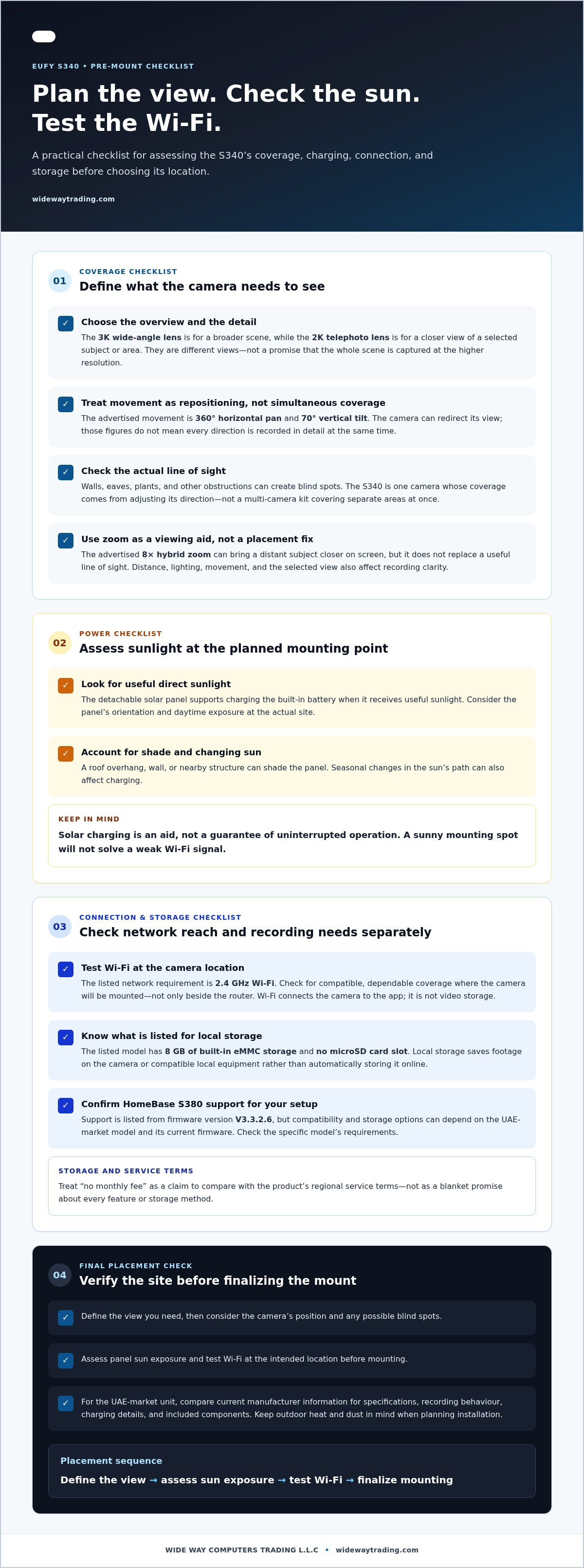
A successful installation starts with the site, not the drill. For the Eufy s340, the camera’s view, the panel’s access to sunlight, and the Wi-Fi signal all need to work at the mounting point. In UAE homes, also consider how outdoor heat and dust affect the chosen location and how easily you can reach the equipment for routine checks. Use this sequence before fixing the camera in place.
- Define the view. Choose the area you want to monitor and note the direction people or vehicles approach from. Check the proposed angle from ground level, including obstructions such as walls, pillars, roof edges, plants, or gates. An entrance may need a clear approach view; a wider yard may need a position that allows the camera to be redirected. Consider access for maintenance as well as the view.
- Assess sunlight. Look at the proposed solar-panel position at different times of day. Nearby buildings, overhangs, and other shade can reduce direct exposure, while panel orientation and changing seasonal sunlight may affect charging. Consider whether the panel can be positioned for better sun without compromising the camera’s view or making it difficult to access.
- Check Wi-Fi. Test the intended camera location for a stable 2.4 GHz connection before mounting. A strong signal beside the router doesn’t prove that the outdoor position will connect reliably. Check the app or network performance from the planned spot, and consider how walls and other building materials affect the signal.
- Finalize the mounting point. Once the view, sunlight, and signal look suitable, confirm that the surface allows a secure installation and that the camera and panel remain accessible. Before drilling, consult current manufacturer instructions for mounting, operating conditions, and weather-resistance specifications for the UAE-market model.
Choose a camera position for useful coverage
Think about what should be visible, not simply where a camera is easiest to attach. A position looking across an entrance may show the approach more clearly than one aimed directly at a door, while a driveway may need room in the frame for vehicles to enter. Check that nearby structures won’t block the lens view, and weigh the desired angle against sunlight and practical access.
Check Wi-Fi and solar conditions before mounting
Do these checks before making permanent changes. If the intended spot has weak Wi-Fi or persistent shade, reconsider the location rather than assuming the camera or panel will overcome those conditions. Outdoor exposure to heat and dust is also a planning consideration. Follow the manufacturer’s current guidance for the operating environment and care rather than assuming a rating or temperature range applies to every regional configuration.
For complex mounting, difficult access, or a layout with several competing viewpoints, professional installation can help coordinate the camera position with the property’s practical constraints. Arrange professional security camera installation for support planning and fitting a security camera in your UAE home.
Buying the Eufy S340: Product Support and Next Steps
The Eufy s340 is a stronger fit when its adjustable view solves a real coverage need and the planned location also works for solar charging and Wi-Fi. Before buying, consider those conditions alongside your storage expectations and installation plan. A feature that works well in one spot matters less if the camera can’t get a reliable connection or the panel receives little direct sunlight.
A final Eufy S340 buying checklist
- Coverage: Decide which area needs monitoring, then consider whether pan-and-tilt adjustment and the two lens views suit that scene. Don’t assume one camera will cover every side of a property.
- Sunlight: Assess the panel’s proposed position for direct exposure and shade. Solar charging supports the battery, but its contribution depends on site conditions.
- Wi-Fi: Check for a stable 2.4 GHz signal at the intended mounting point, not only indoors beside the router.
- Storage: Review the built-in storage capacity and whether your recording needs call for compatible HomeBase equipment. Check regional service terms before relying on claims about subscriptions or storage options.
- Installation: Decide whether the mounting surface, access, and panel position make a straightforward setup practical, or whether installation support would help.
Published product information describes a dual-lens configuration with 3K wide-angle and 2K telephoto imaging, 2.4 GHz Wi-Fi, and 8 GB of built-in eMMC storage. These details are useful reference points, not a substitute for checking the exact UAE-market model. Specifications, included accessories, firmware requirements, HomeBase compatibility, and service terms can vary by region or configuration. Compare the product documentation for the unit you’re considering before treating a feature as part of your setup.
Get help with Eufy camera selection and installation
Professional installation can help translate the intended view into a workable camera position, taking mounting access, signal conditions, and solar-panel placement into account. This is especially useful when the best viewing angle and the best location for sunlight or Wi-Fi don’t naturally align. WIDE WAY COMPUTERS TRADING L.L.C sells Eufy security cameras and provides professional security camera installation across the UAE.
For a well-defined entrance and suitable mounting conditions, the S340 may offer a practical combination of flexible viewing and wireless installation. If your coverage needs extend to several separate areas, plan those viewpoints before deciding that one camera is enough. Review the model specifications, accessories, and regional compatibility alongside your site plan, then explore Eufy cameras and professional installation support for your home.
Make Your Next Security Decision With Confidence
A useful next step is to picture the moments you want your camera to help you review, such as a delivery arriving or someone approaching an entrance. That real-world purpose is a better guide than choosing based on a feature list alone. With the Eufy s340, match the camera to the role you want it to play, then decide whether the proposed location and setup support that role.
Keep the plan practical. A camera should fit naturally into how you use your home, with a clear purpose and a considered position. If your needs change, the same planning approach can help you decide whether to adjust the view or build out a broader security setup. Thoughtful placement makes the technology easier to use and gives you a clearer basis for your buying decision.
For your next step, explore Eufy camera options alongside professional installation support across the UAE. Explore Eufy cameras and professional security installation, then move forward with a setup planned around your home.
Frequently Asked Questions
What is the difference between the Eufy S340's two camera views?
The Eufy S340 pairs a wide-angle view for scene context with a telephoto view for closer detail. The wide lens can help show how someone approaches a gate, while the telephoto lens can bring a selected subject or area closer on screen. They serve different framing needs, so don’t assume the wide view shows distant details as clearly, or that both lenses capture every direction at identical detail.
Does the Eufy S340 need a monthly subscription?
The product listing’s “no monthly fee” claim doesn’t mean every service or storage arrangement is included without charge. Check the current UAE-market product documentation and service terms to understand which local recording features are available and whether optional services carry separate terms. If you’re deciding based on ongoing costs, distinguish the camera’s included functions from optional services before purchase.
Can the Eufy S340 run on solar power alone?
The solar panel is designed to help charge the camera’s built-in battery, with sunlight providing energy over time. It shouldn’t be treated as a guarantee that the camera will never need attention or charging. For example, a panel positioned under a deep overhang may receive less direct sun than one with clearer exposure. Check the exact UAE model’s instructions for battery operation and charging expectations.
How much sunlight does the Eufy S340 need?
Eufy advertises that two hours of direct sunlight can provide enough power for a full day of operation. That’s a manufacturer claim, not a universal charging guarantee. Results depend on actual exposure, shade, panel orientation, and camera use. Confirm that the claim applies to the current UAE-market model, then assess the intended panel position across the day rather than judging sunlight from a single moment.
Does the Eufy S340 work with HomeBase S380?
The Eufy S340 is listed as compatible with HomeBase S380, but compatibility alone doesn’t establish which storage features your setup will support. Check the UAE-market camera documentation and required firmware version for the specific unit. Also review the HomeBase documentation for supported storage options and configuration requirements. This helps distinguish basic device compatibility from the capacity or recording arrangement you may expect.
Does the Eufy S340 work on 5 GHz Wi-Fi?
The product listing specifies 2.4 GHz Wi-Fi, so plan on using that band for the camera and verify the current regional specifications before setup. A router can offer both 2.4 GHz and 5 GHz bands; having 5 GHz available doesn’t mean the camera connects to it. If your network uses one shared network name, check your router or app instructions for connecting a 2.4 GHz device.
Can the Eufy S340 record clearly at night?
The product specifications list colour and infrared night vision, giving the camera options for low-light scenes. The result in a particular location depends on available lighting, distance, obstructions, and camera placement. For example, a bright light close to the lens may affect the scene differently from an evenly lit entrance. Review the current UAE model’s night-vision documentation, and avoid assuming a specific range or image clarity without verified evidence.


