

A high-end 4K projector is a wasted investment if the light hits a cheap, wavy surface. You've likely seen it before. A beautiful cinematic moment ruined by visible wrinkles or a washed out image because the sun peeked through the curtains. It's frustrating to spend thousands on optics only to have the environment fight back. Choosing the right motorized projector screen isn't just about the convenience of a button press. It's about preserving image integrity and reclaiming your living space when the movie ends.
You want a setup that disappears when not in use but delivers professional-grade clarity the moment the lights dim. This guide will help you master the technical nuances of ALR, CLR, and floor-rising solutions to transform your home into a high-end cinema. We'll break down why tensioned materials are non-negotiable for 4K clarity. You'll learn how to pair Sony, BenQ, or LG projectors with specialized surfaces like the QMJM Cabinet ALR screen for a truly minimalist setup. From seamless automation to professional installation requirements, we're providing the roadmap to a perfect theater that performs even in broad daylight.
Key Takeaways
- Learn how to select the ideal mechanism—whether drop-down, in-ceiling, or floor-rising—based on your room's architecture and aesthetic goals.
- Master the technical differences between ALR and CLR materials to ensure your motorized projector screen delivers crisp 4K images even in bright environments.
- Understand the critical pairing requirements between your projector throw distance and screen material to avoid image distortion and light loss.
- Explore premium minimalist solutions like the QMJM Cabinet Floor-Rising screen that keep your high-end cinema completely hidden until it's time to watch.
- Discover why professional installation is essential for motorized systems to guarantee safety, preserve your warranty, and enable seamless automation.
Why a Motorized Projector Screen is the Ultimate Home Cinema Upgrade
A motorized projector screen is a high-precision system that uses an electric motor to deploy and retract the fabric. It's the gold standard for modern, multi-purpose living spaces. Unlike fixed-frame options, these screens disappear when not in use. You don't have to sacrifice your wall decor for a massive white rectangle. When the movie ends, the screen rolls into a slim housing, maintaining a minimalist aesthetic. This design also offers superior protection. Retracting the fabric keeps it safe from dust, UV damage from sunlight, and accidental physical contact. It's a long-term investment in material longevity.
Manual vs. Motorized: Is the Investment Worth It?
Manual screens rely on physical pulling and internal springs. This often leads to uneven tension and inconsistent stop points. A motorized projector screen removes the human factor. It deploys to the exact same height every single time, ensuring your image alignment remains perfect. Integration is the real game changer here. You can sync your screen with high-end Sony or BenQ projectors using a 12V trigger. Press one button on your remote, and the projector warms up while the screen descends. It's seamless. It's professional. Eliminating the manual pull also prevents the "snapping" motion that eventually damages manual mechanisms. You get a smoother, quieter, and more reliable experience that matches the luxury of a 4K setup.
The Role of Tab-Tensioning in Motorized Screens
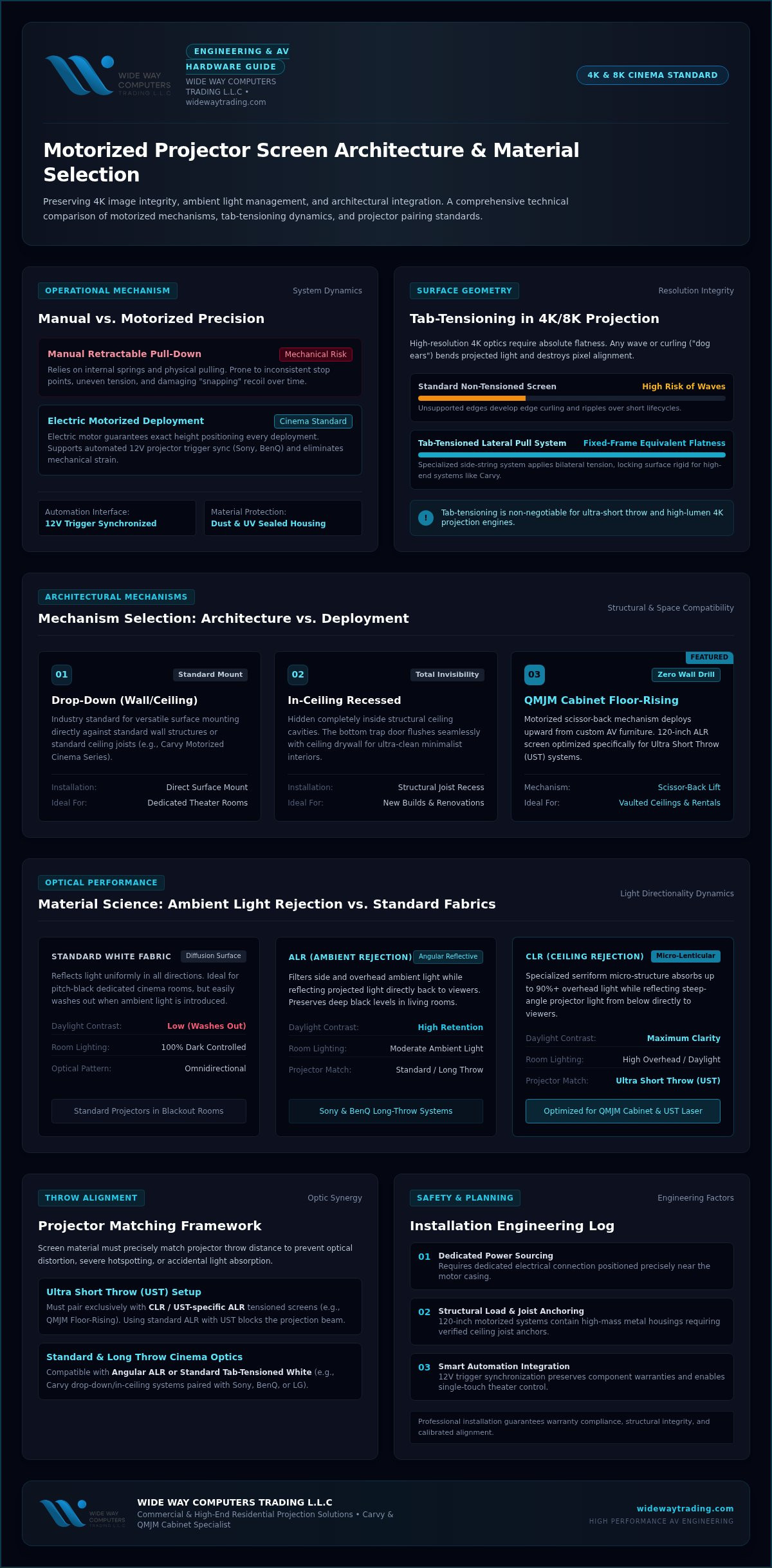
Image distortion is the enemy of high-resolution cinema. Standard retractable screens often develop "dog ears" or waves over time because the fabric isn't supported at the sides. Tab-tensioning solves this. It uses a specialized side-string system that pulls the material taut from both sides. This creates a surface as flat as a fixed-frame screen. If you're using a 4K or 8K projector, a perfectly flat surface is non-negotiable. Any ripple in the fabric will cause the light to bend, ruining the geometry of the image. The history of projection screen technology shows that maintaining this flatness is the biggest challenge for retractable systems. High-end solutions from Carvy utilize this tensioning to ensure the material stays ripple-free for its entire life cycle. While non-tensioned screens are cheaper, they rarely survive more than a few years before visible waves begin to degrade the viewing experience.
Comparing Motorized Mechanisms: Drop-Down, Floor-Rising, and In-Ceiling
Choosing a motorized projector screen involves more than just picking a size. Your room's architecture dictates the mechanism. Drop-down screens are the versatile industry standard. They mount easily to walls or ceilings. In-ceiling models, however, are for those who want total invisibility. These recessed units hide within the ceiling structure. They're perfect for new builds or extensive renovations where clean lines are a priority. If you're dealing with high vaulted ceilings or glass walls where mounting is impossible, floor-rising units offer a sophisticated alternative. Each mechanism has specific structural needs that you must address during the planning phase.
The Rise of Floor-Rising Motorized Screens
The QMJM Cabinet ALR Floor-Rising Screen 120-inch represents the peak of minimalist design. It doesn't require wall drilling. This makes it a perfect solution for luxury rentals or homes with complex interior designs. You can even integrate these screens into custom AV furniture. They rise from the floor using a motorized scissor-back mechanism. This mechanism provides incredible stability even at large sizes. It's specifically optimized for Ultra Short Throw (UST) projectors. It places the screen exactly where the light path needs it. It creates a massive display that disappears into a sleek cabinet when the show is over. It's the ultimate hidden cinema solution for modern living rooms.
Drop-Down and In-Ceiling Installation Logistics
Carvy Motorized Cinema Screens offer a robust solution for traditional wall and ceiling mounts. These systems require careful planning before the first screw is turned. You must account for power requirements. Most units need a dedicated electrical point near the motor housing. Weight is another critical factor. A 120-inch motorized housing is heavy. It's not just a piece of fabric. It's a metal casing and a powerful motor. You need to ensure the structural integrity of your wall or ceiling joists. For in-ceiling models, you'll need professional help to cut the drywall and secure the mounting brackets properly. Professional installation across the UAE ensures your screen stays level and safe for years to come. If you're ready to upgrade, you can explore our professional screen solutions to find the right fit for your space.
Material Matters: Choosing Between ALR, CLR, and Standard White
The screen material is just as critical as the projector lens itself. Many enthusiasts spend thousands on a high-end Sony or LG projector but pair it with a basic white sheet. This is a mistake. To get the most out of your hardware, you must match the fabric to your room's lighting conditions. Most setups fall into three categories:
- Standard White: Best for dedicated, pitch-black cinema rooms with zero ambient light.
- Ambient Light Rejecting (ALR): Essential for living rooms with windows or side lighting.
- Ceiling Light Rejecting (CLR): Specifically engineered for Ultra Short Throw (UST) projectors.
Standard white screens offer a neutral color balance and wide viewing angles. However, they reflect all light. In a living room with windows, a white motorized projector screen will look washed out. The image loses its punch. For multi-purpose spaces, you need specialized optics built into the fabric.
How ALR and CLR Technology Works
Specialized materials use optical layers to manage light. ALR (Ambient Light Rejecting) surfaces redirect off-axis light away from the viewer. They prioritize the light coming directly from the projector. CLR (Ceiling Light Rejecting) technology is even more specialized. It's engineered specifically for Ultra Short Throw (UST) projectors. These screens use microscopic lenticular or Fresnel structures. A lenticular screen uses a sawtooth pattern to absorb light from above while reflecting light from the projector below. Fresnel structures use circular patterns to concentrate light toward the viewer. This technology maintains deep blacks and high contrast in non-ideal settings. There's a trade-off, though. Higher "gain" usually means a narrower viewing cone. You must choose a material that fits your seating arrangement.
Pairing Materials with Projector Brightness
In the UAE, sunlight is intense. Even high-lumen BenQ or LG laser projectors struggle against it. This is why ALR is essential for any living room setup. Many professional installations utilize grey screens. These surfaces improve perceived black levels by reflecting less light overall. It makes the image feel more cinematic and less like a glowing television. You also need to be careful with "hot spotting" on high-gain motorized surfaces. This happens when the center of the screen is noticeably brighter than the edges. Choosing a high-quality motorized projector screen with a balanced gain helps avoid this distortion. It ensures a uniform image across the entire surface, whether you're watching from the center or the side. Proper pairing prevents the "shimmer" effect often seen on cheap, poorly engineered ALR materials.
Selection Framework: Matching Your Screen to Your Projector
Your hardware choices shouldn't happen in a vacuum. The specific optics of your projector dictate which motorized projector screen will actually perform in your room. If you've invested in a high-end Sony or BenQ standard throw projector, your needs differ significantly from someone using an Ultra Short Throw (UST) laser. Standard throw projectors cast light from several meters away. This requires a Long-Throw ALR or a standard white surface to maintain color accuracy. If you use a UST screen with a long-throw projector, the image will be dark and distorted because the micro-structures aren't aligned for that light path.
Resolution matching is another critical factor. Modern 4K laser projectors produce incredibly fine pixel detail. If the screen material has a coarse texture, it can create a distracting grain or "moiré" effect. You need a surface with a smooth, high-definition coating to ensure the 4K clarity remains intact. For those seeking the ultimate setup, you can explore our curated projector and screen pairings to ensure perfect hardware compatibility.
The UST and Floor-Rising Synergy
Floor-rising screens are the preferred format for UST setups for a simple reason: geometry. An Ultra Short Throw projector sits on a cabinet just inches from the wall. It casts light upward at a very steep angle. A traditional drop-down screen can sometimes sway slightly, which ruins the alignment of a UST image. The QMJM Cabinet ALR Floor-Rising Screen 120″ solves this by providing a rigid, tensioned surface that rises directly behind the projector. This proximity eliminates shadowing and ensures the CLR (Ceiling Light Rejecting) material can effectively block overhead light while reflecting the projector's light toward your eyes. It's the most stable and visually impressive way to manage a UST light path.
Optimizing for Sony and BenQ 4K Projectors
High-lumen projectors from Sony and BenQ offer massive brightness, but you still need to calibrate for your surface. When using an ALR motorized projector screen, you might find that the "Cinema" or "Filmmaker" modes provide the best balance. These surfaces enhance contrast, so you don't need to push the projector's lamp to its maximum setting. You should also consider your desired aspect ratio. While 16:9 is the standard for TV and gaming, widescreen enthusiasts often prefer 2.35:1 to eliminate black bars during movies. Finally, don't overlook automation. Most professional projectors feature a 12V trigger output. Connecting this to your motorized screen allows the fabric to descend automatically the moment you power on the projector. It's a small technical detail that makes your home cinema feel like a truly high-end, integrated system.
Professional Installation and Motorized Solutions from Wide Way
Wide Way acts as a specialist curator for the UAE market. We don't just sell products; we provide pre-vetted solutions like Carvy Motorized Cinema Screens and the QMJM Cabinet ALR Floor-Rising Screen 120″. These brands are chosen for their reliability in the unique climate and housing structures found across the UAE. A high-end home cinema requires more than just unboxing equipment. It requires a partner who understands how to integrate these technologies into your specific living space. Our national installation coverage ensures that every residential or commercial setup meets professional standards.
We handle the technical heavy lifting, including expert calibration. We ensure your screen is perfectly level for laser alignment. If a screen is off by even a fraction of a degree, your 4K image will suffer from focus issues or geometric distortion. We provide comprehensive support that starts with an initial site survey and ends with seamless smart home integration. This methodical approach removes the guesswork from your cinema project.
Why Professional Installation is Mandatory for Motorized Screens
A motorized projector screen is a complex mechanical system. The housings for 120-inch screens are heavy. Mounting them safely requires specialized hardware and knowledge of local wall types. We don't take risks with structural integrity. Electrical safety is equally important. We ensure all cabling is hidden and follows strict safety standards. This prevents fire hazards and keeps your minimalist aesthetic intact. You won't see messy wires hanging from your ceiling.
Setting motor limits is another critical step. If the motor isn't calibrated correctly, the fabric can over-extend or retract too far. This causes permanent damage to the material or the internal motor. Our technicians program these limits precisely. This protects your investment and ensures the screen stops at the exact same height for every viewing session. It's about consistency and longevity.
Get Started with Wide Way Computers Trading
We offer bespoke home cinema designs tailored to your room's specific light levels and layout. Our experts help you pair your new screen with premium hardware from Sony, BenQ, or LG. This synergy ensures you get the maximum performance from your laser projector. We provide a national service guarantee for peace of mind. You can trust that your system will perform reliably for years under our care.
Ready to transform your home? Explore our range of motorized screens and professional installation services to begin your journey toward a professional-grade cinema setup.
Transform Your Living Space into a Professional Cinema
A high-end motorized projector screen is more than a luxury; it's a technical necessity for maintaining image geometry and material longevity. By selecting the right ALR or CLR fabric, you've addressed the challenge of ambient light in the UAE. You've also seen how floor-rising and drop-down mechanisms allow a massive screen to disappear when the credits roll. These solutions provide the perfect balance between cinematic performance and minimalist home design. Success lies in the synergy between your projector's optics and the screen's specialized layers.
Wide Way is your local partner for premium audiovisual integration. As an authorized dealer for Sony and BenQ, we specialize in the advanced optical materials required for 4K laser projection. Our UAE-wide professional installation team ensures your setup is level, safe, and perfectly calibrated. We take the complexity out of smart home integration so you can focus on the movie. It's time to stop compromising on image quality and start enjoying a truly immersive experience.
Contact Wide Way for Expert Projector Screen Installation in the UAE and take the first step toward your bespoke home theater.
Frequently Asked Questions
What is the difference between an ALR and a CLR motorized screen?
ALR (Ambient Light Rejecting) redirects light from windows or side lamps; it's ideal for standard throw projectors in living rooms. CLR (Ceiling Light Rejecting) is a specialized subset of ALR designed specifically for Ultra Short Throw projectors. It uses a microscopic sawtooth structure to absorb overhead light while reflecting the steep light path from below. Choosing the wrong one results in a dark image, so matching the screen to your projector's throw distance is essential.
Can I use a motorized screen with an Ultra Short Throw (UST) projector?
You can absolutely use a motorized projector screen with a UST projector, provided it's a tab-tensioned model. Standard non-tensioned screens have tiny waves that distort a UST image because of the steep projection angle. Specialized solutions like the QMJM Cabinet ALR Floor-Rising Screen are specifically engineered for this. These screens provide the perfectly flat surface and CLR material needed to maintain 4K clarity without the shadowing effects found on inferior retractable surfaces.
Do motorized projector screens require a lot of maintenance?
Motorized screens require very little maintenance compared to other cinema components. The primary rule is to keep the screen retracted inside its housing when you aren't using it. This simple habit protects the fabric from dust, humidity, and accidental physical damage. You should also check the mounting brackets once a year to ensure they remain secure. High-quality motors from brands like Carvy are sealed units that don't require internal lubrication or frequent servicing by the user.
How do I hide the cables for my motorized drop-down screen?
Hiding cables for a drop-down screen is best achieved through professional installation during a renovation or new build. In-ceiling recessed models allow the entire housing and wiring to sit behind the drywall for a completely invisible look. If you're adding a screen to an existing room, you can use color-matched trunking or route cables through the wall cavity. Our team specializes in these hidden cabling solutions across the UAE to ensure your cinema doesn't look cluttered.
Is it better to mount a motorized screen on the wall or the ceiling?
The choice between wall or ceiling mounting depends entirely on your room's architecture. Ceiling mounting is the preferred choice for a minimalist look because it allows the housing to blend into the room's lines. Wall mounting is often more practical for rooms with high vaulted ceilings where a drop-down extension isn't feasible. Regardless of the location, you must ensure the structural surface can support the weight of the motorized projector screen housing to prevent sagging or safety hazards.
What happens if the motor in my projector screen fails?
If a motor fails, it's usually due to improper limit settings or physical obstructions that caused it to overheat. You'll typically notice the screen stopping at incorrect heights or refusing to move at all. Most high-end units allow for motor replacement without discarding the entire screen fabric. To prevent this, we recommend professional calibration of the motor limits during the initial setup. This ensures the motor doesn't strain against the housing or over-extend the tensioning strings.
Do I need a special remote to operate my motorized screen?
Most motorized screens include a dedicated RF or IR remote control in the box. However, you aren't limited to a handheld remote. You can use a 12V trigger cable to connect the screen directly to your Sony or BenQ projector. This setup allows the screen to deploy automatically when you turn the projector on and retract when you turn it off. This level of automation removes the need for multiple remotes and makes the startup process much faster.
Can a motorized screen be integrated into a smart home system?
Integration into smart home systems is a standard feature for modern motorized solutions. Most screens support RS232 or dry contact connections, which allow them to communicate with control systems like Control4 or Crestron. You can also use smart plugs or IR blasters to include the screen in voice-controlled routines. This means you can say a single command to dim the lights, turn on the LG projector, and lower the screen simultaneously for a true cinema experience.


