

A reliable surveillance system doesn't start with a drill. It starts on your network switch. Too many deployments rush straight to physical mounting, only to end up with choppy 4K feeds, severe network congestion, and exposed security ports. Successful IP camera installation requires a calculated approach to bandwidth, cabling, and network architecture before any hardware touches the wall. You need dependable, low-latency video monitoring that protects your property without choking your everyday network.
You're in the right place to build it properly. This guide gives you a clear blueprint to master the process from end to end. We'll break down the technical essentials: balancing Power over Ethernet against wireless hardware, dimensioning secure local storage drives without recurring subscription fees, and hardening device settings against unauthorized access. You'll gain the exact knowledge needed to deploy a rock-solid system independently or confidently assess when hiring a professional installation team makes sense.
Key Takeaways
- Calculate network bandwidth and implement modern H.265 compression before mounting hardware to prevent video lag and local traffic bottlenecks.
- Compare the structural trade-offs between dedicated Power over Ethernet (PoE) wiring and standalone wireless camera options to choose the right infrastructure for your property.
- Execute proper physical IP camera installation by balancing wide situational angles with dedicated facial identification zones anchored to vibration-free surfaces.
- Harden device security using static IP assignments, updated firmware, and isolated local storage to eliminate recurring monthly fees and unauthorized access.
- Validate day-and-night visual clarity and fine-tune motion detection zones to determine whether to self-deploy or bring in professional installation specialists.
Planning Your IP Camera System Architecture and Network Demands
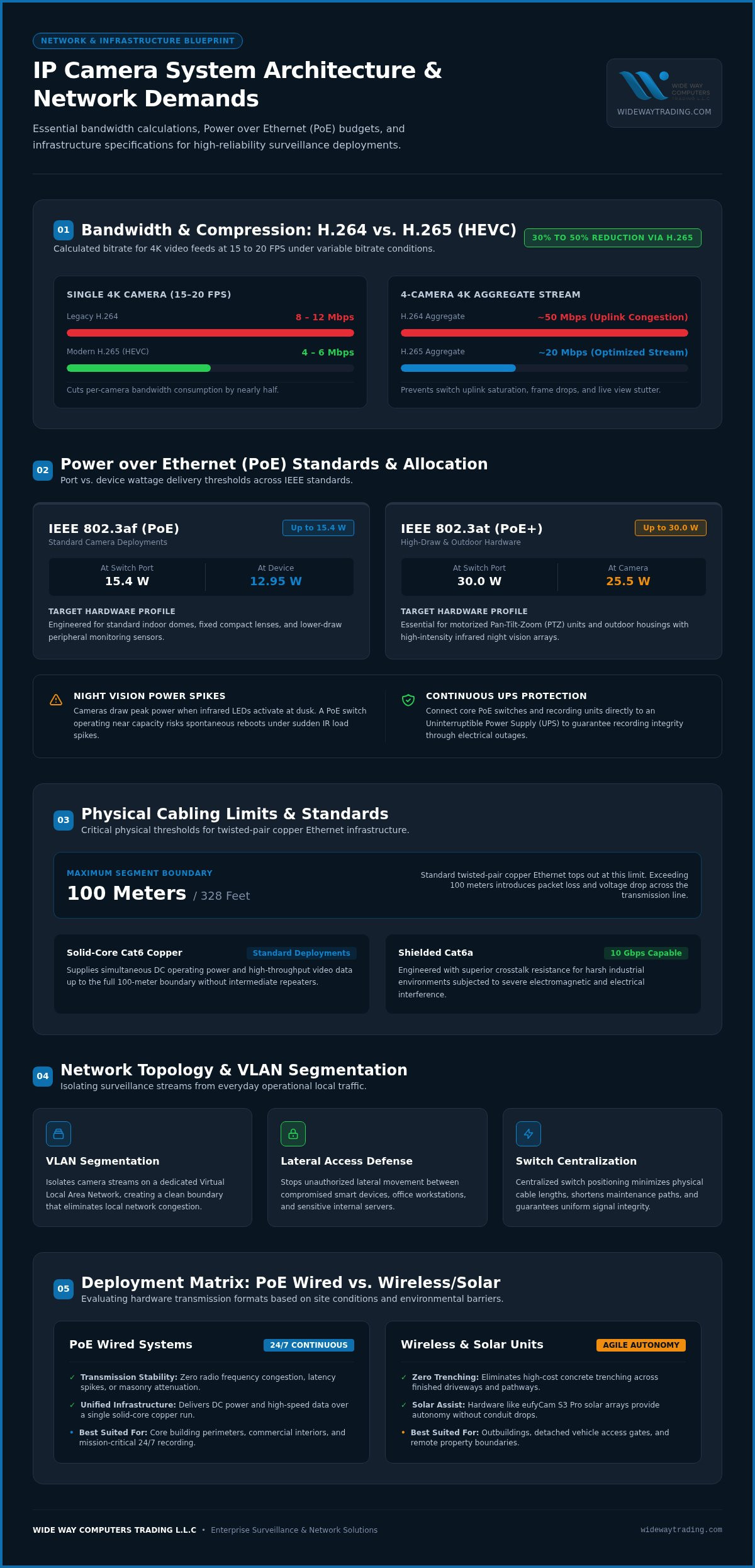
Every digital surveillance deployment lives or dies by the network underneath it. Unlike analog systems sending raw electrical signals over coaxial lines, an IP camera encodes footage internally into data packets. Understanding fundamental IP camera technology and architecture helps you prevent severe performance drops before running a single cable. Without proper segmentation, constant video streams compete directly with workstations, VoIP calls, and streaming devices, degrading overall traffic. Isolating your security cameras onto a dedicated Virtual Local Area Network (VLAN) creates a clean, secure boundary that eliminates local network congestion and stops unauthorized lateral movement between devices.
Calculating Bandwidth and Bitrate Requirements
Bandwidth usage changes dramatically depending on resolution, frame rate, and compression format. A single 4K camera running at 15 to 20 frames per second using legacy H.264 compression demands roughly 8 to 12 Mbps. In contrast, modern H.265 (High Efficiency Video Coding) cuts that volume by 30% to 50%, pulling stream requirements down to 4 to 6 Mbps under typical variable bitrate conditions. For a four-camera 4K setup, deploying H.265 keeps your aggregate recording stream near 20 Mbps rather than overwhelming a switch uplink at nearly 50 Mbps. Calculating this total switch throughput in advance protects your system against dropped frames, stuttering live views, and buffer delays.
Designing Network Topology and Power Distribution
Centralized switch placement shortens physical cable lengths and simplifies maintenance. Long cable runs create signal degradation; standard twisted-pair copper Ethernet tops out at 100 meters (328 feet). Exceeding this boundary introduces packet loss and voltage drop. To keep hardware running smoothly, you must also calculate your Power over Ethernet (PoE) demands across every port:
- IEEE 802.3af (PoE): Delivers up to 15.4 W at the switch port (12.95 W at the device), ideal for standard indoor domes and compact fixed lenses.
- IEEE 802.3at (PoE+): Delivers up to 30.0 W per port (25.5 W at the camera), necessary for pan-tilt-zoom units or outdoor cameras featuring high-intensity infrared night vision illuminators.
- PoE Switch Power Budget: Calculate cumulative wattage across all connected ports. Night vision kicks in after dark, and cameras draw peak power when infrared LEDs turn on. A switch running near its total wattage limit will spontaneously reboot under these heavy infrared loads.
- Uninterruptible Power Supply (UPS): Connect your core switches and recording hardware directly to an uninterruptible power supply, preserving continuous monitoring through local electrical outages.
Planning these network dependencies turns your initial IP camera installation into a resilient, scalable security asset rather than a troubleshooting headache.
Comparing IP Camera Technologies: PoE Wired vs. Wi-Fi Systems
Choosing between wired and wireless hardware shapes your entire deployment strategy. Neither format wins in every scenario. Your site layout, construction materials, and surveillance objectives determine the correct balance. While marketing claims often present wire-free units as universal fixes, real-world conditions demand an objective look at long-term transmission stability, maintenance routines, and network security.
Power over Ethernet (PoE) Deployments
Wired Power over Ethernet delivers unmatched stability for continuous 24/7 monitoring. Running an Ethernet cable supplies direct DC operating power and high-speed data transmission through a single line. This setup eliminates separate electrical conduit drops entirely. Solid-core Cat6 copper cabling handles high-throughput video streams reliably up to 100 meters (328 feet). For harsh industrial spaces with heavy electrical interference, shielded Cat6a offers superior crosstalk resistance, maintaining 10 Gbps capability across the entire segment. Wired lines avoid the radio frequency congestion, physical masonry blockages, and latency spikes common to wireless frequencies.
Wireless and Solar-Powered Smart Cameras
Wired lines aren't always practical across outbuildings, detached gates, or perimeter fences. Digging trenches across concrete driveways quickly drives up project scope. In these zones, agile wireless units excel. Modern solar-assisted hardware provides practical autonomy without running electrical infrastructure:
- eufyCam S3 Pro 4-Cam Kit Solar: An integrated solar solution engineered for rapid perimeter deployment, capturing crisp video while eliminating the routine chore of taking down units to recharge batteries.
- Eufy s340: A versatile dual-camera smart unit combining wide-angle framing with telephoto zoom capabilities, delivering comprehensive situational awareness alongside tight subject detail from a single mounting point.
- Coverage and Security Planning: Deploying wireless hardware successfully requires strong signal distribution. Outdoor mesh nodes prevent dead spots, while following the FTC guide on securing security cameras ensures encryption and strong passwords shield wireless streams against unauthorized interception.
High-density business environments and continuous multi-channel NVR configurations generally demand the uninterrupted throughput of Cat6 PoE runs. Conversely, residential perimeters and hard-to-reach outdoor angles benefit immensely from self-sustaining solar hardware. If you need help tailoring hardware combinations to your specific layout, exploring professional security camera installation services ensures your property gets the ideal balance of wired stability and smart wireless flexibility.
Step-by-Step Physical IP Camera Installation and Mounting
Careful planning means little if physical execution fails. Securing hardware to a structure demands precision, because poor mechanical stability ruins motion detection, and poor weatherproofing destroys sensitive electronics. A methodical approach turns raw hardware into an uncompromising perimeter shield. Professional testing guides on evaluating outdoor security cameras consistently emphasize that lens alignment, mounting height, and environmental resistance matter just as much as internal sensor specs.
Site Survey and Field of View Assessment
Every perimeter features natural vulnerabilities. Walk the grounds to audit primary access paths, low-light corners, and transition zones between sun and shadow. Lens height dictates your balance between coverage and identification:
- Mounting Height: Fix camera lenses between eight and ten feet above finished grade. This elevation places equipment safely out of reach from casual tampering while maintaining a downward angle shallow enough to capture clear facial geometry rather than the tops of hats.
- Sun Orientation: Avoid pointing lenses straight into direct East or West sightlines. Direct morning and late-afternoon sun causes severe backlight blinding, rendering high-resolution sensors useless during critical daylight transitions.
- Surface Rigidity: Secure baseplates only to solid surfaces such as masonry, concrete, or reinforced structural framing. Flimsy fascia boards vibrate under heavy winds, which triggers endless false motion alerts and degrades video sharpness.
Cabling, Mounting, and Weatherproofing Execution
Running wires cleanly keeps connections working for years. When pulling Cat6 cabling through exterior walls, drill pass-through holes angling slightly downward toward the outside. This pitch prevents rainwater from following the cable sleeve into the interior wall cavity. Insert appropriate masonry anchors into concrete or brick surfaces, then screw the mounting base tightly into position.
Terminate the cable using the standardized T568B pinout pattern, crimp your RJ45 connector, and test continuity before final mounting. Never leave exposed modular RJ45 connections tucked loose under eaves. House all terminations inside an IP66- or IP67-rated waterproof junction box fitted with rubber compression glands. Run any exterior surface wiring through UV-resistant PVC or rigid metal conduit, and finish by sealing every structural penetration with exterior-grade silicone sealant. Doing this protects your IP camera installation against moisture ingress, seasonal temperature cycling, and pest intrusion.
Configuring Network Settings, Recording Storage, and Device Security
Mounting the cameras completes only half the job. Digital provisioning dictates whether your system operates smoothly or experiences frequent stream drops. Once connected to the local switch, every camera requires disciplined network addressing, robust recording pathways, and defensive security measures. Skipping these steps leaves your hardware vulnerable to address conflicts and unauthorized remote snooping.
IP Addressing, Subnets, and NVR Integration
Relying on default DHCP lease pools creates severe connection instability. When your core router reboots after a power hiccup, Dynamic Host Configuration Protocol reassures new, random addresses. The Network Video Recorder (NVR) immediately loses contact with those modified streams. Fix this vulnerability during initial provisioning:
- Static IP Reservation: Assign each device a fixed static IP address outside the main router's active DHCP range. This keeps communication paths between your cameras and NVR permanent.
- Modern Stream Standards: Utilize standardized discovery protocols to pair hardware. While older deployments relied on legacy Profile S, modern setups should specify ONVIF Profile T for dependable H.265 video compression, bi-directional audio handling, and HTTPS streaming compliance.
- Recording Logic: Inside the NVR management console, structure custom recording triggers. Reserve continuous 24/7 recording for critical access points, while applying AI-driven human and vehicle classification triggers to secondary peripheral cameras to conserve storage space.
Hardening Camera Security and Data Privacy
Default credentials represent the single largest vulnerability in networked surveillance. Global regulations such as the UK PSTI Act 2022 and California SB-327 strictly outlaw generic factory passwords like "admin/admin" for connected electronics. Replace standard defaults with an alphanumeric passphrase containing at least 16 characters. Disable Universal Plug and Play (UPnP) directly within camera settings. UPnP punches unmonitored inbound holes through your firewall, exposing internal video streams directly to web-wide scanning bots.
Remote viewing should never rely on direct port forwarding. Set up an encrypted Virtual Private Network (VPN) tunnel back to your local network, or utilize vendor-encrypted direct peer-to-peer protocols. Relying on dedicated local hard drives or onboard high-endurance microSD cards keeps video archives entirely on-premise, guaranteeing data confidentiality without forcing you into expensive cloud subscriptions. Routine firmware updates preserve this integrity, patching known software vulnerabilities and refining machine learning accuracy over time. If you want a secure setup without the network configuration headache, you can schedule an installation security system service to let technical specialists handle subnet isolation and hardware hardening from start to finish.
Testing, System Validation, and Professional Deployment Options
Completing your hardware mounting and network addressing brings the system online, but validation ensures it performs under pressure. Leaving cameras on factory detection profiles guarantees poor capture angles and endless alert fatigue. Rigorous commissioning turns an untested installation into a responsive, high-reliability security perimeter that functions predictably through severe lighting shifts.
System Calibration and Night-Vision Testing
Daytime video quality rarely reveals low-light optical limitations. True validation requires comprehensive evening testing during actual dusk transitions:
- IR Cut-Filter Engagement: Observe the physical switch as daylight fades. You should hear the mechanical click of the infrared cut-filter disengaging, transitioning the sensor cleanly to monochrome night mode without optical focus drift or severe haloing around external fixtures.
- Dynamic Range Adjustments: Verify headlights or streetlights do not wash out vehicle license plates or human faces. Enable Wide Dynamic Range (WDR) to balance dark shadowy corners against high-intensity light sources.
- Motion Masking: Define custom detection boundaries within your software. Mask out swaying tree branches, shifting shadows, and busy public roads to avoid constant false alerts.
- Privacy Boundaries: Apply strict privacy blocks over neighboring windows, adjacent patios, or communal pathways to maintain ethical compliance and protect local privacy.
When to Choose Professional Installation Services
Straightforward ground-level setups with accessible attic spaces make rewarding weekend projects. Other structural realities demand specialized field equipment, low-voltage expertise, and dedicated rigging tools. Running exterior conduit across multi-story masonry façades, penetrating fire-rated structural barriers, and managing core switch trunking present serious logistical hurdles. Attempting risky high-altitude ladder work without proper safety equipment risks physical injury, structural damage, and costly hardware failures.
Partnering with certified technicians guarantees code-compliant low-voltage routing, clean aesthetic conduit finishes, and optimal field-of-view alignments. When projects involve multi-building layouts, complex routing, or expansive perimeter requirements, securing professional security camera installation delivers reliable turnkey execution. Seasoned technicians ensure your switches, data cabling, and local storage pools operate in complete harmony, giving you an uncompromising surveillance infrastructure from day one.
Build Your High-Performance Surveillance Network
A dependable security perimeter demands more than just mounting hardware to an exterior wall. Reliable monitoring rests on sound network architecture, smart bandwidth allocation, and secure local recording. Whether you pull dedicated Cat6 lines for Power over Ethernet stability or deploy solar-assisted smart cameras across wide outer perimeters, proper configuration keeps your video feeds fast and your private data confidential. Eliminating generic passwords and disabling UPnP protects your hardware from outside interference long after initial setup.
You don't have to tackle complex cabling runs, masonry drilling, or advanced switch provisioning alone. As an authorized provider of premium surveillance hardware from Eufy, EZVIZ, and Imou, WIDE WAY COMPUTERS TRADING L.L.C brings proven technical expertise to every IP camera installation. Our specialized national engineering team ensures clean cable management, zero wall clutter, and completely private on-premise storage. Equip your property with top-tier technology and book expert security camera installation to get your system planned, wired, and secured correctly from day one.
Frequently Asked Questions
Can IP cameras work without an active internet connection?
Yes, IP cameras function completely without an active internet connection on an isolated local area network. When connected directly to a network switch or Network Video Recorder (NVR), the cameras transmit, encode, and record footage locally onto internal hard drives or onboard memory cards. You only require internet access if you want to view live video feeds remotely on a smartphone or receive external push notifications.
What is the main difference between an IP camera and an analog CCTV camera?
The primary difference lies in how video data is processed and transmitted across the wire. Analog cameras send raw electrical video signals over coaxial cables to an external DVR for processing and digitization. In contrast, an IP camera processes, digitizes, and compresses video directly on its internal image processor before transmitting organized data packets over Ethernet or Wi-Fi, allowing much higher resolutions, edge analytics, and integrated power delivery.
How far can an Ethernet cable run to an IP camera before losing signal quality?
The maximum physical limit for standard copper twisted-pair Ethernet cabling is 100 meters (328 feet) per channel run. This standard distance covers 90 meters of solid-core horizontal installation cable plus 10 meters of combined patch cords. Exceeding this boundary without deploying an active PoE extender or converting the line to fiber optic media leads to packet loss, frame drops, and severe power voltage drops.
Do IP cameras require a monthly subscription to record and store security footage?
No, an IP camera installation does not require ongoing subscription fees when you choose hardware engineered for local video storage. Modern systems direct high-definition streams straight to on-premise NVR hard drives or encrypted onboard microSD cards. This setup keeps your surveillance archives completely private, accessible without internet reliance, and completely free of recurring cloud storage costs.
Is Power over Ethernet safe to use with outdoor security cameras?
Power over Ethernet is safe, reliable, and standardized for all outdoor surveillance installations. Certified switches use intelligent active handshake protocols (such as IEEE 802.3af or 802.3at) that test the connected line and inject DC power only when a compatible camera is detected. Using outdoor-rated UV-resistant cabling and properly sealed junction boxes prevents short-circuits caused by driving rain, condensation, and temperature swings.
What network speed is necessary to run four 4K IP cameras simultaneously?
A four-camera 4K array typically demands between 16 Mbps and 24 Mbps of aggregate switch bandwidth when configured with efficient H.265 compression at 15 to 20 frames per second. Legacy H.264 compression doubles that requirement, pulling up to 48 Mbps. Standard gigabit network switches easily handle this internal traffic volume, provided the surveillance feeds are routed on a dedicated switch or isolated VLAN.
How do outdoor IP cameras protect against dust and extreme temperature conditions?
Commercial-grade outdoor cameras rely on specialized metal housings carrying IP66 or IP67 ingress protection ratings. These rigorous standards ensure complete sealing against windblown sand, fine dust particles, and intense water jets. Internal thermal management components and specialized operating circuits allow ruggedized units to maintain continuous performance through intense seasonal summer heat without sensor degradation or thermal shutdown.


